
Key Takeaways
- Amazon Headline Search Ads, also called as Amazon Sponsored Brands ads give sellers premium visibility above organic search results, on product pages, and across Amazon.
- Amazon Sponsored Brand ads work best when advertisers combine strong keyword targeting, compelling creatives, optimized Store pages, and effective bid management.
- Brands should use a mix of branded, category, long-tail, competitor, and seasonal keywords across broad, phrase, and exact match campaigns.
- Sponsored Brands Video Ads and Store Spotlight Ads can improve engagement, increase new-to-brand sales, and help shoppers discover more products.
- The best Sponsored Brands campaigns do not operate alone. They work alongside Sponsored Products, Sponsored Display, listing optimization, and Amazon Store optimization as part of a full-funnel PPC strategy.
Amazon Headline Search Ads are one of the most effective ways to increase visibility, attract more shoppers, and drive higher sales on Amazon. Although Amazon now calls them Sponsored Brands, many sellers still search for terms like Amazon Headline Search Ads, headline search ads Amazon, and Amazon headline search ads campaign when looking for ways to improve their PPC performance.
Unlike Sponsored Products, Amazon Headline Search Ads give brands more control over how they appear in search results. Sellers can showcase multiple products, use a custom headline, add their logo, and direct shoppers to a product page, a custom landing page, or an Amazon Store.
Sponsored Brands ads can appear above organic listings, within search results, on product detail pages, and on the Amazon homepage, giving brands premium visibility throughout the shopper journey.
Amazon Ads reports that 35% of surveyed shoppers discover new brands on Amazon, while 36% of U.S. small business sales come from Amazon Ads. Amazon also found that advertisers using its ad products saw an average 23% increase in non-branded searches.
For brands trying to win on high-intent keywords, improve click-through rates, and strengthen branded search visibility, Sponsored Brands can become one of the strongest assets in an Amazon advertising strategy.
What Are Amazon Headline Search Ads and How Do They Work?
Amazon Headline Search Ads are a pay-per-click advertising format that allows brands to promote multiple products using a custom headline, logo, and creative. Today, Amazon officially refers to these ads as Sponsored Brands, but many sellers still use terms like headline search ads, Amazon, or Amazon headline search ads campaign because that was the original name.
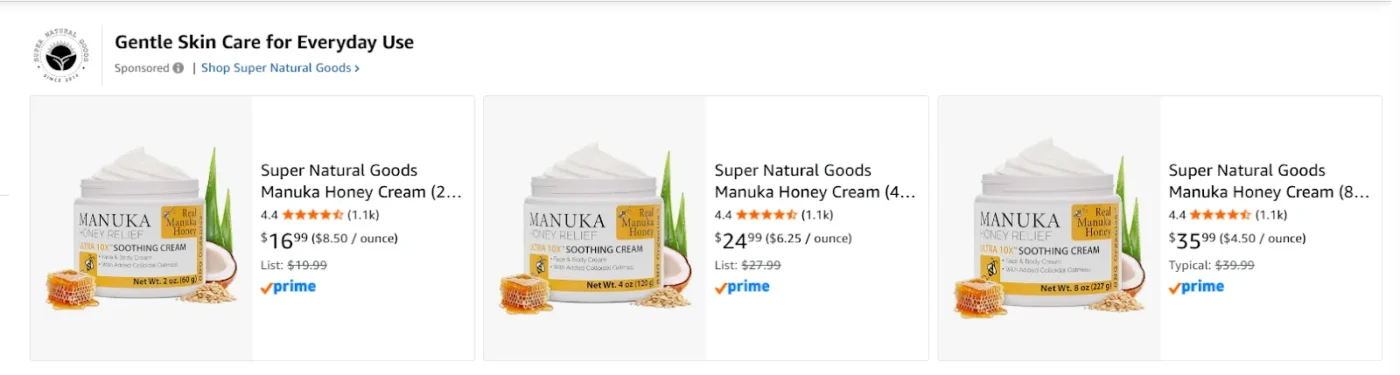
These ads typically include:
- A brand logo
- A custom headline
- Up to three featured products
- Lifestyle images or video creatives
- Links to Amazon Stores or custom landing pages
How They Work
Amazon Headline Search Ads operate on a cost-per-click model, advertisers only pay when shoppers click the ad. When setting up a campaign, advertisers choose their campaign objective, select which products to feature, target specific keywords, set a daily budget and bids, and choose a destination page. Once live, Amazon runs an auction for relevant search terms. If the bid and ad quality are strong enough, the ad secures premium placement.
The shopper journey typically begins with a keyword search, followed by the ad appearing, a click, and finally the shopper landing on a product or Store page where they browse and complete a purchase.
Where Amazon Headline Search Ads Appear
One of the biggest benefits of headline search ads in Amazon campaigns is placement visibility. These ads can appear in several premium positions:
- Top of search results above organic listings
- Middle of search results pages
- Product detail pages
- Amazon homepage in some placements
- Mobile search placements
- Desktop search placements
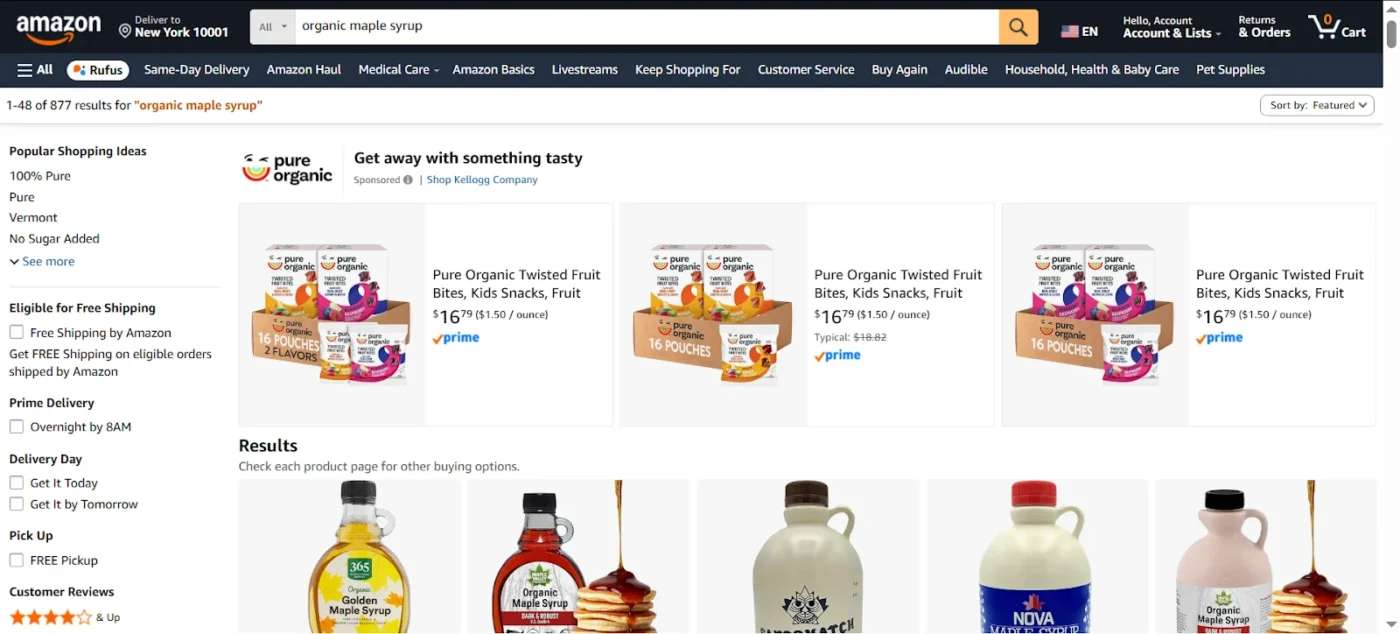
Top-of-search placement is especially valuable because it allows brands to capture high-intent traffic before competitors.
Types of Amazon Sponsored Brands Ads
Sponsored Brands offer three distinct ad formats, each serving different strategic goals.
1. Product Collection Ads
Product Collection Ads are the most common Sponsored Brands format. These ads feature:
- Brand logo
- Custom headline
- Up to three product images
They appear prominently at the top of search results, giving brands prime visibility above organic listings. This format is best suited for promoting best sellers, product bundles, complementary items, and seasonal collections.
According to Pacvue’s Q4 2025 Retail Media Benchmark Report (analyzing billions in ad spend), Sponsored Brands achieved near parity ROAS with Sponsored Products during peak shopping periods, with performance even surpassing Sponsored Products during Cyber 5. Because Product Collection Ads showcase multiple products, they give shoppers choices without requiring navigation away from search results. However, the format relies heavily on strong product photography and compelling headline copy to stand out.
2. Sponsored Brands Video Ads
Sponsored Brands Video Ads replace static images with autoplay video content that plays as shoppers scroll. Motion naturally attracts more attention, making this format effective for top-of-funnel awareness.
Video ads excel at:
- Demonstrating product use
- Highlighting features
- Showing before-and-after transformations
- Launching new products
Research published by Amazon scientists in the Journal of Marketing Analytics found that Sponsored Brands Video ads achieve a 17.7x higher CTR compared to static image ads, and brands using video alongside static ads saw a 25% higher CTR with 10% higher year-over-year sales growth. Video ads typically require higher bids due to increased competition, but Pacvue’s Q4 2025 analysis found that relevance and creative quality matter more than aggressive bidding.
3. Store Spotlight Ads
Store Spotlight Ads direct traffic to specific pages within an Amazon Store rather than individual products. These ads feature:
- Brand logo
- Custom headline
- Links to up to three Store pages
This format is ideal for brands with diverse product catalogs, multiple product lines, or new category expansions where educating shoppers is as important as closing an immediate sale.
Analysis of over $2.8 billion in ad spend across 1,200+ brands shows Sponsored Brands drive a 2.3x higher new-to-brand purchase rate compared to Sponsored Products, and 31% of Sponsored Brands views lead to Sponsored Products clicks within 48 hours, demonstrating how upper-funnel brand formats feed into lower-funnel conversion. Store Spotlight Ads excel at brand exploration and cross-category discovery; they tend to have lower click-through rates than product-focused ads but can generate higher average order values when shoppers engage.
Who Can Run Amazon Headline Search Ads?
Not every seller is eligible to run Sponsored Brands campaigns. Amazon typically allows the following account types to use Amazon Headline Search Ads:
- Professional sellers
- Amazon vendors
- Brand Registry-approved sellers
- Agencies managing advertising accounts for brands
For most sellers, the biggest requirement is Amazon Brand Registry. If a brand is not enrolled in Brand Registry, it usually cannot access Sponsored Brands campaigns.
To qualify, sellers generally need:
- A registered trademark
- Brand Registry approval
- A professional seller account
- Products in eligible categories
- A valid payment method
- An active account in good standing
If you want to enroll in Amazon Brand Registry, read our complete guide to Amazon Brand Registry setup and migration.
This is important because many newer sellers assume they can launch Sponsored Brands immediately after opening an account. In reality, Amazon Headline Search Ads are designed for brands that already have some level of identity, trademark protection, and product catalog maturity.
For agencies and aggregators, Sponsored Brands can be especially powerful because they help multiple brands control more search real estate and build awareness beyond a single ASIN.
How To Create Headline Search Ads Amazon Sellers Can Use
Step 1: Choose Sponsored Brands Campaign Type
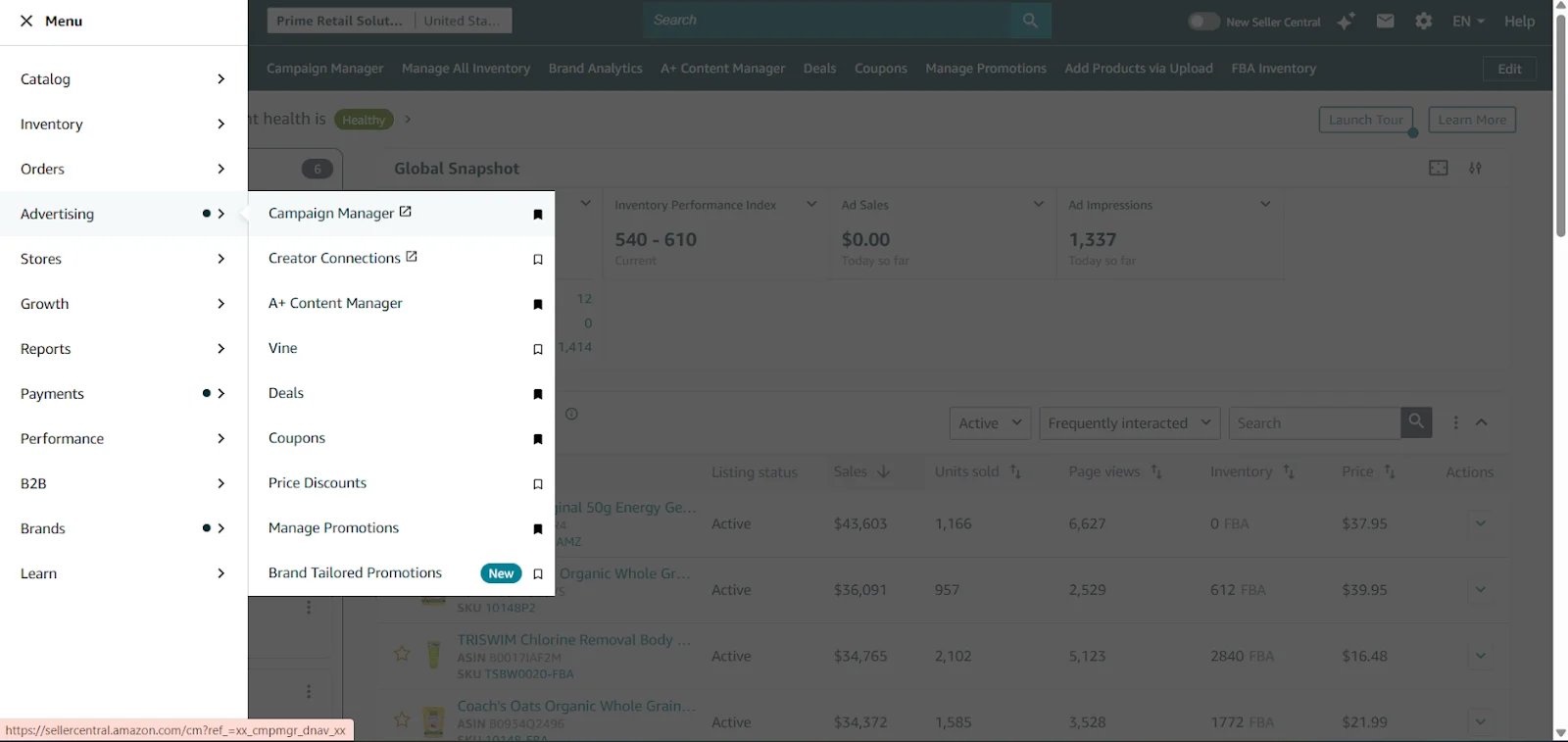
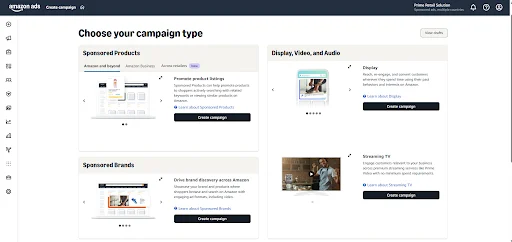
Log into your Seller Central account and click on the “Advertising” tab in the main menu. Then click on “Campaign Manager.”
From the campaign creation page, click on “Create Campaign.” Under campaign types, select Sponsored Brands. This will open the setup interface specifically for headline search ad formats.
Step 2: Select a Campaign Goal
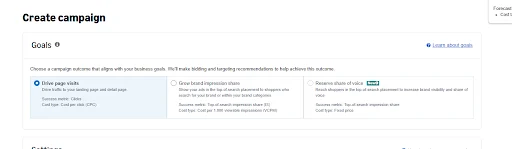
Amazon will ask you to choose a campaign goal. Your options include driving Store traffic, increasing product sales, improving brand awareness, or promoting a new launch. Select the goal that aligns with what you’re trying to accomplish. This helps Amazon optimize delivery toward your objective.
Step 3: Choose Your Products
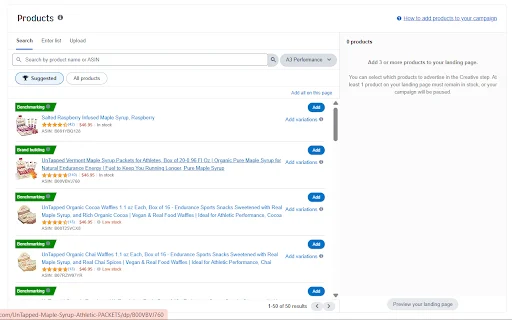
You can feature up to three products in your ad. Select items that are closely related and make sense to show together. I usually choose my strongest sellers or products that complement each other, for example, if you sell coffee makers, feature the machine alongside a grinder and a bag of beans. Avoid mixing unrelated products because shoppers will click expecting to see a cohesive theme.
Step 4: Choose Your Keywords
This is where you tell Amazon which search terms should trigger your ad and here you need a list of keywords which is not random but built through expert-driven Amazon keyword research. Build a keyword list using a mix of branded keywords, category keywords, long-tail phrases, and competitor terms.
For branded keywords, include your own brand name and variations. For category keywords, think about the core terms shoppers use to find products like yours.
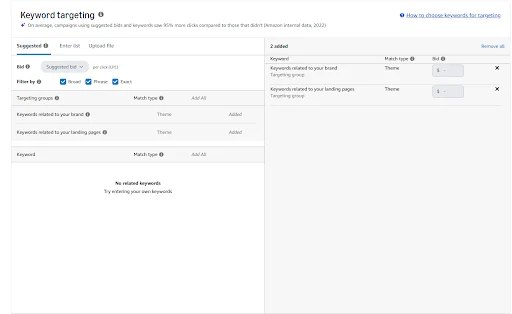
Long-tail keywords are more specific phrases that usually have lower competition. Competitor keywords can help you capture traffic from similar brands. I recommend starting with both broad match for discovery and exact match for control. You can always refine your keyword list after you see what’s working.
Step 5: Set Your Bids and Budget
Give your campaign a name that makes sense. We would suggest you to do something like “BrandName-ProductCategory-SponsoredBrands-Jan2026” so you know exactly what it is later.
For your daily budget, start with an amount that allows at least 10 to 20 clicks per day. If you are a new advertiser, $50 per day is a reasonable starting point while you figure out what works. You can always increase it later if the campaign is performing well.
For bids, Amazon will show you a suggested range based on what other advertisers are paying. Most categories see clicks ranging from 50 cents to $3, though competitive categories like electronics or beauty can cost $5 or more per click.
You have three bidding options and you can only know which one to choose if you know ins and outs of Amazon bid management:
- Dynamic bids down only: Amazon lowers your bids when it thinks someone is less likely to buy
- Dynamic bids up and down: Amazon adjusts your bids both ways based on how likely someone is to convert
- Fixed bids: You stay in complete control with no automatic changes
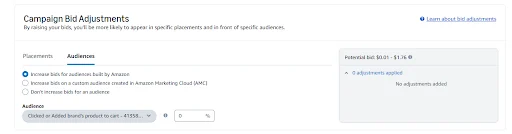
Most sellers start with dynamic bids down to prevent overspending while they’re learning. Set higher bids for top-of-search placement if you want visibility at the very top of results.
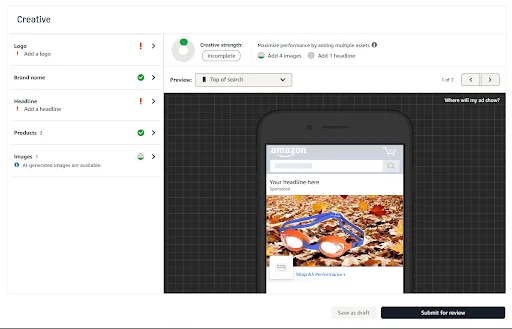
Step 6: Add Your Creative Assets
Your ad creative needs to grab attention quickly. Shoppers decide in seconds whether to click or scroll past.
- Brand Logo: Upload a high-resolution image with a transparent background. Your logo should look crisp on both desktop and mobile devices.
- Custom Headline: Keep it under 50 characters. Focus on your main benefit or value proposition. “Save 30% on Premium Kitchen Tools” beats “High-Quality Products Available Now.”
- Product Images: Use images with clean, uncluttered backgrounds. Your featured products should be clearly visible and appealing.
- Lifestyle Image or Video: If you have video content, use it. Motion attracts more attention than static images. If using a static lifestyle image, show your product being used in a real-world setting.
Step 7: Choose Your Landing Page
Select where shoppers go after they click your ad. Your options include:
- Product page: Best when you’re promoting a specific item
- Amazon Store: Ideal for brands with multiple categories or a strong brand story
- Custom Store page: Works well for seasonal campaigns or category-specific promotions
- Curated collection page: Effective for showcasing bundles or themed product groups
Choose based on where shoppers are most likely to convert. If you’re running a new product launch, send traffic directly to that product page. If you want shoppers to explore your full catalog, send them to your Store. But before launching the campaign, make sure your Amazon storefront is completely optimized for conversion.
Step 8: Launch and Optimize
Review all your settings and click “Launch Campaign.” After launching, monitor performance using a structured Amazon PPC performance and reporting process. During the first week, check in daily to see how your keywords and creative are performing. Pay attention to click-through rate, if it’s below 0.3%, your creative or keywords may need adjustment. Watch your ACoS and compare it against your target margin.
Make adjustments as you go. Pause keywords that are spending without converting. Increase bids on terms that are driving sales. Test different product combinations if one set isn’t performing. Refresh your creative if the click-through rate starts to decline over time.
Most campaigns need at least two to three weeks of data before you can make confident decisions, so give it time while staying hands-on with optimization.
Best Keyword and Match Type Strategy for Amazon Headline Search Ads
Keyword selection is one of the most important parts of an Amazon headline search ad strategy because it determines who sees the ad, how much traffic the campaign receives, and how efficiently the budget is spent. A strong approach combines the right keyword themes with the right match types.
Keyword Themes to Include
1. Branded Keywords
These include your company or product name, for example, “Nike running shoes” or “Apple charger.” Branded keywords usually generate the highest conversion rates because shoppers already know your brand and are closer to purchasing. I recommend bidding aggressively on these terms because competitors may target the same searches to steal your traffic.
2. Category Keywords
These target broader searches and help you reach shoppers who may not know your brand yet. Examples include “running shoes for men” or “wireless earbuds.” Category keywords typically have higher search volume, but they are also more competitive and expensive. Use these to build awareness and capture new customers.
3. Long-Tail Keywords
These are more specific phrases that often convert better because they show stronger purchase intent. Examples include “waterproof hiking boots for women” or “BPA free baby bottles.” Long-tail keywords usually have lower CPCs and can be easier for smaller brands to win. I like to use these for efficient, high-converting traffic.
4. Competitor Keywords
You can bid on competitor names to capture shoppers who are comparing alternatives. If someone searches for a competitor’s brand, your ad can appear and introduce them to your product. Competitor campaigns can be expensive, so watch your conversion rates closely and be ready to pause terms that aren’t paying off.
5. Seasonal Keywords
These are useful during holidays, promotions, and major shopping periods. Examples include “Black Friday deals,” “back to school supplies,” or “Christmas gifts for dad.” Seasonal campaigns usually need higher bids and faster optimization because competition increases during peak periods. I recommend launching these 4–6 weeks before the event to capture early shoppers.
Match Types to Use
Now that you have your keyword themes, you need to decide how tightly you want Amazon to match those keywords to shopper searches.
1. Broad Match
Broad match gives you the widest reach because Amazon can show your ad for related searches, synonyms, and variations. I use this match type for discovery campaigns when I want to find new search terms I hadn’t considered. The trade-off is that it can create wasted spend if not monitored closely, so check your search term report regularly.
2. Phrase Match
Phrase match gives you more control because the keyword phrase must appear in the search query in the same order. For example, if you bid on “waterproof hiking boots,” your ad may show for “men’s waterproof hiking boots” but not for “hiking boots waterproof.” This is often a good middle ground between reach and efficiency.
3. Exact Match
Exact match gives you the highest level of control because your ad only appears for the exact keyword or close variations. For example, if you bid on “waterproof hiking boots” in exact match, your ad will show for that term but not for “waterproof hiking boots for men.” Exact match keywords usually generate the strongest conversion rates and are ideal for proven, high-performing search terms.
How to Combine Themes and Match Types
Most successful campaigns use a tiered approach. Start with broad match on category and long-tail keywords to discover what’s working. Once you identify high-performing search terms, move them into phrase or exact match campaigns where you can control bids more precisely. Use exact match for your branded keywords to ensure you capture that traffic efficiently. Add competitor keywords in phrase match to balance reach and relevance.
Best Practices for Amazon Headline Search Ads
Following Amazon headline search ads best practice can improve CTR, lower CPC, increase conversion rates, and help campaigns scale profitably.
1. Use High-Intent Keywords
Focus on keywords that show buying intent rather than general browsing intent. For example, a keyword like buy gaming chair is usually more valuable than a broad keyword like office chair because the shopper is closer to making a purchase.
2. Write Benefit-Focused Headlines
Strong headlines should tell shoppers why they should click. Instead of writing generic headlines like Shop Our Collection, use headlines that communicate value.
Examples include:
- Discover Premium Kitchen Essentials
- Upgrade Your Home Office Today
- Shop Best-Selling Fitness Products
The strongest headlines usually focus on one key message such as quality, convenience, affordability, or problem-solving.
3. Send Traffic to an Optimized Store Page
A Sponsored Brands campaign can generate clicks, but the landing page determines whether shoppers convert. Brands should make sure their Amazon Store includes:
- Strong product images
- Clear category organization
- Mobile-friendly layouts
- Lifestyle banners
- Product comparison sections
- Best sellers and reviews
4. Use Lifestyle Images and Video
Lifestyle content helps shoppers understand how the product fits into their daily life. For example, cookware brands should show products being used in a kitchen, fitness brands should show products during workouts, and baby brands should show products in family settings. Video can be even more powerful because it grabs attention in search results and helps explain the product quickly.
5. Group Similar Products Together
Products in the same ad should be closely related. For example, if a customer clicks on an ad for protein powder, they are more likely to also be interested in shaker bottles and pre-workout supplements. Featuring unrelated products together can lower CTR and reduce conversion rates.
6. Test Different Creatives Continuously
One of the biggest mistakes sellers make is launching one version of an ad and never testing alternatives. Brands should regularly test:
- Headlines
- Images
- Videos
- Product combinations
- Landing pages
- Keyword groups
Even small improvements in CTR or conversion rate can have a major impact on profitability over time. That is why ongoing testing should focus not only on clicks, but also on improving Amazon conversion rate optimization across your listings and landing pages.
7. Create Separate Campaigns by Match Type
Separate exact, phrase, and broad match campaigns give advertisers more control over bids, budgets, and optimization.
For example, brands can bid more aggressively on exact match keywords that already convert well while keeping lower bids on broad match discovery campaigns.
8. Bid Aggressively on Branded Keywords
Branded keywords usually have the highest conversion rates because shoppers already know the brand. If a seller does not bid on their own brand name, competitors can appear for those searches and take traffic away.
9. Combine Sponsored Brands With Sponsored Products and Sponsored Display
Sponsored Brands work best when they are part of a full-funnel advertising strategy. Sponsored Products can drive direct conversions, Sponsored Brands can improve visibility and brand awareness, and Sponsored Display can retarget shoppers who did not buy the first time. Together, these formats help brands dominate more placements across the shopper journey.
Difference Between Amazon Sponsored Brand Ads and Amazon Sponsored Product Ads
Sponsored Brands and Sponsored Products are both valuable, but they serve different purposes.
Sponsored Products are usually better for driving direct conversions on individual ASINs. Sponsored Brands are better for increasing visibility, strengthening brand awareness, cross-selling related products, and sending shoppers to an Amazon Store.
Most successful brands use both formats together because they support different stages of the shopper journey.
| Feature | Sponsored Brands | Sponsored Products |
| Placement | Top and middle of search results | Search results and product pages |
| Number of Products | Up to three or more | Usually one product |
| Branding | Includes logo and headline | Limited branding |
| Best For | Brand awareness and cross-selling | Direct conversions |
| Destination | Product page or Store page | Product page |
| Creative Options | Images, headlines, videos | Standard product ad |
Benefits of Amazon Headline Search Ads
There are several reasons why sellers invest in Amazon Headline Search Ads.
1. Higher Search Visibility: Sponsored Brands often appear above organic results, making them one of the most visible ad formats on Amazon.
2. More Brand Awareness: Because these ads include logos and headlines, they help shoppers remember the brand.
3. Ability to Promote Multiple Products: Unlike Sponsored Products, Amazon Headline Search Ads can feature several products in one ad.
4. Better Cross-Selling Opportunities: Brands can group related products together to increase average order value.
5. More Store Traffic: Sponsored Brands can drive traffic to Amazon Stores, allowing sellers to showcase their full catalog.
6. Stronger Click-Through Rates: A well-optimized Amazon headline search ads campaign can generate better click-through rates than many standard Sponsored Products campaigns.
Common Amazon Headline Search Ads Mistakes
Many advertisers struggle because they make preventable mistakes that reduce CTR, waste budget, and limit conversions.
1. Using Only Broad Match Keywords
Broad match keywords can help discover new search terms, but relying on them too heavily often leads to irrelevant traffic. Brands should balance broad match with phrase match, exact match, and negative keywords.
2. Ignoring Negative Keywords
Without negative keywords, advertisers often spend money on searches that are not relevant. For example, a premium skincare brand may not want to appear for searches containing cheap or DIY.
3. Sending Traffic to Weak Product Pages
Even the best Amazon headline search ads campaign will struggle if the destination page is weak. Poor images, weak bullet points, low review counts, and unclear pricing can all reduce conversion rates.
4. Using Weak Headlines
Generic headlines like Shop Now or Great Deals do not communicate value. A stronger headline should explain why the shopper should click and what benefit they will receive.
5. Featuring Unrelated Products Together
Products in one ad should make sense together. If a shopper clicks on a fitness product ad but sees unrelated products, they are more likely to leave without buying.
6. Failing To Test Creatives
Many advertisers never test alternative headlines, images, or videos. Over time, creative fatigue can reduce CTR, so testing new variations is essential.
7. Focusing Only on ACoS
Many brands only focus on lowering ACoS, but Sponsored Brands also help increase branded search volume, Store traffic, and repeat purchases. Looking only at ACoS can cause sellers to undervalue the long-term branding benefits of these campaigns.
Key Metrics To Track
To improve performance, sellers should monitor more than just clicks and sales. Here are the key Amazon PPC metrics you should keep a check on:
- Impressions: Impressions show how often the ad appears. If impressions are low, the issue may be low bids, low search volume, or weak keyword targeting.
- Click-Through Rate (CTR): CTR measures how often shoppers click after seeing the ad. Low CTR usually means the creative, headline, products, or targeting need improvement.
- Cost Per Click (CPC): CPC measures how much the advertiser pays for each click. High CPCs often indicate strong competition, weak relevancy, or inefficient keyword targeting.
- Conversion Rate: Conversion rate measures how many clicks turn into sales. If conversion rate is low, the problem is often with the product page, pricing, reviews, or Store experience.
- Advertising Cost of Sale (ACoS): ACoS measures how much ad spend is required to generate revenue. Lower ACoS is generally better, but brands should also consider long-term goals such as visibility and new customer acquisition.
- Return on Ad Spend (ROAS): ROAS measures how much revenue is generated for every dollar spent. A higher ROAS usually indicates stronger campaign efficiency.
- New-to-Brand Sales: New-to-brand metrics show how many purchases came from shoppers who had not purchased from the brand before. This is especially important for brands focused on customer acquisition.
- Store Visits and Detail Page Views: Store visits and product detail page views help measure engagement beyond direct sales. These metrics are useful because Sponsored Brands often influence shoppers before they are ready to purchase.
What Is a Good CTR, CPC, and ACoS for Sponsored Brands?
Benchmarks vary by category, but advertisers often use these ranges as general performance targets.
- CTR: 0.4% to 1%+
- CPC: $0.50 to $2.50+
- ACoS: 15% to 35%
- ROAS: 3x to 6x+
Categories such as beauty, supplements, electronics, and apparel often have higher CPCs because competition is stronger.
Brands with strong creative, high review counts, and well-optimized Store pages usually achieve better CTR and conversion rates.
According to Amazon advertising guidance and agency benchmark reports, Sponsored Brands campaigns with video often outperform static formats on CTR because they attract more attention in search results.
Conclusion
Amazon Headline Search Ads remain one of the most powerful advertising formats for brands that want to improve visibility, increase click-through rates, and drive more sales.The most successful campaigns use a combination of strong keyword targeting, compelling creatives, optimized Store pages, and ongoing bid management.
For brands that want to maximize Amazon PPC performance, Sponsored Brands should not operate alone. They should work alongside Sponsored Products, Sponsored Display, listing optimization, and conversion-focused Store design as part of one connected growth strategy.
If you want to improve Sponsored Brands performance but are struggling with keyword targeting, creative testing, Store optimization, or bid management, AMZDUDES, a full-service Amazon marketing agency can help. Our Amazon PPC management services combine Sponsored Brands, Sponsored Products, Sponsored Display, listing optimization, and Store strategy into one connected system designed to increase visibility, improve conversion rates, and drive profitable long-term growth.
Frequently Asked Questions
1. What are Amazon Headline Search Ads?
Amazon Headline Search Ads are now called Sponsored Brands. These ads appear in premium placements above search results and allow sellers to showcase their logo, custom headline, and multiple products to increase visibility and sales.
2. Are Amazon Headline Search Ads the same as Sponsored Brands?
Yes. Amazon renamed Headline Search Ads to Sponsored Brands. Many sellers still search for terms like Amazon Headline Search Ads, headline search ads Amazon, and Amazon headline search ads campaign, but they all refer to Sponsored Brands ads.
3. How much do Amazon Headline Search Ads cost?
Amazon Headline Search Ads work on a cost-per-click model, so sellers only pay when shoppers click. Costs vary based on keyword competition, category, bid strategy, and placement, with CPCs often ranging from $0.50 to $3 or more.
4. Can I run Amazon Headline Search Ads without Brand Registry?
In most cases, no. Sellers usually need Amazon Brand Registry approval, a professional seller account, and a registered trademark before they can run Sponsored Brands campaigns.
5. Do Sponsored Brands help increase sales?
Yes. Sponsored Brands can improve search visibility, increase click-through rates, drive more Store traffic, strengthen brand awareness, and support higher sales across multiple products.
6. Should I send traffic to a product page or Store page?
It depends on your campaign goal. Product pages are usually better for single-product campaigns, while Amazon Store pages work better for cross-selling, showcasing multiple categories, and improving brand discovery.