
Key Takeaways
- A returnless refund means Amazon issues a refund without requiring the item to be returned if the customer keeps the product.
- Low-cost items, bulky goods, fragile products, perishables, and hygiene items most commonly qualify for returnless refunds.
- High-value electronics, fine jewelry, digital content, hazardous materials, and handmade items typically do NOT qualify.
- For sellers, returnless refunds save on return shipping, restocking costs, and manual processing, but risk policy abuse and inventory loss.
- Customers cannot force a returnless refund; Amazon and sellers determine eligibility based on item type, price, and condition.
- Sellers can enable returnless refunds through account-level rules or per-SKU templates in Seller Central.
Imagine ordering a product, receiving it, and then getting a full refund without having to return it. For many Amazon customers, that’s exactly how a returnless refund works. For sellers, it’s a strategic way to reduce return shipping, restocking, and processing costs.
With Amazon’s returnless refund policy, buyers keep the item while receiving a refund. Customers benefit from a hassle-free resolution, while sellers save time and money on low-value or difficult-to-resell products.
As a customer, you may wonder why Amazon lets you keep the item or how to qualify for a returnless refund. As a seller, you may be asking whether you should enable it, how to set it up, and what risks to consider.
This guide explains how Amazon returnless refunds work, which products qualify, how to request or enable them, and the key benefits and drawbacks for both buyers and sellers.
What is Amazon Returnless Refund?
A returnless refund means Amazon issues a full refund to the buyer without requiring the item to be returned. The customer keeps the product.
Example: A customer buys a $12 kitchen utensil, finds it unsatisfactory, and requests a return. Instead of paying $6-8 in return shipping, the seller approves a returnless refund. The customer gets their money back and keeps the item.
From the customer perspective, if you see a message saying “Refund processed, no need to return the item,” you’ve received a returnless refund. It’s not a special trick; the seller determined it was cheaper to refund you than to pay for return logistics.
This differs from Amazon’s standard process, where returned items go through inspection, restocking, or liquidation before a refund is issued. Understanding what happens to Amazon returns in a typical case helps clarify why sellers choose the returnless route for certain products.
Who Qualifies for Returnless Refunds?
Customers cannot Force This. There’s no special button or phrase that guarantees a returnless refund. Amazon and sellers determine eligibility automatically based on item type, price, and condition.
Items Most Likely to Qualify
- Low-Cost Items (under $15-20): Phone cases, screen protectors, kitchen utensils, socks, accessories where return shipping exceeds product value.
- Bulky or Heavy Items: Small furniture, dumbbells, yoga mats, rugs, vacuum cleaners, where return shipping costs are prohibitively high.
- Fragile Items: Wine glasses, coffee mugs, vases, picture frames, and mirrors are likely to break during return shipping.
- Perishable or Consumable Goods: Coffee beans, protein powder, vitamins, tea, snacks, baby food items with short shelf life that cannot be resold once opened.
- Hygiene or Personal Care: Toothpaste, shampoo, lotion, makeup, razors, and opened items that cannot be resold for safety reasons.
- Personalized or Custom Items: Engraved jewelry, custom t-shirts, monogrammed bags, items made specifically for the buyer that cannot be reused.
- Damaged or Defective Items: Electronics that won’t power on, furniture with broken parts, clothing with ripped seams.
Items That Do NOT Qualify
- High-Value Electronics (over $100): Laptops, smartphones, tablets, camera items requiring physical return to prevent fraud.
- Fine Jewelry & Watches: Diamond rings, luxury watches, and gold necklaces are too valuable for automatic returnless refunds.
- Digital Content: E-books, video games, music downloads, software licenses, and non-physical items.
- Medical Devices & Supplements: Blood pressure monitors, CPAP machines, prescription supplements with strict regulatory requirements.
- Hazardous Materials: Lithium batteries, aerosol sprays, paint, chemicals, flammable liquids.
- Handmade Items: Custom pottery, artwork, hand-knit blankets, and artisan goods.
- Sexual Wellness Products: Adult items covered by hygiene and safety policies.
How to Get an Amazon Refund Without Returning the Item
As a customer, you cannot force a returnless refund. There is no special button or magic phrase that guarantees you will keep the item. The system automatically determines eligibility based on factors set by the seller or Amazon.
Step-by-Step Process
- Log into your Amazon account and go to Your Orders.
- Find the item you want to return and click Return or Replace Items.
- Select the reason for your return from the dropdown menu (e.g., defective, wrong item, damaged).
- If the item qualifies for a returnless refund, Amazon will display a message saying: “Refund processed, no need to return the item.”
- The refund is typically processed within 1-2 business days to your original payment method.
When Amazon Offers Returnless Refunds Automatically
Amazon’s algorithms determine eligibility based on factors such as:
- Low-cost items where return shipping costs exceed the product value
- Bulky or heavy products with high return shipping costs
- Fragile items likely to break during return shipping
- Damaged or defective items reported by customers
- Perishable or hygiene products that cannot be resold
- Items from sellers who have enabled returnless refund rules
Important Notes for Customers: If you contact Amazon Customer Service directly, the representative will determine if your return qualifies based on the item, price, and your account history. Returnless refunds are a convenience for legitimate issues; they are not intended as a way to get free products.
Why Amazon Offers Returnless Refunds
For Customers: Instant refunds without shipping hassle, faster resolution, better customer experience, and environmentally friendly.
For Sellers: Return shipping, inspection, and restocking costs often exceed the product value. Eliminating unnecessary returns protects profit margins while maintaining customer goodwill.
Sustainability: Every avoided return means fewer shipments, less packaging waste, and lower carbon emissions, supporting Amazon’s environmental commitments.
How Sellers Can Enable Returnless Refunds
Sellers can enable Returnless Refunds on Amazon in two ways. Here’s a clear walkthrough for both:
Method 1: Setting Returnless Refund Rules (Account Level)
Amazon allows sellers to offer an Amazon returnless refund for specific return scenarios that meet set criteria, such as low-value products or certain return reasons. You can configure these directly in your Return Settings within Seller Central.
Here’s how to set it up step-by-step:
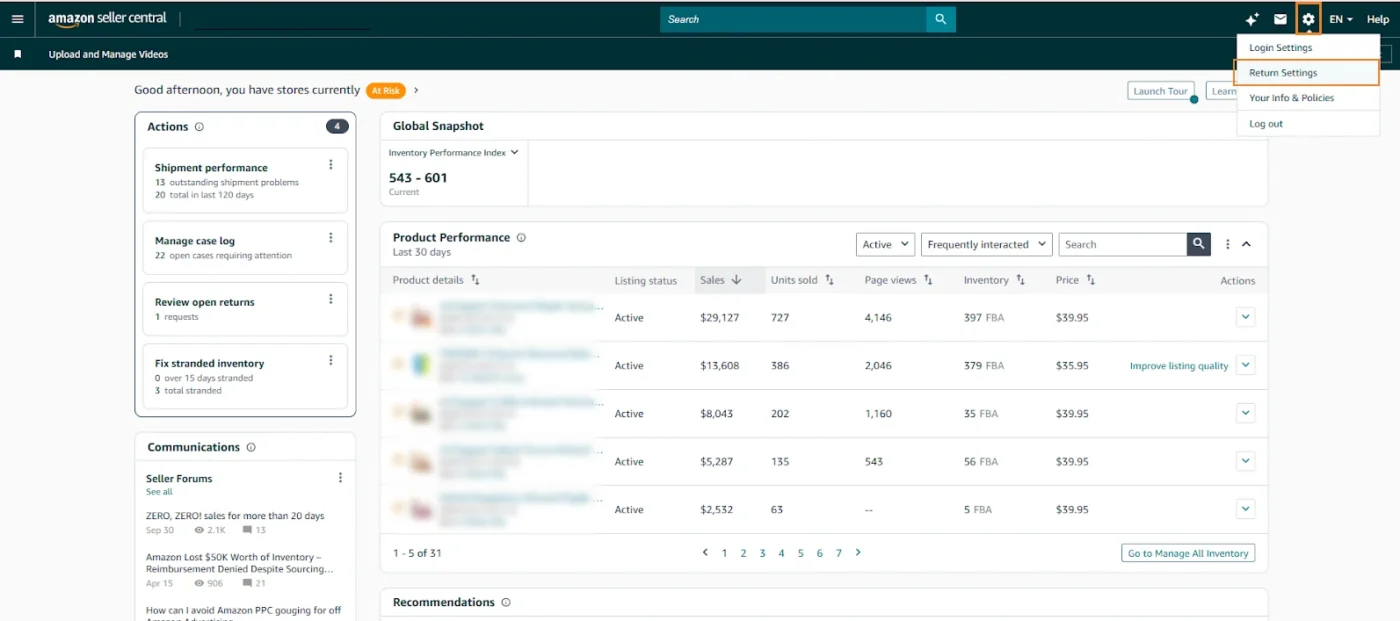
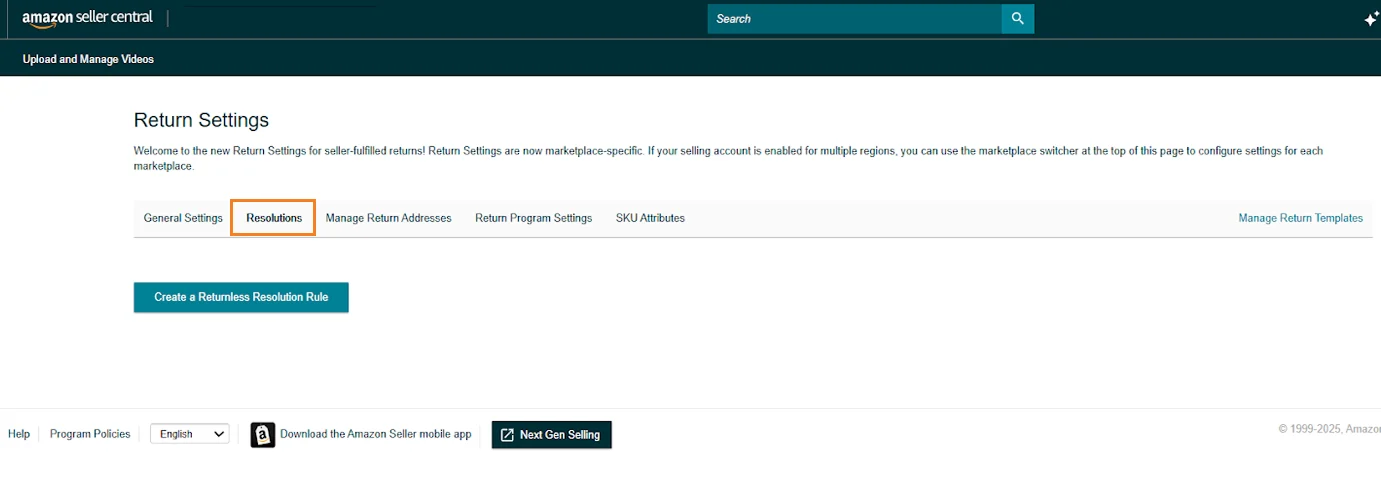
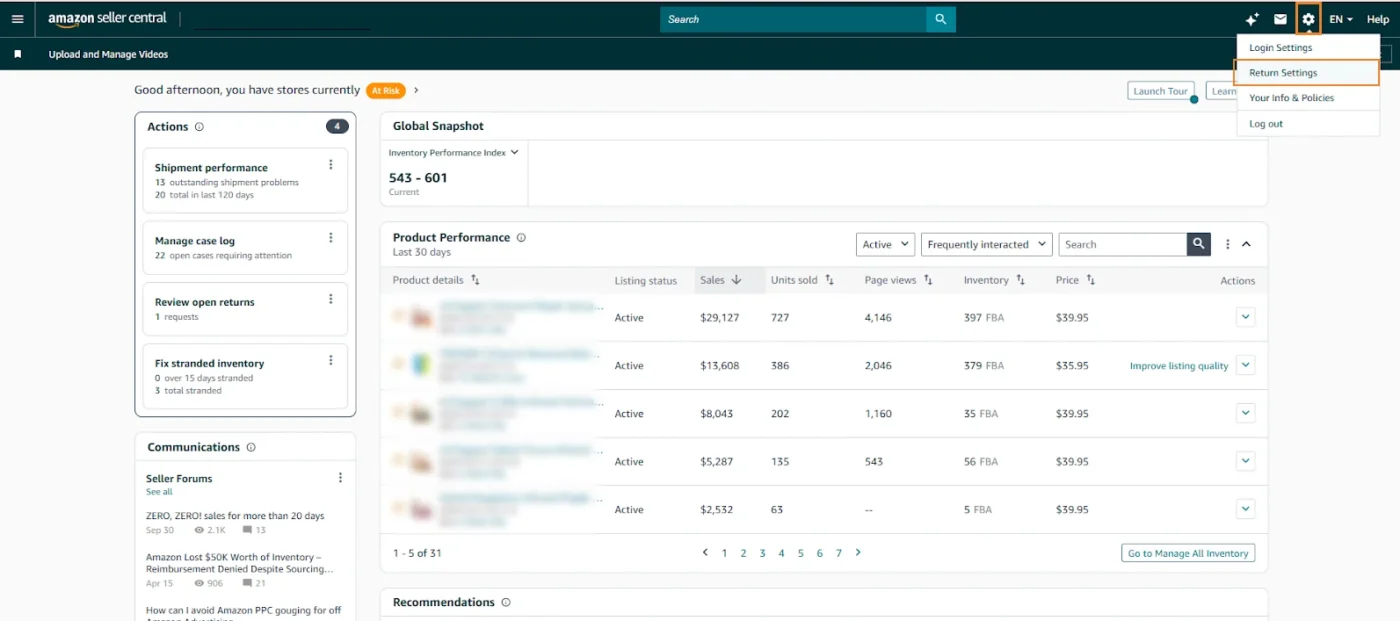
Step 1: Log in to your Amazon Seller Central. Go to Settings, navigate to “Return Settings”, and open the “Resolutions” tab.
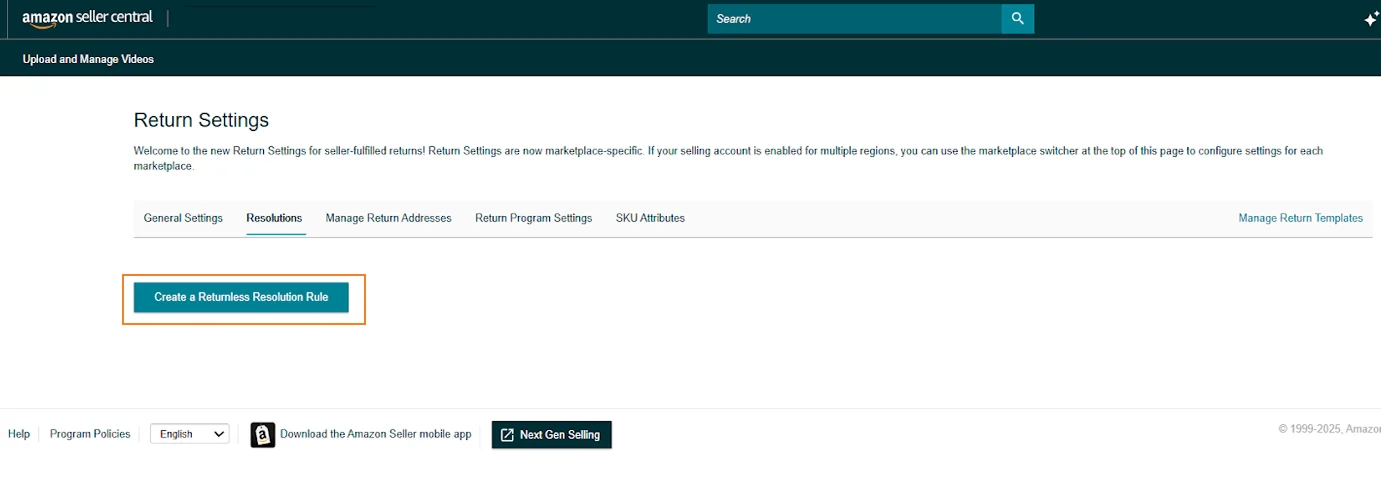
Step 2: Click Create a returnless resolution rule.
Step 3: Give your rule a clear name (e.g., “Low-Value Returnless Refunds”).
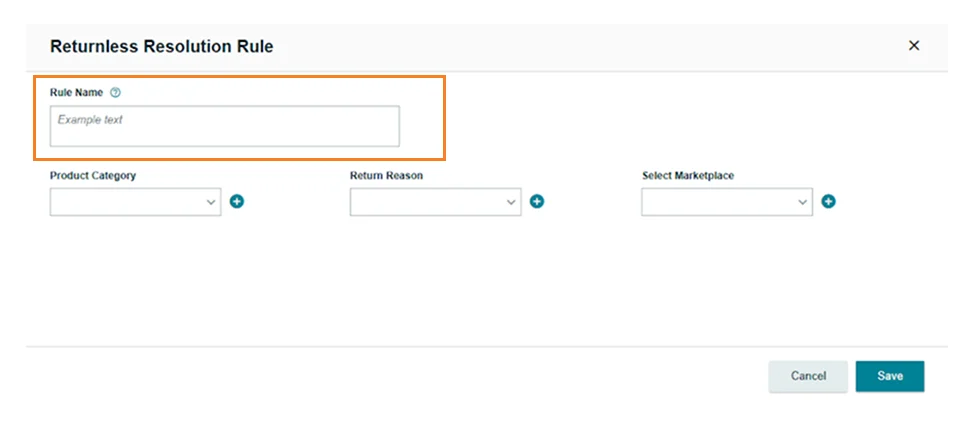
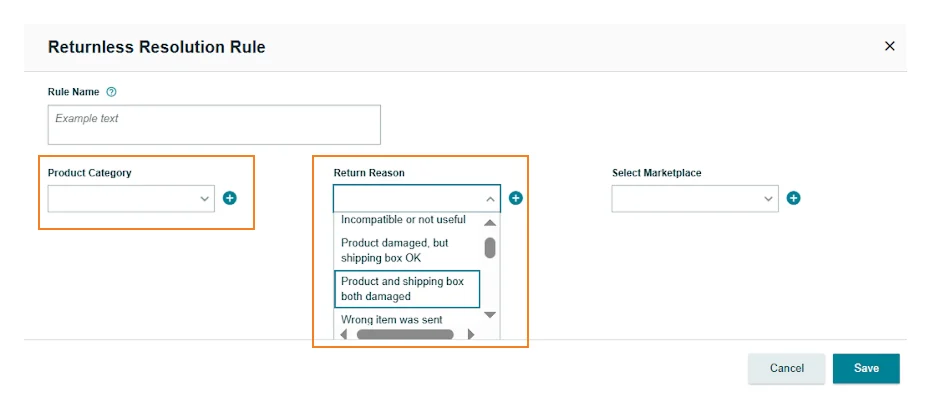
Step 4: Set your rule conditions, such as defining the price range for which the returnless refund should apply. Optionally, select specific product categories or return reasons (e.g., “damaged packaging” or “wrong size”).
Step 5: Once done, click Save.
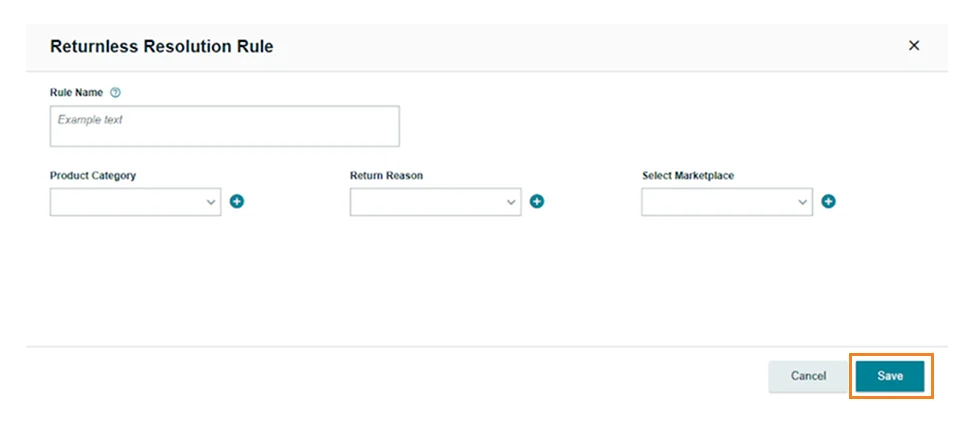
The rule will automatically apply to all future orders that meet those criteria.
If you ever need to make changes:
- To edit an existing rule, click on the rule, select Edit, update your settings, and click Save.
- To delete a rule, click the rule, select Delete, and confirm removal.
Method 2: Setting Returnless Refunds Amazon for Specific Products or SKUs
If you want more control and prefer to enable or remove returnless refunds only for selected products (instead of your entire catalog), you can do this easily using Amazon’s Returnless Resolution Template.
Here’s how to set it up step-by-step:
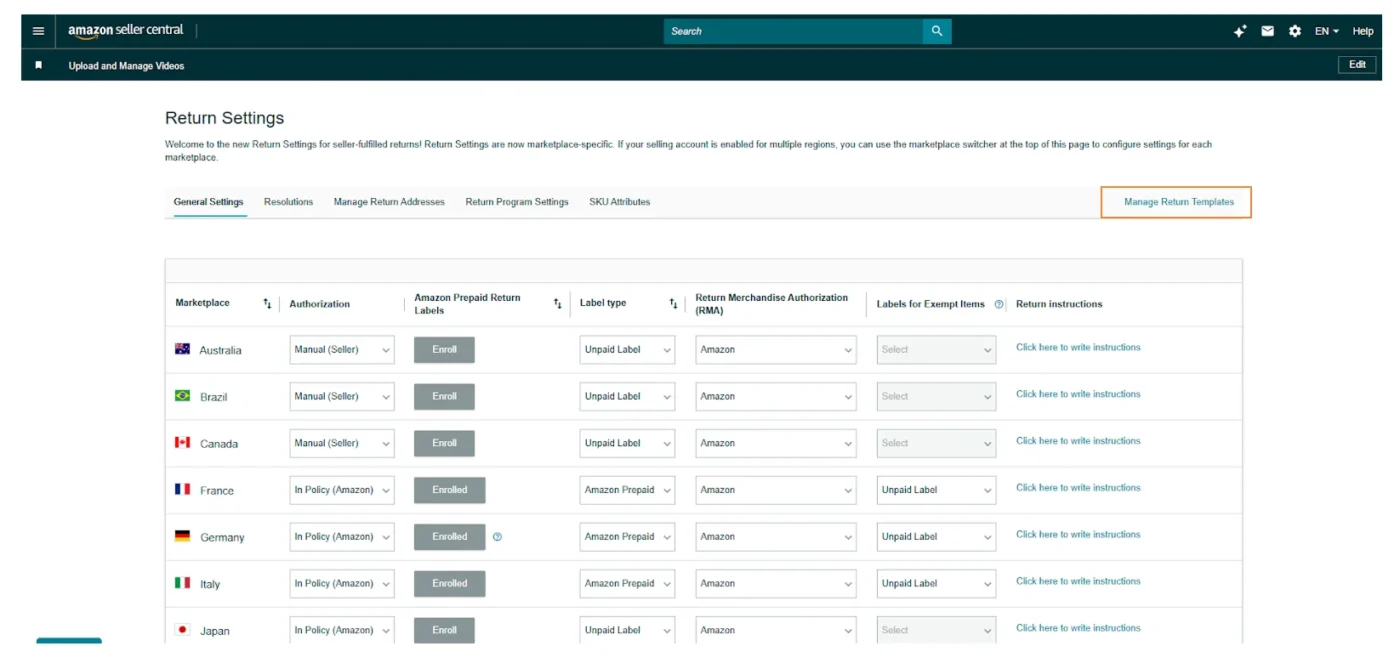
Step 1: In Seller Central, go to Settings > Return Settings > Returnless Resolution Template.
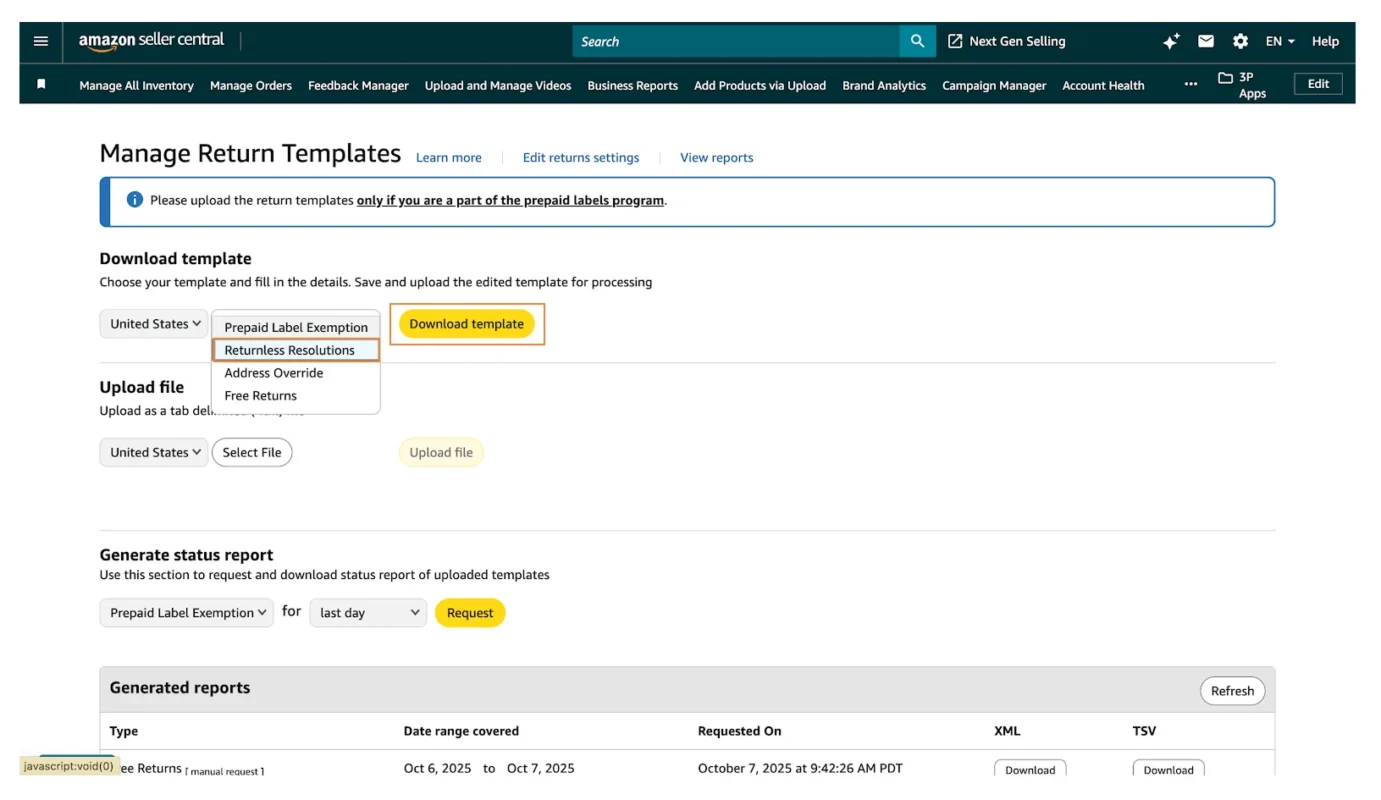
Step 2: Click Download Returnless Resolution Template and open the file.
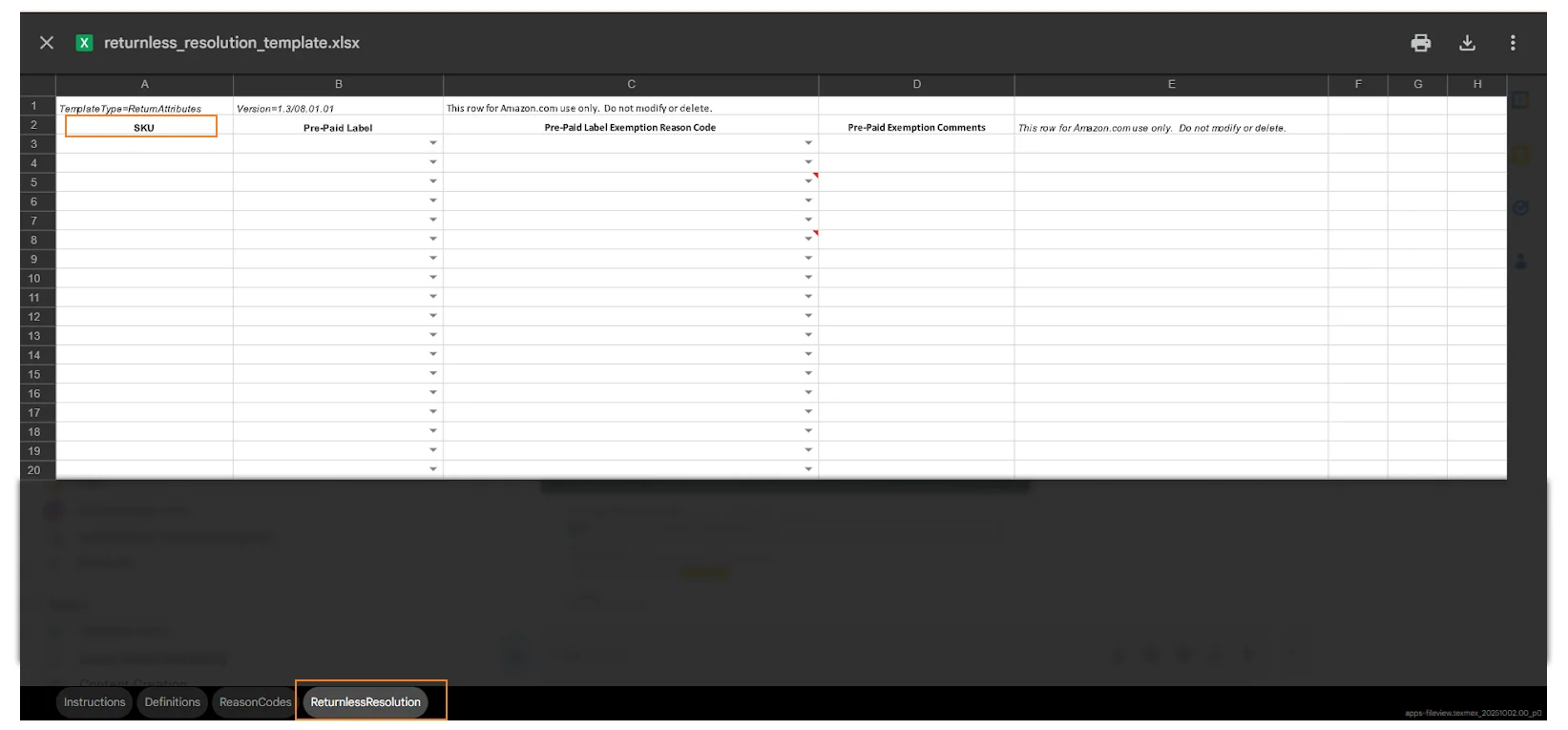
Step 3: In the “Returnless Resolution” tab, add the SKUs you want to include or exclude and select the appropriate reason codes for each.
Step 4: After completing the details, make sure no filters are applied, then save the file first as an Excel workbook (.xlsx) for your records.
Step 5: Next, save it again as a tab-delimited text file (.txt). Ensure the “Returnless Resolution” tab is active before saving.
Step 6: Return to Manage Return Templates and upload the .txt file you just saved.
Once uploaded, Amazon will process your request, and the returnless refund settings will be applied (or removed) for those specific SKUs.
Pros and Cons of Amazon Returnless Refund for Sellers
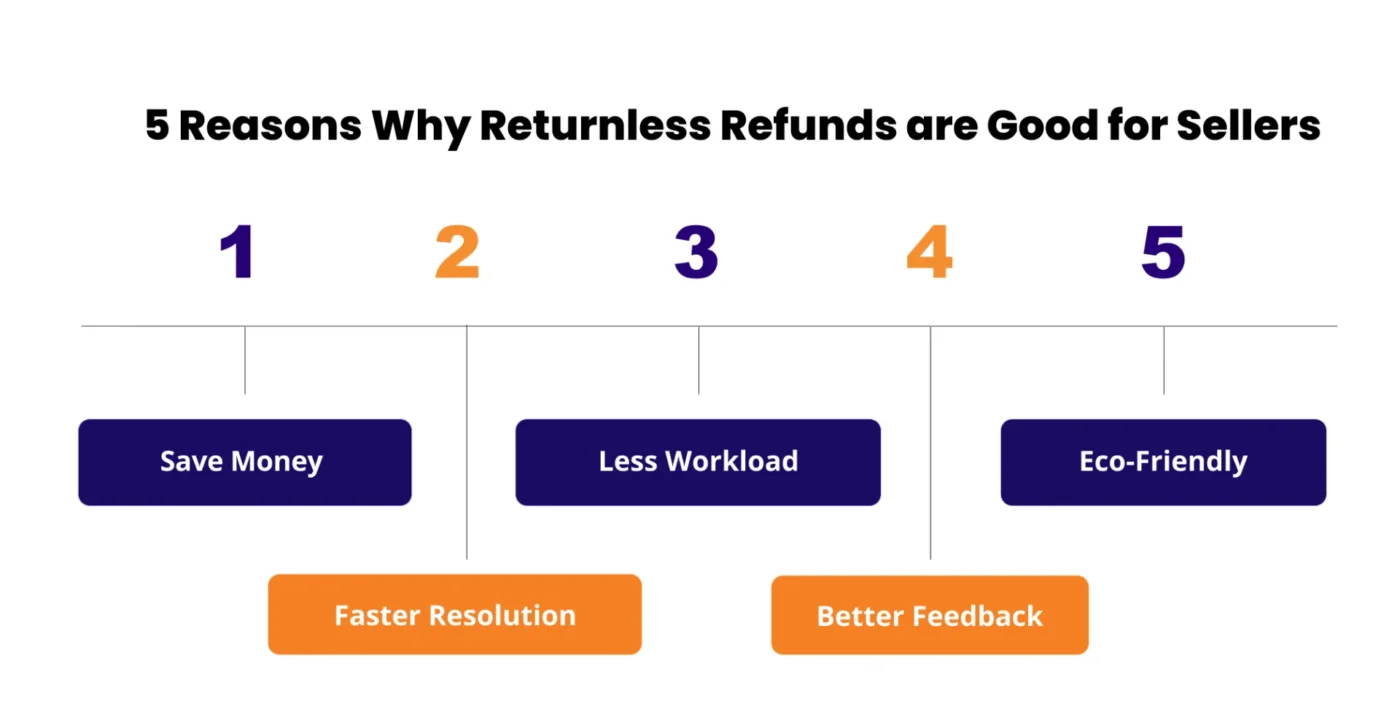
PROS:
- Save Money: Avoid return shipping, repackaging, and restocking costs.
- Faster Resolution: Instant refunds keep customers happy and minimize disputes.
- Less Workload: Cut manual processing, inspections, and restocking tasks.
- Better Feedback: Fast, easy resolutions lead to positive reviews and higher satisfaction.
- Eco-Friendly: Fewer shipments reduce packaging waste and carbon emissions.
CONS:
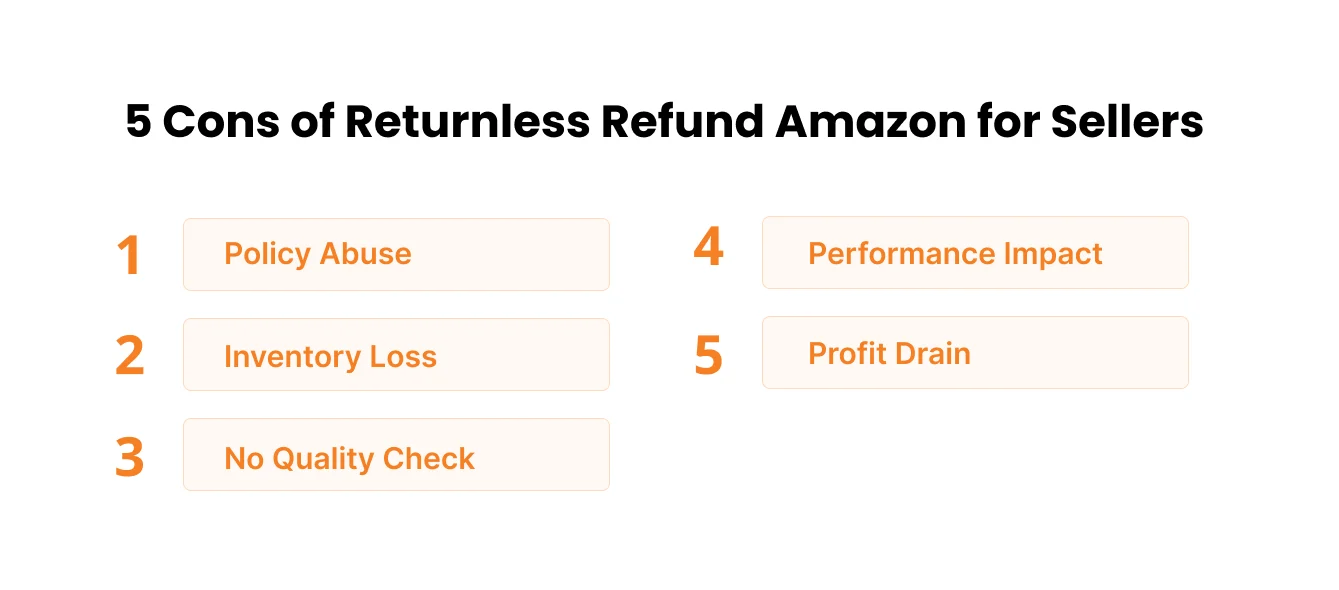
- Policy Abuse: Some buyers claim refunds on products that aren’t actually defective, and unchecked patterns like this can eventually trigger Amazon account health violations if refund rates climb too high.
- Inventory Loss: Refunded items aren’t returned, so inventory is lost entirely.
- No Quality Check: Sellers can’t inspect returned items to identify defects or supplier issues.
- Performance Impact: Excessive refunds may raise red flags about product quality and can pull down your Account Health Rating (AHR) if return-to-refund ratios spike.
- Profit Drain: Frequent small refunds gradually reduce margins and cash flow.
Best Practices for Managing Amazon Returnless Refunds
- Apply Selectively: Enable returnless refunds only on low-cost items (under $15) where return shipping makes no sense.
- Track Patterns: Monitor refund trends and watch for repeat customers requesting multiple refunds to prevent abuse. Reviewing your Amazon seller metrics and reports regularly makes it easier to spot these patterns before they affect your account standing.
- Improve Listings: Accurate descriptions, clear photos, and realistic product expectations reduce buyer confusion and lower return rates.
- Keep Records: Maintain simple logs of returnless refund cases for analysis and dispute resolution.
- Review Monthly: Check refund data for trends or problem SKUs and adjust rules as needed.
- Plan for Seasonal Spikes: Return volume rises sharply around the holidays, so revisiting your returnless refund rules ahead of time helps you manage Amazon holiday returns without overwhelming your team.
Conclusion
Returnless refunds benefit both sides when used correctly. For sellers, they save time and money on low-value returns. For buyers, they offer instant, hassle-free resolutions without shipping costs.
Success depends on balance. Sellers should apply returnless refunds strategically on items where return logistics don’t make sense, while monitoring for abuse. Buyers should use them honestly, only for genuine issues like damaged or incorrect items.
When both sides use the system responsibly, returnless refunds remain a win-win: sellers save money, buyers get fast resolutions, and the system stays sustainable for everyone.
For sellers looking to optimize their overall return strategy alongside advertising, listing optimization, and customer experience, AMZDUDES, a full service Amazon agency, brings every aspect of your Amazon business together under one roof. Our expert Amazon marketing agency services can help you implement a returnless refund strategy that reduces unnecessary costs, protects profitability, and maintains a positive customer experience.
Book a free consultation today!
Frequently Asked Questions
Q1: What is a returnless refund on Amazon?
A returnless refund means Amazon approves a refund without requiring the item to be returned. The customer keeps the product and receives their money back.
Q2: How do I get a returnless refund?
You cannot force one. Amazon and sellers determine eligibility based on item type, price, and condition. If your return qualifies, the option appears automatically during the return process. Contact Customer Service if you believe your item should qualify.
Q3: Which items qualify for returnless refunds?
Low-cost items, bulky goods, fragile products, perishables, hygiene items, and damaged goods most commonly qualify. High-value electronics, fine jewelry, digital content, and hazardous materials typically do not qualify.
Q4: Why does Amazon do returnless refunds?
Return shipping, inspection, and restocking often cost more than the product itself. Returnless refunds save money for sellers while improving customer satisfaction and reducing environmental impact.
Q5: How do sellers enable returnless refunds?
Sellers can create account-level rules in Seller Central (Settings > Return Settings > Resolutions) or use the Returnless Resolution Template to enable/disable for specific SKUs.
Q6: Can sellers abuse returnless refunds?
No. Sellers benefit from them only on low-cost items where return logistics are genuinely uneconomical. Amazon monitors refund rates, and excessive refunds damage seller metrics.
Q7: Is there a returnless refund limit?
No official limit exists, but excessive refunds can negatively impact seller performance metrics and account health.
Q8: What’s the difference between a refund with return vs. returnless?
With return: Customer ships the item back and receives a refund. Returnless: Customer keeps the item and receives a refund. Sellers choose based on item type and economics.