
Key Takeaways
- A successful Amazon PPC strategy starts with selecting highly relevant keywords, not simply increasing bids or budgets.
- Use match types strategically: Broad for discovery, Phrase for testing, and Exact for scaling proven search terms.
- Prioritize keyword data from Search Term Reports, Brand Analytics, and customer search behavior before relying on third-party tools.
- Negative keyword management is essential to reducing wasted spend and improving campaign efficiency.
- Treat keyword optimization as an ongoing process through regular harvesting, bid adjustments, and expansion based on performance data.
Many sellers keep wondering why sales are not coming despite running ads with a reasonable budget. They keep adjusting the bids and budget but what they don’t get is that the problem is not with the bids or budget, but in most of the cases, it’s just that you’re targeting the wrong keywords.
After doing Amazon PPC management across dozens of categories, from supplements and electronics to home goods and apparel, the single biggest mistake we see sellers make is skipping the keyword strategy and jumping straight into Campaign Manager. They pick a handful of generic terms, set a budget, and hope for the best. That approach rarely works.
The good news is that Amazon keyword research doesn’t have to be complicated. You don’t need 10 tools or a massive spreadsheet. What you need is a clear, repeatable process, and that’s exactly what this guide gives you.
By the time you finish reading, you’ll know how to find the right keywords, filter out the ones that waste money, structure your campaigns properly, and keep improving your results week after week. Let’s get into it.
Step 1: Understand Amazon Keyword Match Types Before You Create Any Campaign
Before you do any Amazon PPC keyword research, you need to understand how Amazon’s keyword match types work. This is the foundation. If you get this wrong, even the best keywords won’t help you.
There are three match types in Amazon Sponsored Products: Exact, Phrase, and Broad. Each one controls how closely a shopper’s search query must match your keyword before your ad is shown.
What Exact Match Does and When to Use It
With Exact Match, your ad only shows when someone searches for your keyword almost word-for-word. For example, if your exact match keyword is “stainless steel water bottle 32oz,” your ad only triggers for that precise search, not for “water bottle” or “32oz bottle stainless.”
Use Exact Match when:
• You already know which specific search terms are converting for your product
• You want the tightest control over your spend
• You’re running a bid strategy focused on profitability, not discovery
What Phrase Match Does and When to Use It
Phrase Match shows your ad when a shopper’s search includes your keyword as part of a longer query, in the same order. So if your phrase keyword is “water bottle,” your ad could show for “insulated water bottle” or “water bottle for gym.”
Use Phrase Match during the first two to four weeks of a new campaign to capture modifier variants you might not have thought of. It gives you broader reach than Exact without the chaos of Broad Match.
What Broad Match Does and When to Use It
Broad Match gives Amazon the most freedom to show your ad for loosely related searches. It can surface terms you’d never think to target manually, which makes it powerful for discovery. But it can also match completely irrelevant searches.
The rule is simple: never run Broad Match without a tightly managed negative keyword list. If you’re launching a new product and want to use broad match for research, add your known irrelevant terms as negatives before you even start the campaign. We’ll cover how to build that negative list in Step 6.
Step 2: Build Your Seed Keyword List Without Any Paid Tool
Most sellers rush to paid tools before they’ve extracted the free, high-quality keyword data sitting right inside their own Amazon account. Here’s how to build a solid seed list before you spend a dollar on third-party software.
Mine Your Own Search Term Report First
This is the most underused source of keyword data on Amazon. Go to your Seller Central, navigate to Campaign Manager, and pull your Search Term Report for the last 90 days. Filter for search terms where ACoS is below your target threshold, typically under 35-40% depending on your margin.
Every term that passes that filter is a proven keyword. A real shopper searched for it, clicked your ad, and bought your product. These are your best seed keywords, and they cost you nothing to find.
Use Amazon’s Auto-Complete Bar as a Free Research Tool
Go to Amazon.com, type your main product keyword into the search bar, and then add a single letter after it, A, B, C, and so on through Z. Amazon’s autocomplete will show you the most commonly searched variations for each letter combination. Screenshot every result.
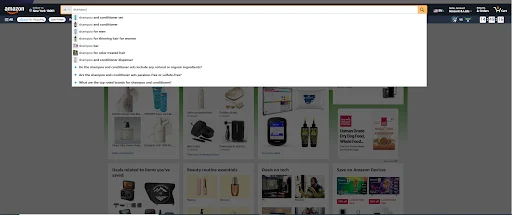
Then repeat the process with your keyword at the end, for example, “32oz __ water bottle”, to catch modifier-first searches. This process takes about 20 minutes and regularly surfaces keywords you’d never find in a paid tool.
Reverse-Engineer Competitor Keywords via Their ASINs
Go to your top three or four competitor listings on Amazon. Copy their ASINs. Then run each ASIN through a reverse-lookup tool like Helium 10 Cerebro or Amazon Brand Analytics. You’ll see exactly which keywords are driving traffic to their listings.
Focus on keywords where the competitor ranks organically in positions 1 through 15. Those are the terms shoppers are actually clicking. Add the most relevant ones to your seed list.
Pull Keywords Directly from Amazon Brand Analytics
If you’re enrolled in Amazon Brand Registry, you have access to Brand Analytics for free. The Search Query Performance report is particularly valuable, it shows you the actual search queries shoppers use to find products in your category, along with click share and add-to-cart rate data for the top three competing ASINs.
Sort by search query frequency and look for terms where the top three ASINs have low combined click share. That gap is your opportunity. These keywords are being searched, but no single listing dominates them yet.
Step 3: Choose the Best Amazon Keyword Research Tool for Your Budget
Once you’ve built your seed list from free sources, a paid tool will help you expand it, validate search volumes, and spot opportunities your manual research missed. Here’s a straightforward comparison of the most widely used options.
| Tool | Best For | Key Feature | Price Range |
| Helium 10 Cerebro | ASIN reverse lookup | Organic rank filtering | $39–$99/mo |
| Jungle Scout Keyword Scout | New sellers on a budget | 30-day trend + PPC bid range | $29–$49/mo |
| Amazon Brand Analytics | Brand-registered sellers | Click share & cart-add data | Free |
| Data Dive | Deep listing optimization | Competitor keyword gaps | $19–$49/mo |
Helium 10 Cerebro: Best for ASIN Reverse Lookup
Cerebro is the tool we recommend most often for established sellers. Enter a competitor’s ASIN, and it shows you every keyword that ASIN ranks for, both organically and through PPC. The key filter to apply is Organic Rank 1 through 15. Keywords where your competitor ranks in the top 15 organically are the ones driving real traffic, not just impressions.
After filtering, sort by Search Volume and export the top 50. Cross-reference with your seed list, and you’ll have a strong, validated keyword set to work from.
Jungle Scout Keyword Scout: Best for New Sellers on a Budget
If you’re just starting out or running a lean operation, Jungle Scout’s Keyword Scout gives you the most important data points in one view: 30-day search volume trend and estimated PPC bid range. The trend data is particularly useful, a keyword with declining volume over 30 days is less attractive than one that’s growing, even if the total volume looks similar.
Amazon Brand Analytics: Best Free Tool You’re Probably Ignoring
If you’re brand-registered and not using Brand Analytics regularly, you’re leaving significant competitive intelligence on the table. The Search Query Performance report tells you which search terms are driving the most clicks in your category and which ASINs are capturing those clicks. It’s updated weekly and requires no paid subscription.
For the best Amazon keyword research without spending money, Brand Analytics combined with your Search Term Report and Amazon’s autocomplete is more than enough to build a competitive keyword strategy.
When You Don’t Need a Paid Tool at All
If you’re managing fewer than 50 SKUs and spending under $500 per month on ads, a paid keyword tool is not your highest-leverage investment right now. Use your Search Term Report, Brand Analytics, and the autocomplete method from Step 2. Get your campaigns structured correctly first. Add a tool later when your spend and SKU count justify it.
Step 4: Score and Shortlist Keywords Using a Simple Priority Matrix
You now have a raw list of potential keywords. The next step in the Amazon advertising keyword research process is filtering that list down to only the terms worth spending money on. This is where most sellers make the second big mistake, they add everything and let Amazon sort it out. Don’t do that. Be deliberate.
The 3 Filters Every Keyword Must Pass Before You Add It
Before any keyword makes it into a campaign, it needs to pass three filters:
1. Search volume of at least 300 searches per month. Below this threshold, there simply isn’t enough traffic to generate useful data, and you may go weeks without a single impression.
2. Relevance score of at least 7 out of 10. Ask yourself: if someone searched this exact term and landed on my listing, would they buy? Be honest. A score of 7 means the keyword directly describes what you sell.
3. Suggested bid within your maximum CPC based on your target ACoS. We’ll calculate this in the next section.
Any keyword that fails one of these three filters goes on a watch list, not into an active campaign.
How to Calculate If a Keyword’s Bid Is Profitable Before You Spend
This formula tells you the maximum you should pay per click for any given keyword:
Max CPC = Product Price x Conversion Rate x Target ACoS
For example: if your product sells for $30, your conversion rate is 12%, and your target ACoS is 25%, your Max CPC = $30 x 0.12 x 0.25 = $0.90.
If Amazon’s suggested bid for a keyword is $2.50 and your Max CPC is $0.90, that keyword will almost certainly run at a loss. Either don’t add it, or target it with a much lower bid and accept limited impressions.
How to Categorize Keywords into Tier 1, 2, and 3 Buckets
Once your keywords pass the three filters, sort them into tiers:
- Tier 1: Proven converters: Keywords from your Search Term Report with confirmed sales. Target these as Exact Match only. Allocate the most budget here.
- Tier 2: High-potential terms: Keywords validated by tools with good search volume and high relevance but no conversion data yet. Test these as Phrase Match.
- Tier 3: Discovery terms: New keywords from autocomplete or competitor research. Run these in an Auto campaign or as Broad Match with a tight negative list.
This tiering system is the core of sound Amazon PPC keyword selection. It keeps your proven terms protected while still allowing you to discover new winners.
Step 5: Structure Your Amazon Sponsored Products Campaigns Around Your Keywords
Keyword research only pays off if your campaign structure supports it. A disorganized campaign makes it nearly impossible to know which keywords are working and which ones aren’t.
Why You Need Separate Campaigns for Auto and Manual Targeting
Auto targeting lets Amazon decide which search terms to show your ad for, based on your listing. Manual targeting means you control exactly which keywords trigger your ad. These two modes serve different purposes and should never share a campaign.
Think of Auto campaigns as your keyword discovery engine. Amazon’s algorithm will surface search terms you haven’t thought of, and some of them will convert. Your job is to harvest those converting terms every week and move them into a Manual Exact campaign. This is the most reliable way to continuously expand your keyword set with proven, data-backed terms.
The Single-Keyword Ad Group (SKAG) Method for Your Best Terms
For your Tier 1 keywords, the ones with proven conversion history, use a Single-Keyword Ad Group structure. This means one keyword per ad group, on Exact Match only. It gives you clean, isolated data on each keyword and allows you to adjust bids precisely without affecting other terms.
This approach works especially well for your top five to ten highest-volume keywords. For the rest of your Tier 1 list, grouping three to five tightly related terms per ad group is fine.
How to Write Keyword-Rich Ad Copy That Improves Relevance
Amazon rewards relevance. When your ad copy closely matches the keyword a shopper searched for, your click-through rate improves and your effective CPC often drops. The simplest implementation: put your exact match keyword in your headline and in the first bullet point of your product listing.
For Sponsored Brands campaigns, write a custom headline for each ad group that mirrors the keyword. This small change consistently improves CTR without requiring any bid adjustments.
Step 6: Build Your Negative Keyword List to Eliminate Wasted Spend
Amazon ads negative keywords are one of the most powerful and most ignored tools in your campaign. Adding the right negatives can reduce your ACoS by 10-20% without changing a single bid. Here’s how to build and maintain your list.
How to Pull Negative Keyword Candidates from Your Search Term Report
Pull your Search Term Report every week. Filter for search terms that meet all three of these conditions:
• More than 50 impressions in the period
• Zero orders
• ACoS above 80% (or above 2x your target ACoS)
Every term that meets all three conditions should be added as a Negative Exact match immediately. Don’t wait. Every day these terms stay active, they’re consuming a budget that could go to your converting keywords.
Negative Exact vs Negative Phrase: Which to Use and When
Negative Exact blocks your ad only for that specific search term. Negative Phrase blocks it for any query containing that phrase as part of a longer search. Use Negative Phrases for entirely irrelevant categories, for example, “free,” “wholesale,” “kids,” or “DIY”, where you want to block an entire class of searches. Use Negative Exact for individual terms that are close to your product but clearly not converting.
A Starter Negative Keyword List Every Amazon Seller Should Use
Regardless of your product category, these terms almost universally generate wasted spend on Amazon:
• free, cheap, discount, wholesale, bulk
• used, refurbished, replacement, parts
• how to, tutorial, DIY, review, reviews
• for kids, for children, for toddlers (unless your product is for kids)
• Amazon, eBay, Walmart (brand names of competitors or platforms)
Add these as Negative Phrase matches to every new campaign before it goes live. This one step alone will save you meaningful budget in the first week.
Set a Weekly 15-Minute Negative Keyword Audit Routine
Every Monday, pull the previous week’s Search Term Report. Spend 15 minutes filtering for new wasted spend terms and adding them as negatives. That’s it. This routine, done consistently, compounds over time. Campaigns that are six months old with a regular audit discipline have dramatically lower wasted spend than campaigns that were set up and left alone.
Step 7: Launch Your Campaign and Collect Enough Data Before Optimizing
One of the most common mistakes in Amazon PPC keyword research is optimizing too early. You launch a campaign, see a high ACoS after three days, and start pausing keywords or cutting bids. At that point, you don’t have enough data to make good decisions. Here’s how to launch correctly and know when you’re ready to optimize.
How Much Data You Need Before Touching a Keyword’s Bid
Wait for at least 10 clicks or 7 days, whichever comes first, before making any bid change on a keyword. With fewer than 10 clicks, your conversion data is statistically meaningless. A keyword with 5 clicks and 0 conversions isn’t necessarily a bad keyword, it just hasn’t had enough at-bats.
The exception: if a keyword is spending at 10x your Max CPC and clearly irrelevant to your product, pause it immediately. Don’t wait for data on obvious mismatches.
The Right Budget Split Between Auto and Manual on Launch Day
On launch day, allocate 60% of your daily budget to your Manual campaigns (Exact and Phrase Match on your Tier 1 and Tier 2 keywords) and 40% to your Auto campaign. After week three, once your Auto campaign has generated enough search term data to harvest from, you can reduce the Auto budget to 25-30% and shift more to your proven Manual keywords.
ACoS vs TACoS: Which Metric Actually Matters
ACoS (Advertising Cost of Sales) measures ad spend against ad-attributed sales only. TACoS (Total Advertising Cost of Sales) measures ad spend against your total revenue, including organic sales. TACoS is the more meaningful long-term metric because it shows whether your advertising is growing your overall business, not just generating ad sales.
As a rough benchmark: a healthy TACoS is typically 5-10% for established products and 15-25% during a product launch when you’re aggressively building organic rank. If your TACoS is growing while your total revenue stays flat, your ads are not helping your organic position, which is a signal to reassess your keyword strategy.
Step 8: Run the 30-Day Keyword Optimization Loop to Keep Improving Results
The sellers who consistently get the best results from Amazon advertising don’t set up a campaign once and forget it. They run a monthly loop, harvesting new winners, cutting losers, and refining their keyword mix. Here’s the exact process week by week.
Week 1–2: Harvest Converting Search Terms from Auto Into Manual
Pull your Auto campaign’s Search Term Report. Look for any search term with at least one order. For each converting term, check whether it’s already in your Manual Exact campaign. If it isn’t, add it now, with a bid slightly higher than what you paid for the click in Auto. Then add it as a Negative Exact match in your Auto campaign so both campaigns don’t compete against each other.
Week 3: Raise Bids on Winners, Cut Spend on Underperformers
In week three, you’ll have enough data to make meaningful bid decisions. Apply these rules:
• If ACoS is below your target for 14+ days with at least 10 clicks, raise the bid by 10–15%.
• If ACoS is more than 2x your target for 14+ days with at least 10 clicks, lower the bid by 15–20%.
• If a keyword has more than 20 clicks and zero orders over 14 days, pause it and add as a negative.
These aren’t rigid rules, context matters. A high-ACoS keyword during a product launch is sometimes worth keeping if it’s building organic rank. But as a default framework for steady-state campaigns, these rules work consistently.
Week 4: Expand with New Seed Terms Based on What’s Converting
Your converting keywords are telling you exactly what language your customers use. In week four, take your top five converting search terms and run them back through the keyword research process from Step 2. Use them as new seeds in Helium 10 or Brand Analytics. You’ll consistently find related terms that your original research missed, because now you’re starting from proven customer language rather than guesswork.
When to Change Match Type Instead of Pausing a Keyword
Before you pause a keyword, consider whether a match type change might fix the problem. If a Broad Match keyword has high impressions and a low CTR, it may be triggering for irrelevant searches rather than being a fundamentally bad keyword. Try it as an Exact Match and give it two more weeks. If it still underperforms on Exact, then pause it.
Similarly, if a Phrase Match keyword has strong CTR but zero conversions, check the search terms it’s triggering for. You may need to add negatives rather than change the keyword itself.
Conclusion
Amazon advertising success comes from building a strong keyword process, structuring campaigns properly, and continuously optimizing based on real customer search behavior. Sellers who consistently improve ACoS and grow organic rankings are the ones who treat keyword research as an ongoing system, not a one-time setup.
By applying the strategies in this guide, from choosing the right match types and building keyword lists to managing negatives and optimizing campaigns weekly, you can reduce wasted spend and focus your budget on keywords that actually drive conversions.
If you need a reliable partner to manage your Amazon PPC and growth strategy, AMZDUDES is a full service Amazon agency, ready to help the brands on Amazon. Book a free consultation call and let our team build a smarter, data-driven advertising strategy for your brand.
Frequently Asked Questions
How many keywords should I add to an Amazon PPC campaign?
For a new Manual campaign, start with 15 to 30 keywords. More than that makes it hard to manage bids and interpret data cleanly. As keywords prove themselves over time, you can scale up. Quality and relevance matter far more than quantity, 20 tightly relevant keywords will almost always outperform 200 loosely related ones.
What is the difference between negative exact and negative phrase on Amazon?
Negative Exact blocks your ad only for that specific search query. Negative Phrase blocks your ad for any query containing that phrase, in any order, as part of a longer search. Use Negative Phrase for broad irrelevant categories and Negative Exact for specific terms that are close but not relevant to your product.
How do I find the best keywords for Amazon ads without a paid tool?
Use three free sources: your 90-day Search Term Report (for proven converters), Amazon’s autocomplete bar (for popular variations), and Amazon Brand Analytics (for category-wide search query data). Combined, these three sources give you a strong keyword foundation without any paid subscription.
What match type should I start with for a new Amazon product launch?
Start with one Auto campaign and one Manual campaign. In the Manual campaign, use Phrase Match on your top 15 to 20 seed keywords. Avoid Exact Match in the first two weeks, you don’t have enough data yet to know which exact terms will convert. After week two, harvest converting search terms from Auto and add them as Exact Match in Manual.
How often should I update my Amazon keyword list?
Run a light keyword audit every week, 15 minutes to pull the Search Term Report and add negatives. Run a deeper review every 30 days: harvest new winners from Auto, reassess bids on underperformers, and add new seed terms based on what’s converting. This cadence keeps your campaigns improving without becoming a full-time job.