
Key Takeaways
- A keyword is worth bidding on when it meets three criteria: purchase intent, listing relevance, and a CPC that your margin can sustain. Search volume alone tells you nothing about profitability.
- Keywords are what you bid on. Search terms are what shoppers actually type. The gap between them, irrelevant queries triggering your keywords, is where most Amazon ad budgets leak.
- Your maximum profitable CPC is not Amazon’s suggested bid. It is Profit Per Unit × Conversion Rate. Any bid above this loses money on every converting click.
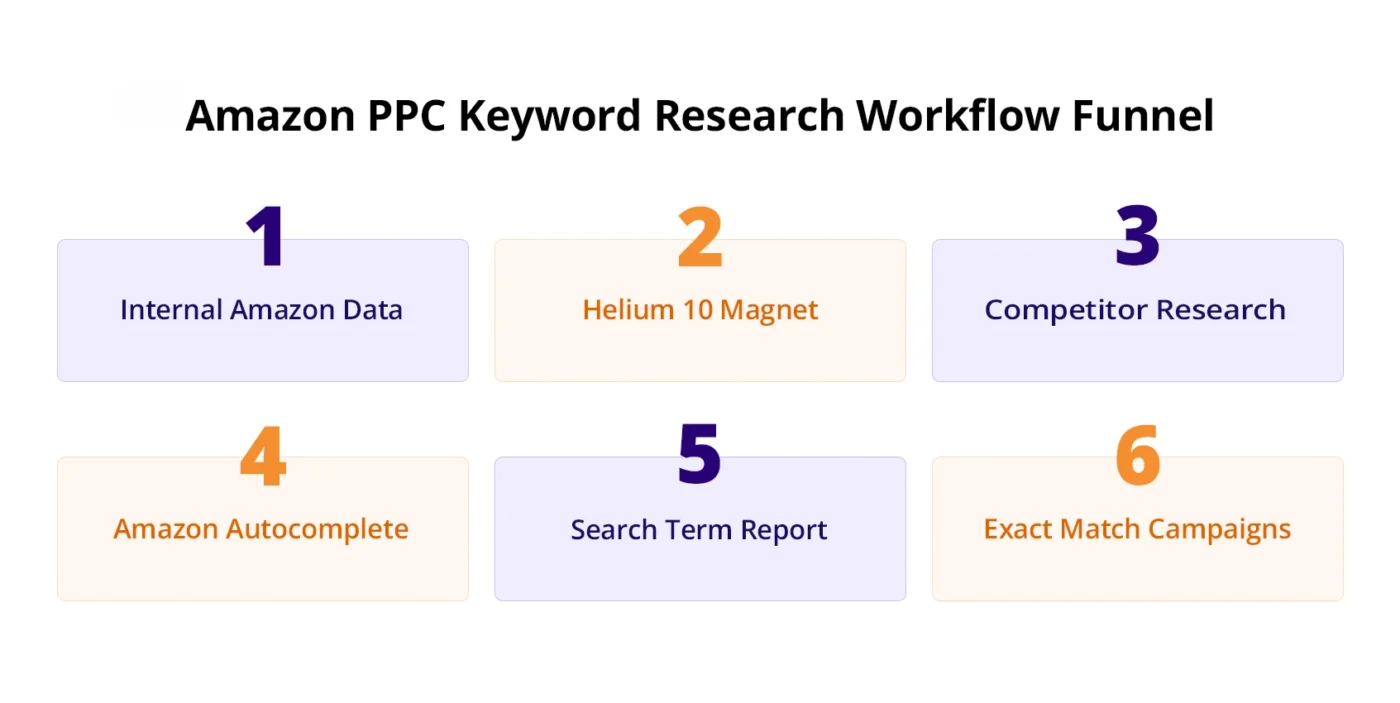
- The five-step research process: internal data (SQP + Brand Analytics) → Helium 10 Magnet → competitor reverse-engineering (Cerebro) → autocomplete → Search Term Report expansion.
- Structure by match type in separate campaigns: Exact for proven converters, Phrase for mid-funnel, Broad for discovery. Never mix all three in one campaign.
- The Search Term Report is not just a reporting tool it is your best ongoing keyword research source, your primary waste-elimination mechanism, and your keyword expansion pipeline.
The gap between a profitable Amazon PPC campaign and one that burns budget without returning sales almost always comes down to keywords. Not the bid amounts. Not the campaign structure. The keywords themselves, whether they represent shoppers who are ever likely to buy your product.
With over 9.5 million active sellers and CPCs rising consistently year over year, bidding on the wrong keywords is no longer just inefficient. It is structurally loss-making. A campaign built on high-volume, low-intent keywords produces impressions, clicks, and a high ACoS. A campaign built on the right keywords, specific purchase-intent terms matched precisely to your product, produces conversions.
This guide gives you the complete keyword research process: how to evaluate a keyword before spending a dollar on it, where to find high-converting terms, how to structure them into campaigns, and how to refine them over time using live campaign data.
How to Know If a Keyword Is Worth Bidding On Before You Spend a Dollar
The most expensive keyword research mistake is building a list based on search volume and bidding on everything before testing whether any of it converts. Volume tells you how many people searched a term. It tells you nothing about whether they will buy your product or whether you can afford to reach them.
Before any keyword enters a manual campaign, run it through three questions.
Does It Signal Purchase Intent?
Purchase intent is the likelihood that a shopper searching this term is ready to buy, not research, not browse, not compare specs.
High-intent signals:
- Specific product attributes: size, material, colour, quantity (“BPA-free 32oz insulated water bottle”)
- Use-case specificity: (“non-slip yoga mat for hot yoga,” “running shoes for flat feet”)
- Comparison intent with your product type as the subject: (“stainless steel vs plastic water bottle”)
- Quantity or bundle signals: (“pack of 3,” “set of 6,” “bulk”)
Low-intent signals that increase cost without returning sales:
- Research modifiers: “best,” “review,” “comparison,” “top 10”
- How-to queries: “how to clean,” “how to use,” “how to make”
- Informational: “what is,” “benefits of,” “types of”
These low-intent terms generate clicks from shoppers who are gathering information, not opening their wallets. They inflate impressions and spend while producing poor CVR, driving ACoS above break-even.
The intent test in practice: Search the term yourself on Amazon. Look at the top-selling products in the results. If your product would be a natural fit in that result set, same category, similar use case, and competitive price, the intent likely matches. If the results show products that your listing would look out of place alongside, the intent does not match your audience.
Will Your Listing Actually Convert This Traffic?
Keyword relevance is not just about category match. It is about whether your specific product with its specific features, price point, and listing quality can satisfy the shopper’s intent well enough to convert the click into a sale.
A keyword can be highly relevant to your product category but irrelevant to your specific variant. “Yoga mat” is relevant to your category. “6mm thick yoga mat” is relevant to your product. “1/4 inch yoga mat” is relevant to your product only if you understand that 6mm = approximately 1/4 inch. If a shopper searches “thick yoga mat” and your listing is for a 3mm mat, the keyword is not relevant regardless of category.
Audience fit check: Who is searching this term? A seller of premium kitchen knives targeting “cheap kitchen knives” is paying to reach the wrong audience, shoppers whose price expectation will not be met by the product they land on. The keyword may have high volume and appear category-relevant, but the audience’s intent conflicts with the offer.
Before adding a keyword, ask: Does the shopper searching this term represent someone who would realistically purchase my specific product at my price point?
Listing quality check: A keyword can be perfectly relevant in intent and audience fit, but your listing may not convert it. If your main image is weak at thumbnail size, if your review count is below 15, or if your price is above the category average without visible differentiation, relevant traffic will still leave without converting.
If your listing is not ready to convert organic traffic, it will not convert paid traffic either. Paid traffic does not improve listing conversion it amplifies whatever conversion rate already exists. Fixing listing quality before scaling keyword spend is the most important sequencing decision in Amazon PPC. Strong Amazon listing optimization improves conversion rates, increases your max profitable CPC, and allows your campaigns to scale without inflating ACoS.
Can Your Margin Support the CPC?
This is the criterion most sellers skip and the one that determines whether a keyword is profitable, regardless of how good the intent and relevance are.
The maximum profitable CPC formula:
Max Profitable CPC = Profit Per Unit × Conversion Rate
Worked example:
- Sale price: $40
- COGS: $12
- Amazon fees (referral + FBA): $8
- Profit per unit: $20
- Estimated CVR for this keyword: 10%
- Max Profitable CPC: $20 × 0.10 = $2.00
Any bid above $2.00 on this keyword loses money on every converting click, regardless of how relevant the keyword is or how well your listing performs. The math does not lie.
Compare against Amazon’s suggested bid: Amazon shows a suggested bid range when you create a campaign. This range represents what other sellers are currently paying for that keyword. It is a market rate signal, not a profitability recommendation.
If Amazon’s suggested bid exceeds your calculated max CPC, you have three options: improve your CVR (which raises your max profitable CPC), accept a lower margin during a launch phase, or find a different keyword with lower competition and a CPC your margin can sustain.
Amazon keyword cost per click, what drives it:
| Driver | Effect | What to Do |
| Keyword specificity | Longer, more specific = lower CPC | Target long-tail variants of expensive generic terms |
| Category competition | More sellers bidding = higher CPC | Find sub-niches with fewer active bidders |
| Match type | Broad match averages higher than exact | Use exact for proven terms to control effective CPC |
| Listing CVR | Higher CVR = higher max profitable CPC | Improve listing to sustain higher bids profitably |
| Seasonality | Q4 and Prime Day spike CPCs 30–50% | Budget separately for peak periods |
| Placement | The top of the search costs more | Control placement multipliers only where data justifies it |
Amazon PPC Keywords vs Search Terms: Why This Distinction Saves Budget
This distinction underpins every section that follows, and it is the most misunderstood concept in Amazon PPC keyword management.
Keywords are the terms you deliberately add to your campaign and bid on. You set them. You control their bids, match types, and which campaigns they live in.
Search terms are the actual queries shoppers typed into Amazon’s search bar that triggered your keyword and caused your ad to show.
They are not the same thing
When you bid on the keyword “yoga mat” on broad match, you are not bidding only on the query “yoga mat.” Amazon will also show your ad for “thick yoga mat,” “yoga mat for kids,” “yoga mat bag,” “how to clean yoga mat,” “cheap yoga mat,” and dozens of other variations. You chose one keyword. Amazon triggered it for many search terms, some of which have nothing to do with what you sell.
The gap between your keywords and the search terms that trigger them is where budget leaks at scale. Understanding this gap and managing it actively through match types and negative keywords is the foundation of profitable keyword research.
The practical implication: After any campaign has been running for 7 days, your Search Term Report shows every actual query that triggered your ads. This report is not just a performance summary; it is your most important keyword research source, because it reveals real buyer language that tools and estimates cannot produce. Section 4 covers how to use it in full.
How to Find High-Converting Keywords for Amazon PPC
Effective keyword research combines Amazon’s internal data, which reflects actual buyer behaviour on the platform, with external tools that expand your keyword universe and reveal competitor strategies. Use both. Neither alone produces a complete picture.
The five steps below follow the same sequence a professional PPC manager uses: start with what you know is real, expand it with tools, validate it against competitors, find more from live buyer behaviour, and continuously surface new opportunities from your own campaign data.
Step 1: Start With Internal Amazon Data (SQP + Brand Analytics)
Before opening any third-party tool, exhaust the data Amazon gives you directly. This data reflects actual platform behaviour, not web crawl estimates. It is more reliable than any external tool for understanding what Amazon shoppers are actually searching and converting on.
Amazon Search Query Performance (SQP): Available in Seller Central Brands Search Query Performance (Brand Registry required).
SQP shows every search query that generated impressions for your products over a selected time period, along with your click share, conversion share, and estimated search volume.
How to mine SQP for keyword opportunities:
High conversion share, low click share: These are queries where your product converts well when shoppers find it, but you are not appearing enough. Your click share is low because your bids are not competitive enough, or you are not bidding on the term explicitly. These are your highest-priority exact match targets.
High search volume, zero impressions: Queries where shoppers are searching in your category but your ads never appear. These are keyword gaps terms you should be targeting but are not. Add them to your manual campaigns and test.
High impressions, zero conversions: Queries generating clicks that never buy. Check whether your product genuinely satisfies the intent behind these queries. If not, they belong on your negative keyword list.
Amazon Brand Analytics Search Frequency Rank: Available in Seller Central: Brands → Brand Analytics → Amazon Search Terms (Brand Registry required).
Shows the top search terms in your category by search frequency, plus the top three clicked ASINs for each term and their combined click and conversion share.
How to use Brand Analytics for keyword research:
Look for high-frequency terms where the top three clicked ASINs are your competitors. This shows significant buyer demand that you are not capturing. These become high-priority campaign targets.
Look for terms where a competitor dominates click share, but your product has stronger reviews, a better price, or superior attributes. These are competitive conquest opportunities where a well-targeted campaign can redirect purchase-ready shoppers.
For sellers without Brand Registry: If you do not have access to Amazon Brand Registry, your auto campaign’s Search Term Report is the closest equivalent. After 7–14 days of auto campaign data, the Search Term Report reveals which actual queries are generating impressions and clicks. Pull it, sort by conversions descending, and use the converting terms as your seed keyword list for manual campaigns.
Step 2: Expand Your List With Helium 10 Magnet
Once you have a validated seed keyword list from internal data, use Helium 10 Magnet to expand it into the full keyword universe for your product.
The process:
- Enter your primary seed keyword (e.g., “insulated water bottle”)
- Magnet returns related keywords with: estimated monthly search volume, relevancy score (1–10), competing product count, and trend direction
- Apply filters to surface high-value targets:
- Minimum word count: 3+ words (forces long-tail, reduces generic high-CPC terms)
- Minimum search volume: 300–500/month (below this, data is unreliable)
- Relevancy score: above 7.0
- Exclude terms with competitor brand names unless you are running a competitor targeting campaign
- Export the filtered list and evaluate each term against the three criteria from Section 1: intent, relevance, and margin-supportable CPC
What Magnet finds that SQP misses: SQP shows you what generated impressions for your existing campaigns. Magnet shows you what shoppers search across the full category, including terms your current campaigns are not capturing because you have never bid on them. This is where keyword gaps are found.
What Magnet cannot tell you: Whether a keyword actually converts for your product. Volume and relevancy scores are estimates. The Search Term Report (Step 5 and Section 4) is the only source that tells you what actually converts in live campaigns. Use Magnet to generate candidates, and use live campaign data to validate them.
Step 3: Reverse-Engineer Competitors With Helium 10 Cerebro
Cerebro answers a question no internal Amazon report can: which keywords are your top competitors currently ranking and bidding on? This tells you where buyer attention in your category is concentrated and which keywords have already been validated by competitors who are profitable on them.
The process:
- Identify your top 3–5 direct competitors’ products that appear consistently at the top of search results for your primary keywords
- Pull each ASIN into Helium 10 Cerebro
- Review the results for each keyword:
- Search volume: how many monthly searches
- Organic rank where this competitor ranks organically
- Sponsored rank where this competitor places in paid results
- IQ Score Cerebro’s signal of volume-to-competition ratio (higher = better opportunity)
What to look for:
Keywords where competitors have Sponsored Rank 1–3 and Organic Rank 11–50: These are terms competitors are actively bidding to compensate for a weak organic position. They are paying to appear here, which means buyer demand is confirmed. If your organic rank for these terms is also weak, this tells you they are worth bidding on. If your organic rank is stronger than the competitor’s, you may be able to win this placement at a lower bid.
Keywords where one competitor dominates, and others are absent: These are single-seller-owned keywords. If you can match or exceed that seller’s listing quality, entering this keyword creates genuine competition and can capture a portion of their traffic.
Keywords your competitors rank organically but do not bid on: Organic ranking without paid support suggests these terms convert well enough to sustain organic position through sales velocity alone. They are worth adding to your manual campaigns; you get the traffic the competitor gets organically, and you reinforce the ranking signal with paid sales velocity.
Cerebro combined with SQP: The most powerful use of Cerebro is cross-referencing its output with your SQP data. A keyword that appears in both competitor ranking data from Cerebro AND shows up in your own SQP impressions is doubly validated. It has confirmed demand, and it is already being triggered for your product. Prioritize these.
Step 4: Mine Amazon Autocomplete for Real-Time Buyer Intent
Amazon’s autocomplete is not a tool you pay for. It is Amazon’s algorithm surfacing the most frequently searched queries related to your seed keyword in real time, reflecting current buyer behaviour on the platform.
The process:
- Go to Amazon.com (not your Seller Central dashboard)
- Type your seed keyword slowly, character by character, and note every autocomplete suggestion
- Add modifiers systematically:
- Size: “water bottle 32oz,” “water bottle small,” “water bottle large”
- Material: “water bottle stainless steel,” “water bottle glass,” “water bottle plastic”
- Use case: “water bottle for gym,” “water bottle for hiking,” “water bottle for school”
- Feature: “water bottle with straw,” “water bottle insulated,” “water bottle leak proof”
- Record every suggestion; these are real queries Amazon is prioritizing for that seed keyword
- Repeat with each autocomplete suggestion as a new seed to find third-level variations
Why autocomplete is undervalued: Every autocomplete suggestion is a real search query with sufficient volume to surface in Amazon’s algorithm. They are not estimates. They are not web crawl projections. They are what Amazon has observed shoppers actually typing, which makes them among the most reliable sources of long-tail keyword candidates available without a paid tool subscription.
Converting autocomplete finds into campaigns: Group autocompletes discoveries by intent and attribute:
- Same use case, different attributes → phrase match in one ad group
- Different use cases entirely → separate ad groups or campaigns
- Competitor brand mentions → dedicated competitor conquest campaign
Step 5: Find More Keywords From Your Own Search Term Report
The Search Term Report from your auto and broad match campaigns is not just a reporting tool. It is your live keyword research engine continuously surfacing real queries that real shoppers are using to find products like yours, complete with actual performance data.
After 7–14 days of any auto or broad match campaign, your Search Term Report contains:
- Search terms generating impressions but no clicks (keyword gap candidates, your product appeared, but the ad did not resonate)
- Search terms generating clicks but no conversions (either irrelevant intent or listing mismatch)
- Search terms generating conversions (proven keywords to promote to exact match)
The keyword expansion workflow from live data:
Pull the Search Term Report (Campaign Manager → Reports → Search Term Report). Sort by conversions descending. Every search term with 3 or more conversions and ACoS below your break-even target is a keyword that real shoppers are using to find and buy your product. These are not estimates. They are validated buyer queries.
Move each validated term into a dedicated exact match manual campaign with a bid calculated from your max profitable CPC formula. This process, an auto campaign as a discovery engine, Search Term Report as validation, and manual exact match as the conversion vehicle, is the keyword research cycle that compounds over time.
The five-step process above works. But most sellers plateau because keyword research is not a one-time task; it is a system that needs connected execution to scale.
When PPC, listing content, and customer search data work separately, valuable insights get lost. A converting search term may move to exact match, but the listing it lands on is not optimized for that intent. The keyword is right. The structure is right. The conversion still fails.
AMZDUDES, a full service Amazon agency, aligns your Amazon ads, listing creative, and customer insights so your advertising drives profit, not just traffic. Every keyword decision is based on what your listings can convert and what your margins can sustain.
The full workflow for the Search Term Report is in Section 4.
How to Structure Keywords Into Campaigns So They Actually Work
Finding good keywords is half the work. How you structure them into campaigns determines whether the data they generate is readable, and this is where a solid Amazon PPC strategy becomes essential.
The most common structural mistake: adding all keywords to one campaign, mixing match types, and wondering why performance is inconsistent and hard to improve.
Exact Match For Keywords You Have Proven Convert
An exact match shows your ad only when a shopper’s query matches your keyword exactly, with the same words, same order, and no additional words.
When to use it: Only for keywords that have demonstrated conversion in your auto or broad match campaigns. A keyword moves to exact match after it produces 3 or more conversions with ACoS below your break-even threshold in the Search Term Report.
What it delivers: The cleanest performance data in your account. When a keyword is in exact match, every impression, click, and conversion is attributable to that specific query. No broad-match noise blends into the data.
What it does not do: Discover new terms. Exact match is your conversion engine, not your discovery engine. It closes sales on queries you have already validated.
Bid level: Your highest bids belong here on keywords you know convert. Start at 90–110% of your calculated max profitable CPC. Adjust based on 30+ days of performance data.
Long-tail keywords belong here: “BPA-free 32oz insulated water bottle for gym” as an exact match keyword targets a shopper who knows exactly what they want. Lower competition than its generic parent keyword. Lower CPC. Higher CVR. Better ACoS. Long-tail exact match keywords are the most efficient spend in most Amazon PPC accounts.
Phrase Match Mid-Funnel Intent Capture
Phrase match shows your ad when a shopper’s query contains your keyword phrase in order, with additional words allowed before or after.
Your phrase keyword “yoga mat” triggers for “thick yoga mat,” “yoga mat for beginners,” “blue yoga mat,” but not for “mat yoga” or “mat for yoga class” (different word order).
When to use it: For keywords with confirmed category relevance where you want to capture variations you have not explicitly identified. Phrase match sits between broad (maximum discovery) and exact (maximum control).
What it delivers: More targeted discovery than broad match. The performance data is less precise than an exact match but more actionable than broad. You can identify which phrase variations are converting and move those to an exact match.
Bid level: 70–90% of your exact match bids for the same core keyword. Phrase match traffic is less precisely targeted, so the bid should reflect that lower targeting precision.
Competitor keywords in phrase match: When targeting competitor brand terms (e.g., “Hydro Flask water bottle”), phrase match captures comparison shoppers while limiting exposure to queries where the competitor brand name appears in unusual contexts. Example: phrase match “Hydro Flask” shows for “Hydro Flask alternative” and “bottle like Hydro Flask,” but is more controlled than broad match on the same term.
Broad Match Discovery With Budget Control
Broad match shows your ad for queries that Amazon considers related to your keyword, including synonyms, related concepts, and variations in any order.
Your broad match keyword “yoga mat” may trigger for “exercise mat,” “pilates mat,” “non-slip mat for working out,” or “fitness mat.” You did not choose these terms; Amazon’s algorithm matched them to your keyword.
When to use it: In dedicated discovery campaigns with conservative budgets. Broad match is not a conversion campaign type; it is a research tool that surfaces search terms you would not have identified through manual research.
The broad match discipline: Never run broad match without a negative keyword list and a weekly Search Term Report review. Every irrelevant query that triggers your broad match keyword costs money. Without active management, broad match campaigns become the fastest budget leak in any Amazon account.
Budget allocation for broad match: 15–20% of total campaign budget. It is your data collection layer, not your primary sales driver. If broad match consumes 50%+ of your budget, you have an allocation problem.
The broad match harvest cycle:
- Run a broad match campaign with conservative bids for 7–14 days
- Pull Search Term Report
- Move converting terms (3+ conversions, ACoS below target) to an exact match manual campaign
- Add non-converting terms ($15+ spend, zero conversions) to the negative keyword list
- Repeat weekly
Negative Keywords: The Step That Protects Everything Else
Negative keywords block specific search terms from triggering your ads. They do not generate traffic, they prevent the wrong traffic from consuming budget.
Why they are the highest-ROI step in keyword management: Every dollar not spent on a non-converting click is a dollar available for a converting one. A seller with a $50/day budget who eliminates 20% of irrelevant spend frees $10/day for proven converters without increasing total spend.
Pre-launch negatives (before your campaign goes live): Based on your product category and the three evaluation criteria from Section 1, build a negative list before launch:
Low-intent modifiers (negative phrase): “cheap,” “free,” “DIY,” “how to make,” “how to build,” “homemade,” “recipe”
Wrong audience signals (negative phrase): “for dogs” / “for cats” (if your product is for humans), “wholesale,” “bulk order,” “sample,” “trial”
Research intent (negative phrase): “review,” “best,” “comparison,” “vs,” “top 10,” “guide,” “tutorial”
The “push down negative results” use case: If specific negative associations appear in search results alongside your brand (e.g., a complaint article or low-quality competitor result), negative phrase matching on those specific terms prevents your ads from amplifying those associations by appearing alongside them.
Negative match types:
| Negative Type | What It Blocks | When to Use |
| Negative Exact | Only that exact query | Specific irrelevant queries with exact phrasing |
| Negative Phrase | Any query containing that phrase | Categories of irrelevant queries (e.g., “how to” blocks all how-to queries) |
Campaign-level vs ad-group-level negatives: Campaign-level negatives apply to all ad groups within a campaign; use these for broad irrelevant categories. Ad-group-level negatives apply to a specific ad group. Use these for variations that are relevant in one ad group but irrelevant in another.
Cross-campaign negatives: When you promote a converting search term from auto to exact match, add that exact term as a negative exact in your auto campaign. This prevents the auto campaign and the exact match manual campaign from bidding against each other on the same query, a form of internal competition that inflates your effective CPC.
Keyword Allocation by Funnel Stage
Not all keywords serve the same role in the purchase journey. Misaligning keyword types with campaign objectives leads to evaluating top-of-funnel awareness keywords by conversion metrics and bottom-of-funnel conversion keywords by impression metrics, both of which produce misleading conclusions.
| Funnel Stage | Shopper Intent | Keyword Type | Match Type | Primary Metric | Budget % |
| Awareness | Browsing, discovering | Generic, broad category | Broad | Impressions, new-to-brand | 15–20% |
| Consideration | Comparing options | Competitor, category-specific | Phrase | CTR, new-to-brand rate | 15–25% |
| Conversion | Ready to buy | Long-tail, branded, ASIN | Exact | CVR, ACoS | 55–70% |
This funnel-based structure is also the foundation of advanced Amazon PPC targeting and retargeting strategies, where campaigns are segmented by shopper intent and buying stage.
The implication for campaign structure: Most of your budget should sit at the conversion stage, exact match on long-tail, high-intent, validated keywords. A smaller portion runs at the consideration stage (phrase match, competitor terms). Discovery/awareness is the smallest allocation and the most closely monitored for waste.
How to Add Keywords to Your Amazon Campaign
Step 1: Sign in to Seller Central → Advertising → Campaign Manager
Step 2: Select the campaign you want to add keywords to, or click Create Campaign for a new one
Step 3: Select or create an ad group within the campaign
Step 4: Go to the Keywords tab within the ad group
Step 5: Click Add Keywords. You can:
– Enter keywords manually (one per line)
– Upload a bulk file (CSV format with keyword, match type, and bid columns)
– Use Amazon’s suggested keywords (shown based on your product listing)
Step 6: For each keyword, set:
– Match type: Exact, Phrase, or Broad
– Default bid: Start from your max profitable CPC calculation. For new keywords without conversion data, start at the lower end of Amazon’s suggested bid range, not the top.
Step 7: Click Add Keywords to confirm. Keywords become active within a few minutes.
For bulk additions across multiple campaigns: Use Campaign Manager → Bulk Operations → Download. Edit the keyword, match type, and bid columns in the spreadsheet. Upload. This is the correct approach when adding 50+ keywords across multiple campaigns simultaneously.
How Many Keywords Per Ad Group
Rule: 10–30 keywords per ad group maximum. Above 30 keywords in a single ad group:
- Budget dilutes across too many terms, and individual keywords get insufficient impressions to generate reliable conversion data
- Optimization becomes guesswork, you cannot tell which keyword in the group is responsible for a conversion
- Amazon Bid management becomes imprecise a single default bid across 50 keywords does not reflect the different competitive landscapes of each term
The right structure for large keyword lists: Segment by intent theme, not alphabetically or by volume. Keywords targeting the same use case (“yoga mat for hot yoga,” “yoga mat for Bikram,” “yoga mat for heated classes”) belong in one ad group; they share an audience and a conversion story. Keywords targeting a different use case (“yoga mat for travel,” “foldable yoga mat,” “portable yoga mat”) belong in a separate ad group.
Single keyword ad groups (SKAGs): For your top 10–15 proven converter keywords spending above $100/month with consistent conversion history, single keyword ad groups give maximum bid control and the cleanest performance attribution. The overhead is worth it for keywords at this spend level. For lower-volume keywords, thematic grouping is more practical.
How to Use the Amazon Search Term Report to Improve Your Keywords Over Time
The Search Term Report is the most important keyword optimization tool available to any Amazon seller. It does not require a paid subscription. It is not an estimate. It is the actual record of every search query that triggered your ads over a selected period with full performance data attached.
Most sellers treat it as a weekly reporting task. The sellers who compound performance over time treat it as their primary keyword research engine, their waste-elimination system, and their keyword expansion pipeline all in one.
How to Read the Search Term Report: The Columns That Matter
Pull the Search Term Report: Campaign Manager → Reports → Search Term Report → Last 30 days → Run → Download.
Open in Excel or Google Sheets. The key columns:
| Column | What It Tells You | How to Use It |
| Customer Search Term | The actual query the shopper typed | The raw keyword research data |
| Impressions | How many times has your ad appeared for this query | Low impressions + active campaign = bid too low |
| Clicks | How many shoppers clicked your ad | High clicks, low orders = listing conversion problem |
| Spend | Total cost of clicks on this search term | Sort descending to find your highest-spend terms first |
| Sales | Revenue attributed to this search term | The denominator in your per-term ACoS calculation |
| Orders | Number of conversions from this term | Your primary conversion signal |
| ACoS | Ad spend ÷ ad revenue × 100 for this term | Compare against your break-even ACoS |
| CTR | Click-through rate for this search term | Below 0.3% signals an ad or listing mismatch |
| CVR | Conversion rate for this search term | Below 8% signals listing or intent mismatch |
The four-quadrant analysis:
| Quadrant | High Spend | Low Spend |
| High Conversions | Scale increase bid, move to exact match | Mine validates and promotes to an exact match |
| Low Conversions | Investigate intent or listing issue | Ignore or negate not worth further attention |
Sort by spend descending. Work through the top 20 terms. Assign each to a quadrant. Act accordingly.
How to Move Winning Search Terms Into Exact Match Campaigns
The threshold for promotion: 3 or more conversions with ACoS below your break-even target, with at least $20 in total spend to ensure the data is reliable.
The process:
- Identify qualifying terms from the report (3+ conversions, ACoS below target)
- Create a dedicated exact match manual campaign (or add to existing exact match campaign if match type structure already exists)
- Add the term as an exact match keyword with a bid set at your max profitable CPC: Profit Per Unit × CVR
- Add the same term as a negative exact in the auto or broad match campaign. It was discovered that this prevents both campaigns from competing for the same query and inflates your effective CPC
- Monitor for 14 days, confirm the exact match version maintains ACoS below your target before increasing the bid
Why this process compounds over time: Each auto or broad match campaign continuously surfaces new converting search terms. Each week, the best of those terms graduate to exact-match manual campaigns where they are bid precisely and isolated from noise. Over 3–6 months, your exact match campaign grows into a library of validated, high-converting queries producing more efficient spend at progressively lower average ACoS.
How to Cut Wasted Spend With Negatives From the Report
The threshold for negation: Any search term with $15 or more in spend and zero conversions. At $15 in spend with no sales, the data is conclusive. The term is either irrelevant to your product or triggering shoppers whose intent your product does not satisfy.
The process:
- Sort the Search Term Report by spend descending
- Filter to search terms with $15+ spend and zero conversions in the selected period
- Evaluate each term: is this irrelevant intent, or is it relevant intent with a listing problem?
- Irrelevant intent (wrong category, wrong use case, research query): add as a negative phrase at the campaign level
- Relevant intent but no conversion: Investigating listing quality before negating the term may be worth keeping if the listing issue is fixable
- Add confirmed negatives to your negative keyword list in Campaign Manager
The compounding effect: Each week of negative keyword management concentrates your budget on queries that do convert, while eliminating spend on queries that do not. An account running weekly negative management for 60 days typically achieves a 15–25% reduction in wasted spend without increasing total budget and sees proportional ACoS improvement as the remaining spend concentrates on converting terms.
The one rule: Never negate a term based on fewer than 14 days of data, unless the irrelevance is obvious (clearly wrong category, “free,” “how to make,” etc.). Amazon’s delivery algorithm needs time to stabilize. A term with zero conversions in 5 days may not have had enough impressions to form a conclusion.
Amazon PPC Keyword Expansion: Finding New Keyword Opportunities From Live Data
The Search Term Report surfaces more than winners to promote and losers to negate. It is a live source of new keyword ideas you would never have discovered through manual research because they emerge from actual shopper behaviour rather than tool estimates.
The expansion workflow:
Pattern mining: Look for patterns in converting search terms. If “insulated water bottle for gym” converts well and “insulated water bottle for hiking” also appears with conversions, the pattern suggests “insulated water bottle + use case” is a high-converting keyword structure. Generate variations: “insulated water bottle for camping,” “insulated water bottle for office,” “insulated water bottle for kids,” and add them to your exact match testing queue.
Modifier discovery: Converting search terms often reveals modifiers you had not explicitly targeted. If “32oz water bottle” converts well, but you had only targeted “water bottle,” the size modifier is a validated addition. Pull all converting terms and catalogue the modifiers: sizes, colours, materials, use cases, quantities. Each modifier is a keyword expansion candidate.
Long-tail discovery from broad match: Your broad match campaigns will surface highly specific long-tail queries, some with 5–7 words that no keyword research tool would surface because their individual search volume is too low to appear in estimates. But if Amazon surfaced them and a shopper converted on them, they are real, and they work. Add them to the exact match.
Category adjacency: Occasionally, a converting search term reveals an adjacent category you had not considered. A seller of yoga blocks discovers their broad match campaign generated conversions from searches for “meditation accessories.” This is a category expansion signal worth testing dedicated targeting if the product genuinely fits.
The Weekly Keyword Review Cadence That Keeps Keywords Compounding
Keyword research is not a one-time activity. It is a weekly system. The sellers who compound performance over time run this review without exception:
Every 7 days:
- Download Search Term Report for the last 7 days
- Sort by spend descending, work through the top 20 terms
- Negate any term with $15+ spend and zero conversions (negative phrase at campaign level)
- Flag any term with 3+ conversions and ACoS below break-even for exact match promotion
- Promote flagged terms to exact match manual campaign; add as negative exact in source campaign
- Mine for patterns in converting terms, and add modifier variations to the exact match testing queue
- Review bid levels on exact match keywords with 30+ days of data, adjust using the bid framework from Section 1
Every 30 days:
- Full Search Term Report for the last 30 days, broader pattern analysis
- Check for keyword cannibalization of the same term in active campaigns bidding against each other
- Review match type distribution is too much budget in broad relative to exact?
- Recalculate the max profitable CPC if COGS or Amazon fees have changed
- Evaluate whether any exact match keywords should be paused (30+ days, consistently above 2× break-even ACoS despite bid reductions)
Time investment: 20–30 minutes per week for accounts with under 50 active keywords. 45–60 minutes for accounts with 100+ active keywords. Use Amazon’s bulk operations spreadsheet (Campaign Manager → Bulk Operations) to action bid changes and keyword additions across multiple campaigns in one upload rather than individual edits.
Keyword Research Mistakes That Cause High ACoS and Wasted Spend
These are the specific, avoidable errors that cause campaigns to underperform, not general principles but exact mistakes with exact consequences.
1. Targeting search volume instead of purchase intent: High-volume keywords attract high-volume traffic. Not all of that traffic is purchase-ready. A keyword generating 50,000 monthly searches but 2% CVR will produce worse ACoS than a keyword generating 2,000 monthly searches with 15% CVR at a fraction of the CPC. Volume is a discovery filter, not a quality signal.
2. Using the same match type for all keywords: Putting all keywords, branded, competitor, generic, and long-tail into broad match, or all into exact match, destroys the purpose of match type segmentation. Broad match on your proven exact match converter wastes budget on irrelevant variations. An exact match on an untested keyword produces too few impressions to generate conversion data. Match types are tools for different stages of the keyword lifecycle. Use them that way.
3. Not harvesting search terms weekly: Every week without Search Term Report review is a week of avoidable waste accumulating. A keyword generating $15 in irrelevant spend per week costs $780/year. An account with 10 such terms loses $7,800/year, enough to fund several months of effective keyword testing. Weekly review is not optional at any budget level.
4. Mixing branded, competitor, and generic keywords in one campaign: When all three types share a campaign, their performance data blends. A branded keyword converting at 25% ACoS masks a generic keyword converting at 85% ACoS in the same campaign. You cannot see the problem. You cannot fix it. You cannot bid each type at the right level. Campaign separation by keyword type is non-negotiable for accounts spending above $2,000/month.
5. Skipping negative keywords at launch: The first 7 days of a broad or auto campaign without a pre-launch negative keyword list generate irrelevant spend that sets the campaign’s performance history in a poor direction. Amazon’s algorithm learns from early signals. If the first 200 clicks produce 3% CVR because of irrelevant traffic, the campaign starts from a weak baseline. Pre-populate your negative lists before launch based on obvious irrelevant terms for your category.
6. Using Amazon’s suggested bid as a profitability benchmark: Amazon’s suggested bid reflects the market rate that other sellers are currently paying. It is not calibrated to your margin. A suggested bid of $2.50 on a keyword where your max profitable CPC is $1.20 will lose money on every conversion, regardless of how relevant the keyword is. Always set bids from your own margin calculation first, then compare against the suggested range to gauge competitiveness.
7. Never promote auto campaign winners to manual exact match: Auto campaigns are discovery engines. Leaving converting search terms in auto campaigns indefinitely means competing for those terms at an auto bid level without the precise bid control of manual exact match. Every converting search term that stays in auto instead of being promoted to exact match is a keyword being underinvested in by design.
Ready to turn your PPC keywords into a compounding growth system?
Keyword research is the foundation. But the sellers who scale profitably don’t just find the right terms, they build the infrastructure that puts those terms to work across every layer of their Amazon presence.
At AMZDUDES, our Amazon PPC Services go beyond campaign management. As a full service Amazon agency, we connect your PPC strategy with listing optimization, A+ Content, creative assets, and customer search insights to create a unified growth engine that drives both visibility and profitability.
If your current campaigns are producing traffic without the returns your margin requires, the issue usually isn’t your bids. It’s the gap between what your ads promise and what your full Amazon presence delivers.
We’ll close that gap and show you exactly where your keyword strategy is leaking spend and where the compounding opportunities are.
Frequently Asked Questions
How do I do keyword research for Amazon PPC?
Start with internal Amazon data: Search Query Performance (SQP) for converting queries on your existing products, and Brand Analytics for high-frequency category terms. Expand with Helium 10 Magnet for long-tail variations, Cerebro for competitor keyword analysis, and Amazon autocomplete for real-time buyer language. After campaigns launch, use the Search Term Report weekly to validate, promote, and expand your keyword list from live conversion data.
What is the difference between Amazon PPC keywords and search terms?
Keywords are the terms you add to your campaigns and bid on. Search terms are the actual queries shoppers type into Amazon that trigger your keyword. They are not the same. A broad match keyword “water bottle” can trigger dozens of different search terms, some relevant, many not. The gap between your keywords and the search terms they trigger is where budget leaks. The Search Term Report shows this gap in full.
How many keywords should I use per ad group?
10–30 keywords per ad group for most accounts. Above 30, the budget dilutes, the data becomes unreadable, and optimisation becomes guesswork. Group keywords by intent theme keywords targeting the same use case or shopper intent belong in the same ad group. Your top 10–15 proven converters (high spend, consistent CVR) are worth single keyword ad groups for maximum bid control.
How do I choose the best keywords for Amazon PPC?
Evaluate every keyword against three criteria before adding it: purchase intent (does this shopper intend to buy?), listing relevance (will your specific product satisfy their intent?), and margin-supportable CPC (does Amazon’s CPC for this keyword fit within Profit Per Unit × CVR?). Volume is a discovery filter, not a selection criterion.
What is the difference between PPC keywords and SEO keywords on Amazon?
Amazon SEO keywords are optimised for organic ranking and free traffic, where volume and ranking difficulty determine priority. Amazon PPC keywords are paid for every click, so purchase intent and CPC vs margin take priority over volume. Long-tail keywords are often more valuable for PPC than for SEO because they deliver lower CPC and higher CVR despite lower search volume.
How do I use the Amazon Search Term Report for keyword research?
Download it weekly from Campaign Manager → Reports → Search Term Report. Sort by conversions descending. Move terms with 3+ conversions and ACoS below your break-even into exact match manual campaigns. Negate terms with $15+ spend and zero conversions. Mine converting terms for modifier patterns to generate new exact match candidates. The Search Term Report is your most reliable ongoing keyword research source because it reflects actual buyer behaviour in your live campaigns.
What are negative keywords, and why do they matter?
Negative keywords block specific search terms from triggering your ads. They eliminate irrelevant clicks, saving budget for converting queries. The negative phrase “cheap” prevents your ads from showing for any query containing “cheap.” Negative exact “-how to clean a water bottle” prevents that specific query. Pre-launch negatives based on obvious category irrelevance, combined with weekly Search Term Report negation, are the highest-ROI ongoing action in Amazon PPC management.
How long does it take for keyword research to show results?
Negative keywords show impact within 7–14 days as irrelevant spend stops. Converting search terms to exact match shows improved ACoS within 14 days. New keywords added from Cerebro or Magnet need 14–30 days to accumulate enough data for reliable optimisation decisions. The compounding cycle, auto discovery, Search Term Report harvest, and exact match promotion typically show meaningful ACoS improvement within 60 days of consistent weekly review.
How does AI affect Amazon PPC keyword research in 2026?
AI tools can automate the identification of negative keyword candidates and flag keyword expansion opportunities from Search Term Report data faster than manual review. Tools like Helium 10 Adtomic use AI to surface bid and keyword recommendations. However, the evaluation criteria purchase intent, listing relevance, and margin-supportable CPC still require human judgment calibrated to your specific product and business context. AI accelerates execution. It does not replace the diagnostic decisions that determine which keywords to pursue and at what bids.