Key Takeaways
- PPC sales drop impacts more than revenue: It can lower organic rankings, reduce visibility, and increase ad costs over time.
- 4 key reasons behind the issue: Weak listings, rising competition, inventory problems, and inefficient campaign structure commonly trigger sales declines.
- 5 strategies to fix the issue: Optimize keywords, refresh listings, monitor competitors, fix fulfillment gaps, and drive targeted traffic.
- Fix before you scale: Solve root causes before increasing budget to avoid higher ACoS and wasted spend.
- Stay consistent: Audit and optimize campaigns regularly to keep PPC performance stable and prevent future drops.
Selling on Amazon feels exciting when sales are consistent. But when sales suddenly stop without a warning, it quickly turns confidence into panic. This is a frustrating situation as your sales drop while your ad spend keeps going up. This makes you feel like your campaigns are working against you.
Most sellers in this situation react blindly as the urge to make drastic changes is strong. Making rushed decisions often creates more damage than the original issue. This is where a structured approach becomes critical. The first step is to diagnose the root cause of the issue so you won’t end up relying on guesswork or assumptions.
This guide will walk you through steps to diagnose sudden sales drops. We also share actionable strategies to fix issues quickly and protect your account from long term damage.
How a Sudden Sales Drop Impact Sellers on Amazon
A drop in sales on Amazon can shake your confidence and make you doubt whether the business is worth continuing. According to a report by True Profit 90% of new Amazon sellers fail in the first year. It feels more tough when you don’t know where the exact problem lies that gets the sales numbers to keep falling.
Sales drop on Amazon disrupts the entire growth momentum of your business. It hurts your organic ranking when low sales and visibility is detected by Amazon’s algorithm. The lower sales resulting in lower visibility further leads to even fewer sales. This ultimately puts extra pressure on sellers and they often end up making decisions in panic mode. Most sellers increase ad spend to maintain visibility without addressing the core issues. Over time this increases ACoS and makes the recovery more expensive than it needed to be.
4 Key Reasons Behind Sudden Sales Drops on Amazon
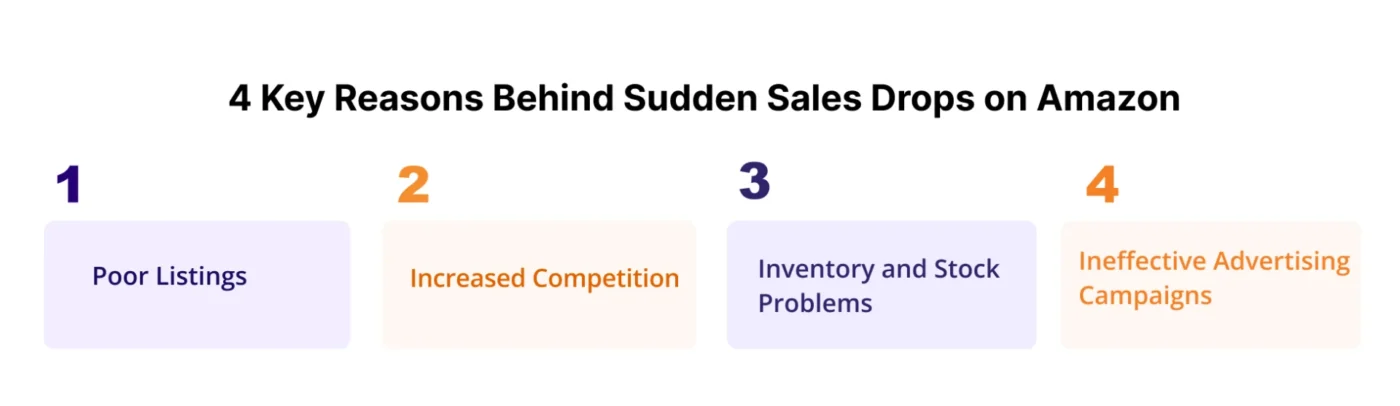
When faced with sales drop on Amazon, it is crucial to diagnose the issue with a clear head. There are a number of reasons why this happens including:
1. Poor Listings
Even the best Amazon PPC strategy can’t save a weak product listing. Your ads only can bring the visitors to your page but it’s the listing that closes the deal. A weak listing can quietly reduce conversion rates even with high clicks. Weak images, titles, missing keywords. Poor content can lead to low conversion rate. Amazon prioritizes listings that convert so poor quality listing directly impacts Amazon PPC performance as well as organic ranking.
2. Increased Competition
As new competitors enter your niche, bidding competition increases resulting in increased CPC. Competitors may come up with better creatives and pricing that draw buyers away from your product.
3. Inventory and Stock Problems
Running out of stock can hurt your product’s ranking. Even low inventory reduces Buy Box ownership and ad eligibility. Once stock is restored, recovering list ranking requires strong PPC support to drive sales and regain algorithm trust.
4. Ineffective Advertising Campaigns
Poor campaign structure, poor keyword targeting and unmonitored bidding can result in lower conversions. It also increases ACoS and reduces profitability. Without regular optimization, campaigns become inefficient and result in sales decline.
5 Strategies to Fix Amazon PPC Sales Drop
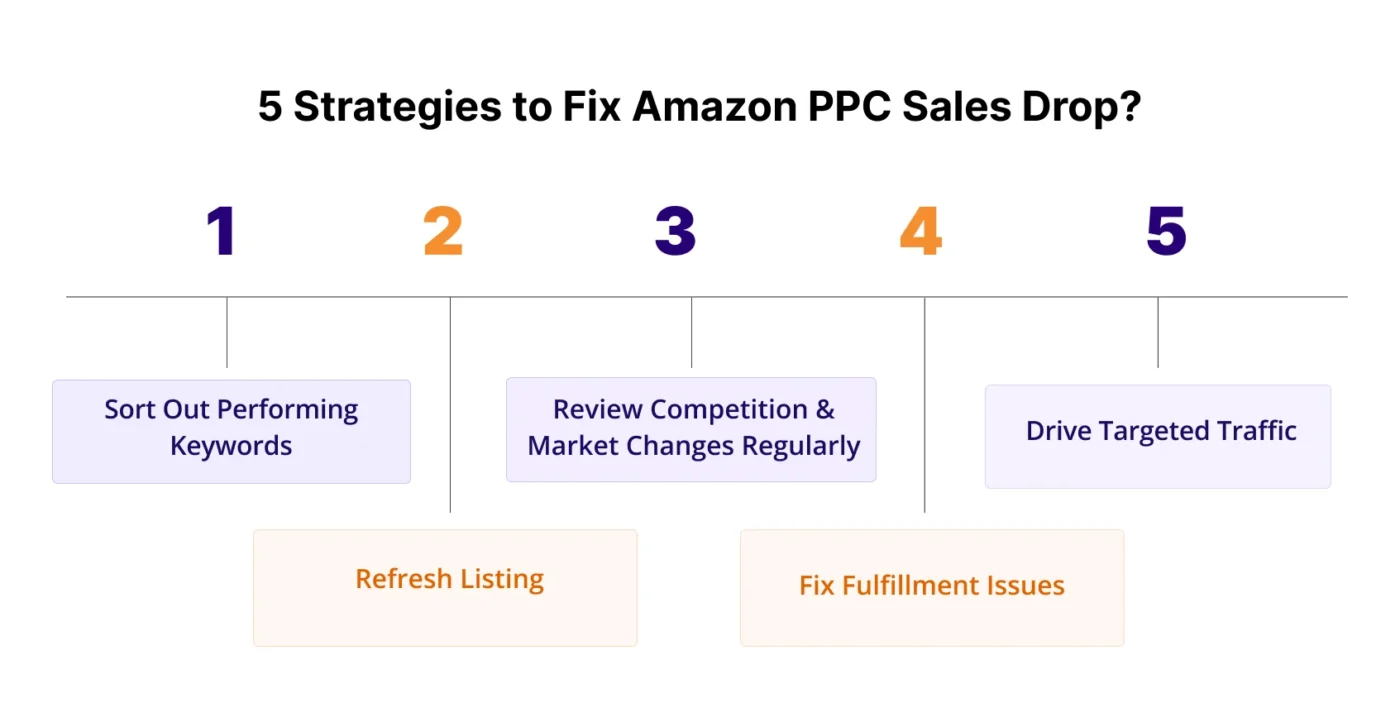
When you notice an unexpected sales drop, there are some things you could fix to restore your sales momentum.
1. Sort Out Performing Keywords
When your sales drop, the first move is a “Search Term Audit.” Pull your search term report to identify what terms are getting sales and which terms are not to plan your further ad spending accordingly.
Look for keywords with high spend that are not profitable. If you have given them enough time (at least 2-4 weeks of data) but they are still not working, simply pause them as they are increasing your ACoS without contributing to profit.
For low-performing keywords that bring some sales but have a high ACoS, you can start lowering bids on them. This might cost your ad position, but it can also bring the ACoS back to the profitable zone.
2. Refresh Listing
Evaluate your listing from a shopper’s perspective and decide if your product clearly communicates value instantly. Check whether your listing images answer common questions and reduce hesitation. Update your visuals and ensure the main image clearly showcases the product and its key features at a glance. Use lifestyle and supporting images that help shoppers visualize how the product fits into their daily lives, making it easier for them to connect with the product and feel confident about purchasing.
Ensure the description clearly communicates the product’s value and benefits, helping visitors understand why it’s the right choice, reducing hesitation.
Your product detail page is the final, most important step in the customer’s journey. Making sure it’s polished and optimized is just as crucial as managing your amazon bids and keywords.
3. Review Competition and Market Changes Regularly
Search your main keywords to examine if competitors are taking traffic away from you with better offers or pricing. If you notice a pricing difference, evaluate if you can decrease the price. While going for lower prices, you have to only go this much low that it wont cut into profitability. You can also add coupons or make bundles to increase the value proposition of your product.
Also, review competitors’ product pages to understand why shoppers may be choosing them instead. You can reposition your offer with improved messaging, and even small changes in positioning can help you regain lost visibility and improve conversion rates.
4. Fix Fulfillment Issues
If you discover that your Amazon sales drop is caused by inventory problems, you can work to restore your fulfillment capacity. Check for stranded or inactive inventory in Seller Central and address the root cause. Resolve labeling or listing issues to reactivate suppressed stock quickly and prevent further sales loss.
If you are low or out of stock, temporarily switch to FBM using available inventory to keep your listing active. Although fulfillment costs may be higher, staying in stock helps protect organic rankings and prevents PPC campaigns from losing performance data.
Prioritize regaining BuyBox ownership as ads perform poorly without it. You can also plan so that you don’t run out of stock in the future. Use inventory alerts, weekly FBA Restock Reports, and maintain safety stock to anticipate demand spikes and shipment delays. These proactive measures reduce the risk of recurring fulfillment problems and keep your sales steady.
5. Drive Targeted Traffic
Driving targeted traffic is essential to recover sales without increasing wasted ad spend. Adding negative keywords is effective to filter out irrelevant traffic that leads to low conversion and results in a decline in ranking. Go through your search term report and identify the search terms that are getting clicks without sales. Add these as negative exact match keywords to their respective ad groups. This is the fastest way to cut irrelevant traffic.
Use product targeting campaigns to reach shoppers viewing similar competitor listings with strong buying intent. Align ad messaging and keywords with your Amazon listing content so the customer journey feels consistent from click to purchase. Shift your focus to high intent traffic as it results in higher conversion rate and lower ACoS.
Conclusion
Every sudden drop in sales can feel overwhelming. Running an Amazon store means dealing with unexpected challenges, and long-term success depends on how effectively you identify and resolve them. Staying calm, analyzing the root cause, and making strategic adjustments allows you to recover faster and build a stronger, more stable business over time. The same approach applies to Amazon PPC sales drops. By following the structured strategies in this guide, you can identify the real causes behind declining performance, apply targeted fixes, and restore steady growth without relying on guesswork.
If you need expert support to implement these strategies, AMZDUDES can help as a specialized amazon ppc campaign management focused on fixing performance issues for sellers. Get a free consultation now!
Frequently Asked Questions
Why did my Amazon PPC sales suddenly drop?
Sales drops are usually caused by rising CPC, declining conversion rate, poor listings, increased competition, inventory issues, or inefficient campaign structure. Reviewing performance data helps identify the exact cause.
Should I increase my budget when PPC sales drop?
Not immediately. First, diagnose the problem. Increasing budget without fixing targeting or conversion issues can increase wasted spend and worsen ACoS.
Can listing quality affect PPC performance?
Yes. Ads drive traffic, but your listing determines conversions. Weak images, unclear messaging, or poor reviews can cause low sales despite high traffic.
What is the fastest way to reduce wasted ad spend?
Analyze search term reports and add negative keywords to block irrelevant traffic. This quickly improves traffic quality and lowers ACoS.
Should I pause campaigns that are not performing?
Pause only after reviewing sufficient data. In many cases, adjusting bids, match types, or targeting is more effective than shutting campaigns off completely.