
Key Takeaways
- The Amazon Vine Program for sellers is Amazon’s official review program, connecting brand-registered products with a curated group of trusted reviewers called Vine Voices in exchange for honest, unbiased reviews.
- 2026 pricing uses a tiered structure per parent ASIN: $0 for 1 to 2 units, $75 for 3 to 10 units, and $200 for 11 to 30 units. Sellers are only charged 7 days after the first review posts.
- Eligibility requires a Professional Seller account, Brand Registry with Brand Representative role, active FBA offer in New condition, and an ASIN with fewer than 30 reviews.
- Total campaign cost includes the enrollment fee, the cost of goods for free units, and FBA fees on those units. A $200 enrollment fee can easily represent a total investment of $650 to $875 depending on your COGS.
- Vine works best for new product launches in competitive categories where early reviews unlock organic ranking, PPC efficiency, and conversion rate. It is not a rescue program for flawed products.
Launching a product on Amazon without reviews is one of the hardest positions a seller can face. Even a well-optimized listing struggles to convert when shoppers see zero reviews next to competitor products with hundreds. This is exactly the problem the Amazon Vine Program is designed to solve.
The Amazon Vine Program offering has changed significantly over the past three years. What was once a vendor-only program with a $2,500 per ASIN fee is now accessible to any brand-registered seller with tiered pricing starting at $0. This guide covers everything you need to know about Amazon Vine for sellers in 2026: how the program works, what it costs, eligibility rules, step-by-step enrollment, best practices, and whether it is the right move for your specific brand.
What Is the Amazon Vine Program and How Does It Work?
Amazon Vine Explained
Amazon Vine is Amazon’s official product review program, run directly by Amazon rather than a third party. Brand-registered sellers can enroll eligible ASINs into the program, and Amazon then makes those products available to a curated group of trusted reviewers called Vine Voices. These reviewers receive the product free of charge and post honest, unbiased reviews on the product listing.
Vine reviews carry a visible “Vine Voice” badge on the product page, signaling to shoppers that the review comes from a trusted, invited reviewer. Because Amazon controls the entire process, the Amazon Vine program seller model is one of the very few completely compliant paths to accelerating review accumulation. Sellers have no control over what reviewers say, no ability to contact reviewers about their reviews, and no ability to remove negative reviews.
How Vine Voices Are Selected
Vine Voices are not random Amazon shoppers. Amazon personally invites reviewers based on the quality, helpfulness, and consistency of their past reviews. Reviewers with a track record of writing detailed, accurate reviews that other Amazon shoppers find helpful earn invitations to join the program.
You cannot apply to become a Vine Voice. The invitation comes from Amazon based on your reviewer history. This selection process is what gives Vine reviews their credibility. Vine reviewers are typically more experienced, more thorough, and more critical than average Amazon shoppers, which produces reviews that shoppers reading them find genuinely useful.
Vine Voices are not paid for their reviews. They must disclose in their review that they received the product through the Vine program, and Amazon monitors their activity to ensure reviewers stay engaged and continue posting quality reviews. Reviewers who violate Vine’s guidelines can be removed from the program.
Timeline: What Happens After You Enroll
Once you enroll a product, the typical timeline is as follows.
- Days 1–2: After a 24-hour waiting period, your product becomes available to Vine Voices. Reviewers can request it through their Vine dashboard.
- Days 3–30: Vine Voices claim your product, receive it, use it, and post their reviews. Most Vine reviews arrive within the first 30 days, though timing varies by category and product appeal.
- Day 7 after the first review: Amazon charges your enrollment fee. If no reviews are posted within 90 days, you are not charged.
- Beyond 30 days: Reviews may continue to arrive as remaining units are claimed by Vine Voices.
Amazon Vine Eligibility Requirements
Not every seller and not every product qualifies for the Amazon Vine program for sellers. Amazon enforces specific eligibility requirements to protect the program’s integrity.
Requirements for Sellers
To enroll a product in Vine, you need to meet all of the following conditions:
- Professional Seller account: Individual seller accounts are not eligible. A Professional Seller account costs $39.99 per month.
- Amazon Brand Registry enrollment: Your brand must be enrolled in Amazon Brand Registry, and you must be assigned a Brand Representative role for the brand.
- Active FBA offer: The product must be fulfilled by Amazon. Seller-fulfilled products cannot be enrolled in Vine.
- New condition: Only products in new condition qualify. Used, refurbished, or renewed products are not eligible.
- Under 30 reviews: The ASIN must have fewer than 30 reviews at the time of enrollment. If your product already has 30 or more reviews, Vine is no longer available for that ASIN.
- Live and buyable ASIN: The listing must be active with available inventory. Suppressed or out-of-stock listings cannot be enrolled.
- Complete listing: Your listing must include a product image and description before enrollment is approved.
Restricted Products and Categories
Some product types are excluded from the Vine program regardless of whether they meet the other eligibility requirements:
- Adult products
- Digital products
- Heavy or bulky items that are impractical for Vine reviewers to receive
- Products that need to be bundled or paired with other items to be reviewed
- Products that differ from the exact item listed in the FBA offer
Verify your specific product’s eligibility in Seller Central before beginning the enrollment process to avoid rejected submissions.
Requirements for Vine Reviewers (Invite-Only)
The invite-only nature of Vine Voices is what gives the program its credibility. Amazon invites reviewers based on:
- A history of writing detailed, helpful reviews on Amazon
- Reviews that other Amazon shoppers have voted as helpful
- Consistent posting activity across multiple product categories
- Compliance with Amazon’s community guidelines
Reviewers cannot apply to become Vine Voices. The invitation is at Amazon’s sole discretion, and reviewers who fail to maintain the standards Amazon expects (posting quality reviews within reasonable timeframes, adhering to community guidelines) can be removed from the program.
Amazon Vine Program Costs in 2026
Before October 2023, the Vine program cost up to $2,500 per ASIN, which put it out of reach for most smaller brands. Amazon overhauled the pricing in late 2023, and the current 2026 fee structure makes Vine accessible to almost any brand-registered seller.
Tiered Pricing Structure
Amazon charges a single enrollment fee per parent ASIN based on how many units you enroll. The 2026 tiered pricing is:
| Units Enrolled | Vine Enrollment Fee |
| 1 to 2 units | $0 |
| 3 to 10 units | $75 |
| 11 to 30 units | $200 |
The fee is applied to the parent ASIN, not per review generated. You can enroll a maximum of 30 units per parent ASIN, and each ASIN can generate up to 30 Vine reviews total.
When You Are Charged
The billing structure for Amazon Vine is favorable for sellers testing the program:
- You are only charged 7 days after the first Vine review is posted on your listing.
- If no reviews come in within 90 days of enrollment, you are not charged at all.
- If you cancel enrollment before any reviews post, you are not charged.
This means the risk of enrolling and getting zero traction is genuinely zero on the enrollment fee side. You only pay if the program actually delivers reviews.
Total Campaign Cost: Enrollment Fee + COGS + FBA
The enrollment fee is only one part of the true cost of a Vine campaign. Free units go to Vine reviewers at no charge to them, which means you cover the cost of goods for those units yourself. FBA fulfillment fees also apply to Vine units, though Amazon typically waives the referral fee since these are not paid orders.
The three cost buckets to plan for:
- Enrollment fee: $0, $75, or $200 depending on units enrolled.
- Cost of goods (COGS): Your landed cost per unit multiplied by the number of units enrolled.
- FBA fees on Vine units: Standard FBA fulfillment fees apply.
Worked Example: What a Vine Campaign Actually Costs
Consider a hypothetical seller with a product that has a $15 landed cost and $4 FBA fulfillment fee per unit.
Enrolling 30 units at the $200 tier:
- Enrollment fee: $200
- COGS: 30 units × $15 = $450
- FBA fees: 30 units × $4 = $120
- Total campaign cost: $770
Enrolling 10 units at the $75 tier:
- Enrollment fee: $75
- COGS: 10 units × $15 = $150
- FBA fees: 10 units × $4 = $40
- Total campaign cost: $265
Enrolling 2 units at the $0 tier:
- Enrollment fee: $0
- COGS: 2 units × $15 = $30
- FBA fees: 2 units × $4 = $8
- Total campaign cost: $38
For a higher-cost product with $80 COGS, a 10-unit enrollment at the $75 tier is: $75 + $800 + $40 = $915. The math changes significantly based on your product’s cost structure, which is why understanding total campaign cost matters much more than the enrollment fee alone.
How to Enroll in the Amazon Vine Program (Step by Step)
The Amazon Vine program sign-up process is straightforward. Once you meet the eligibility requirements, enrollment can be completed in under 10 minutes.
Step 1: Log In to Seller Central
Sign in to your Amazon Seller Central account. Confirm you are logged into the marketplace where you want to enroll your product. If you plan to enroll the same ASIN in multiple marketplaces (US, UK, Canada, etc.), you will need to complete separate enrollments in each marketplace’s Seller Central.
Step 2: Navigate to the Vine Tab
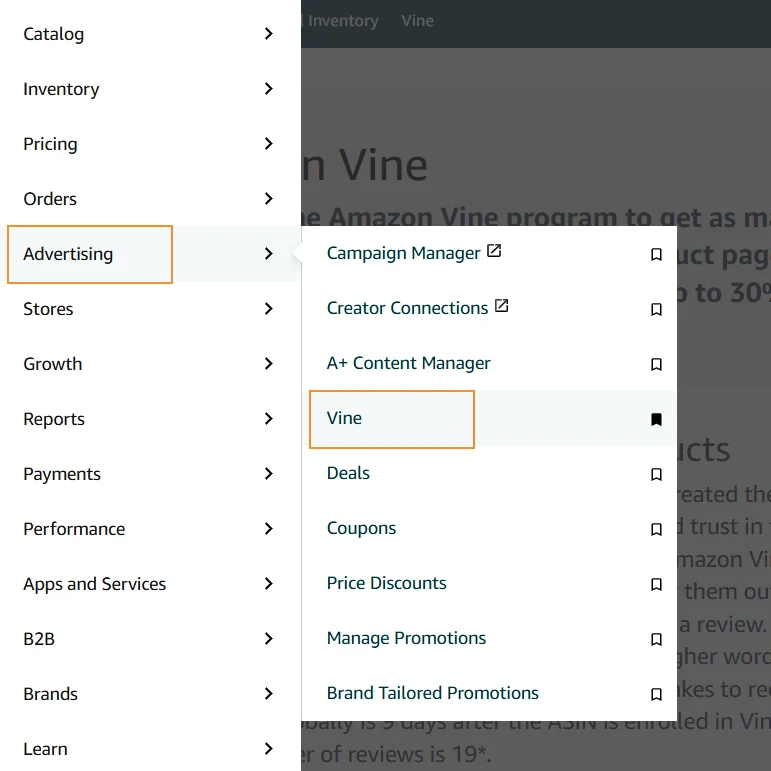
In the top navigation menu, hover over the Advertising tab. From the dropdown, select Vine. This takes you to the Vine dashboard where you can view current enrollments, submit new products, and monitor performance.
Step 3: Enter Your ASIN
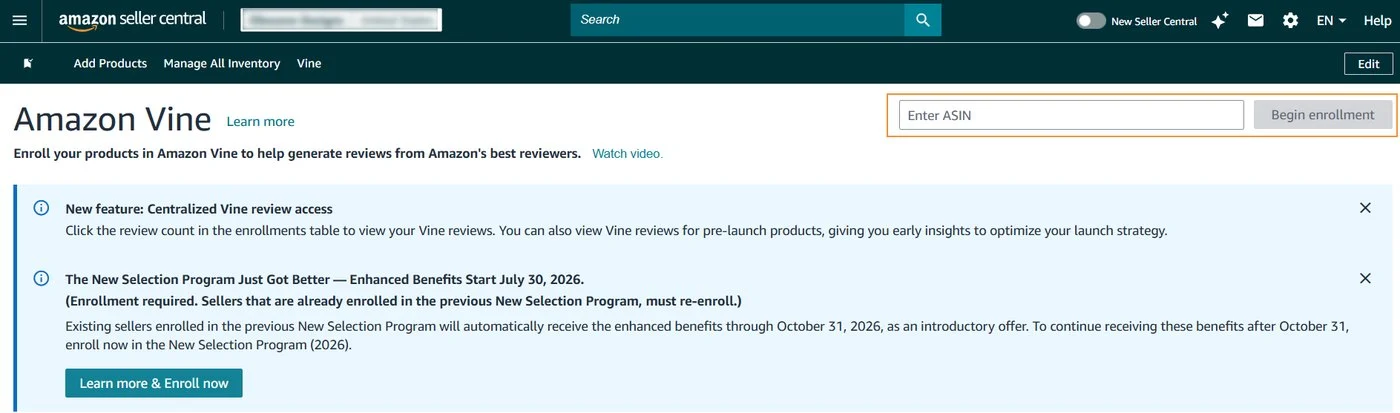
On the Vine dashboard, enter the ASIN of the product you want to enroll. Click “Begin enrollment” to proceed. Amazon will verify eligibility in real time. If the ASIN does not meet requirements (fewer than 30 reviews, active FBA offer, complete listing, etc.), you will see a specific error message indicating what needs to be fixed.
Step 4: Choose Your Unit Count
Select how many units you want to enroll, up to a maximum of 30 units per parent ASIN. Your unit count determines your enrollment fee tier: 1-2 units is free, 3-10 units is $75, and 11-30 units is $200.
Most sellers should enroll the full 30 units if the total campaign cost is acceptable, since this maximizes the number of potential reviews without changing the enrollment fee within a tier.
Step 5: Confirm and Enroll
Review your enrollment details and click “Enroll” to finalize. Amazon then takes 24 hours to make your product available to Vine Voices. During this window, no reviewers can claim your product yet, which gives you time to confirm inventory availability.
Step 6: Monitor Progress
Once enrollment is active, you can monitor progress from the Enrollment Details page in the Vine dashboard. Track:
- How many units have been claimed by Vine Voices
- How many reviews have been posted
- The star rating of Vine reviews as they come in
- The status of your enrollment (active, complete, or cancelled)
Reviews typically begin arriving within 3 to 30 days after enrollment goes live. Amazon charges your enrollment fee 7 days after the first review posts.
How to Cancel Amazon Vine Enrollment
You are not locked into a Vine enrollment. If circumstances change, you can cancel at any time through Seller Central.
When Cancellation Makes Sense
Common reasons for cancelling Vine enrollment include:
- Your product has organically accumulated enough reviews and no longer needs Vine
- Inventory shortage means you cannot fulfill additional Vine unit claims without going out of stock
- Early Vine reviews reveal issues with the product that need to be addressed before more units go out
- You want to redirect budget to other launch activities
Step-by-Step Cancellation Process
- Step 1: Log in to your Seller Central account.
- Step 2: Go to the Advertising tab and select Vine from the dropdown.
- Step 3: Find the ASIN you want to remove and click “Details” next to the enrollment.
- Step 4: Scroll to the bottom of the Details page and click “Stop Enrollment.”
- Step 5: Confirm your decision when prompted.
The enrollment is immediately withdrawn from Vine, and no additional units will be made available to Vine Voices from that point forward.
What Happens to Units Already Claimed
Cancellation only affects future unit claims. Any units that have already been claimed by Vine Voices before cancellation will still be shipped to those reviewers, and any resulting reviews will still be posted publicly. You cannot recall units that are in the hands of Vine Voices, and Amazon will not remove Vine reviews that were posted before or after cancellation as long as they comply with Amazon’s community guidelines.
Plan cancellation timing accordingly. If you cancel while several units are still in transit to reviewers, expect those reviews to continue arriving over the following weeks.
10 Best Practices for Using Amazon Vine Effectively
Enrolling in Vine does not automatically guarantee success. The sellers who get the most value from the program follow specific best practices that maximize their chances of generating meaningful, positive reviews.
1. Choose the Right Product
Enroll products that are genuinely new to Amazon, or that would meaningfully benefit from early social proof. Avoid enrolling low-priority products, established items that already have adequate reviews, or products that are unlikely to appeal to Vine reviewers. The best candidates are new launches in competitive categories where every review helps establish credibility.
2. Optimize Your Listing Before Enrolling
Vine reviewers evaluate your product against your listing’s promises. If your listing overstates features, uses misleading images, or fails to communicate what the product actually does, you are setting yourself up for negative reviews before the first unit ships.
Complete a full listing audit before enrolling: confirm the main image is competitive, bullets accurately describe features, Amazon A+ Content is published, and pricing is set correctly. A listing that is not launch-ready should not be enrolled in Vine.
3. Enroll the Full 30 Units for Maximum Reviews
Within a given pricing tier, enrolling more units simply increases the number of potential reviews without increasing the enrollment fee. If you can afford the total campaign cost, enrolling the full 30 units under the $200 tier maximizes review potential. You do not need all 30 units in stock at once. Additional inventory can arrive as units are claimed.
4. Monitor and Learn From Reviews
Read every Vine review carefully. Even the negative ones. Vine reviewers are typically thoughtful and specific about what worked and what did not, which makes their feedback more valuable than the average customer review. Look for recurring themes: multiple mentions of the same feature, packaging concern, or usability issue signal something worth addressing in the product itself or in the listing. Comparing these themes against what’s showing up in Amazon competitor research helps you tell the difference between a category-wide expectation and something specific to your product.
You cannot contact Vine reviewers about their reviews, but you can use the aggregate feedback to inform product improvements, listing updates, or FAQ additions that address common questions.
5. Be Active in the Customer Q&A Section
While Vine is running, monitor the Questions section on your product listing and answer any customer questions promptly and completely. Vine reviewers sometimes read these questions before writing their reviews, and shoppers reading Vine reviews will also see how attentively you handle questions. Active Q&A engagement signals a brand that cares about customer experience.
Also consider proactively adding common questions and answers to your listing before enrollment based on competitor listings in your category. This preempts questions Vine reviewers might otherwise raise as concerns.
6. Enroll Across International Marketplaces
If you sell in multiple international marketplaces (US, UK, Canada, Germany, etc.), enroll the same ASIN in each marketplace’s Vine program. Each marketplace has its own separate Vine review count, meaning you can potentially accumulate 30 reviews in each. Enroll simultaneously or in close sequence before you hit the 30-review cap in any single marketplace.
7. Consider Separate Listings for Variants
For products with multiple variations (colors, sizes, flavors), consider enrolling variants separately rather than as a single parent ASIN. Each variant can potentially receive up to 30 Vine reviews. Once reviews are accumulated across variants, you can merge them under a single parent ASIN to consolidate the social proof into one listing that shows the combined review count.
This approach requires more units and careful planning but can significantly increase total review accumulation for products with meaningful variant sales spread.
8. Highlight Strong Vine Reviews in Marketing
Once Vine reviews start posting, use the strongest ones as social proof across your broader marketing. Feature standout Vine reviews in your A+ Content, incorporate quotes into your Brand Store, and reference them in off-Amazon marketing (email, social media, ads). Vine reviews carry particular credibility because of the badge, and highlighting them strategically extends their value beyond the listing page itself.
9. Set Realistic Expectations
Vine reviews are honest reviews, not guaranteed positive ones. Some reviewers will love your product. Some will point out real weaknesses. If your product has flaws, Vine will expose them, and Amazon will not remove Vine reviews unless they violate community guidelines.
Enter the program expecting that at least some reviews may be less than 5 stars. Treat honest negative feedback as insight rather than a setback. A 4.3 average from 25 detailed Vine reviews is significantly more credible than a 5.0 average from 25 generic reviews and typically converts shoppers at a higher rate.
10. Follow Amazon’s Guidelines Strictly
Do not attempt to contact Vine reviewers about their reviews. Do not try to influence their feedback through any channel. Do not use Vine in combination with any prohibited review manipulation practices. Amazon actively monitors the program for compliance, and violations can result in removal from Vine and broader account risk.
The value of Vine comes specifically from its compliance status. Behaviors that put that status at risk destroy the entire point of using the program.
Benefits and Drawbacks of Amazon Vine
Understanding both the upsides and the risks helps you decide whether Vine fits your specific launch situation.
Pros of Amazon Vine
- Credibility from experienced reviewers: Vine Voices are selected for their history of writing detailed and helpful reviews, making their feedback especially valuable during a product launch.
- Faster launch acceleration: Vine can generate 15–30 reviews within the first 60 days for eligible products, potentially saving months compared with relying solely on organic reviews.
- Better ranking and PPC performance: More reviews can improve conversion rates, which can increase sales velocity and organic ranking. Higher conversion can also help reduce effective ACoS on PPC campaigns.
- Compliant way to get early reviews: Amazon operates Vine directly, making it a policy-compliant way to accelerate reviews compared with third-party review services.
- Competitive advantage for registered brands: Vine is available to eligible Brand Registry sellers, giving legitimate brands access to a review-generation program that unauthorized resellers cannot use.
- Detailed product feedback: Vine reviewers often provide thorough feedback about product strengths and weaknesses, helping sellers improve products, packaging, and listings.
Cons of Amazon Vine
- Higher overall campaign cost: While the enrollment fee may be $75 or $200, the total cost including COGS and FBA fees can reach $500–$1,000+ for a 30-unit enrollment. High-cost products can require a much larger investment.
- No control over reviewers: You cannot choose which Vine Voices review your product. Reviewers may not always match your target customer profile.
- Honest criticism: Vine reviewers provide honest feedback and may highlight product weaknesses. Negative Vine reviews generally cannot be removed unless they violate Amazon’s guidelines.
- No guarantee of reviews: Not every enrolled unit will be claimed, and not every claimed product will receive a review. Results depend on product appeal, category, and reviewer availability.
- Reviews are long-lasting: Once published, Vine reviews typically remain on your listing unless they violate Amazon’s policies. This means unfavorable early reviews can have a lasting impact on brand perception.
Is Amazon Vine Worth It for Your Brand?
When Vine Is Worth the Investment
Vine is worth the investment when your specific situation matches one of the following patterns:
- Launching in a competitive category: Vine helps overcome the credibility gap of having zero reviews by building a foundation of 15–30 detailed, badged reviews.
- Your product is launch-ready: Your listing, main image, pricing, and inventory should already be optimized. Vine amplifies a strong listing, but it cannot fix a weak one.
- Healthy profit margins: Vine makes more sense when your margins can absorb the cost of 30 free units plus the enrollment fee.
- You need better PPC efficiency: A low review count can hurt conversion and increase ACoS. Vine can help build reviews quickly and potentially improve PPC performance.
- Early sales velocity matters: Vine is especially useful in competitive categories where strong early sales and review momentum can influence organic ranking.
- Overall: Vine is most valuable when you have a competitive, launch-ready product, healthy margins, and a need to build reviews quickly.
When Vine Is Not the Right Choice
Some situations where Vine is not the right investment:
- Product has quality or design issues: Vine reviewers may publicly highlight these problems. Fix the product before enrolling.
- Listing is not launch-ready: Weak images, incomplete bullet points, or missing A+ Content can negatively affect your Vine results. Optimize the listing first.
- Thin profit margins: If your margins cannot support the campaign cost, Vine may not be financially worthwhile. For example, a 30-unit enrollment at $50 COGS = $1,500 in product cost, before the enrollment fee and other costs.
- Already getting enough organic reviews: Established products with a steady flow of reviews may gain less from Vine. It is generally more valuable during the launch phase.
- Product is in a restricted category: Some products, such as adult products and digital products, are not eligible. Check Amazon’s current eligibility requirements before enrolling.
Conclusion
The Amazon Vine Program for sellers has become one of the most valuable tools available for brand-registered sellers launching new products in 2026. The tiered pricing structure ($0, $75, or $200 per parent ASIN) makes the program accessible to almost any brand willing to invest in a proper launch, and the compliance guarantee that comes with an Amazon-run program is genuinely difficult to replicate through any other review strategy.
The sellers who get the most from Vine are the ones who treat it as one component of a well-prepared launch: launch-ready listings, competitive main images, healthy margins, and realistic expectations about honest feedback. Vine amplifies whatever your listing already is. It rewards preparation and punishes shortcuts.
If you want a partner who can prepare your listings for Amazon Vine, connect review generation with your PPC and organic growth strategy, and manage your broader Amazon growth, AMZDUDES, a full service Amazon agency, can help. Our Amazon Review Management Services help sellers make reviews part of a connected growth strategy, from Vine enrollment and review generation to ongoing listing optimization, PPC, and account management. The goal is simple: build stronger social proof, improve conversion, and create a stronger foundation for long-term growth.
Book a free consultation today!
Frequently Asked Questions
What is the Amazon Vine Program?
The Amazon Vine Program is Amazon’s official review program that connects brand-registered sellers with a curated group of trusted reviewers called Vine Voices. Sellers enroll eligible ASINs, Amazon provides free units to invited reviewers, and those reviewers post honest, unbiased reviews on the product listing. Each Vine review carries a visible “Vine Voice” badge, and the program is one of the very few completely compliant paths to accelerating early review accumulation on new products.
How much does the Amazon Vine Program cost in 2026?
The 2026 pricing uses a tiered structure per parent ASIN: $0 for 1-2 units enrolled, $75 for 3-10 units, and $200 for 11-30 units. Beyond the enrollment fee, sellers also cover the cost of goods for the free units and FBA fulfillment fees. A typical 30-unit Vine campaign on a $15 COGS product totals approximately $770 all-in. You are only charged 7 days after the first Vine review posts, and if no reviews come in within 90 days, you are not charged at all.
Who is eligible for the Amazon Vine Program for sellers?
Eligibility requires a Professional Seller account, Amazon Brand Registry enrollment with Brand Representative role for the brand, an active FBA offer in New condition, and an ASIN with fewer than 30 reviews. The ASIN must be live, buyable, and have a complete listing with product image and description. Some categories are excluded including adult products, digital products, heavy or bulky items, and products requiring bundling to review.
How do I sign up for the Amazon Vine Program?
The amazon vine program sign up process: log in to Seller Central, navigate to Advertising then Vine, enter the ASIN of the product you want to enroll, choose your unit count (up to 30 per parent ASIN), and click Enroll to confirm. Amazon takes 24 hours to make your product available to Vine Voices, and reviews typically start arriving within 3 to 30 days after enrollment goes live.
How many reviews can I get through Amazon Vine?
Each parent ASIN can receive up to 30 Vine reviews total. If your product already has some reviews (say 15), Vine will supplement up to the 30 total (adding up to 15 more). Vine reviews count toward your listing’s overall star rating and review total exactly like any other verified review. Amazon also limits sellers to five active Vine ASINs per seller account at a time.
Can I choose who reviews my product through Vine?
No. Amazon selects Vine Voices based on their reviewer history, and reviewers claim products from the available Vine catalog based on their own interests. Sellers cannot contact reviewers, cannot influence which reviewers claim their products, and cannot request specific reviewers for their products. This lack of control is what gives Vine reviews their credibility with shoppers.
Are Vine reviews always positive?
No. Vine reviewers are required to write honest, unbiased reviews. If your product has weaknesses, Vine reviewers will identify them, and Amazon will not remove Vine reviews unless they violate community guidelines. Enter the program expecting a mix of positive and less-positive reviews. A 4.3 average from detailed Vine reviews typically converts shoppers better than a suspicious 5.0 average from generic reviews.
Is the Amazon Vine Program worth it in 2026?
For new product launches in competitive categories with launch-ready listings and adequate margins, Vine is one of the highest-leverage investments available. The combination of credible early reviews, faster path to PPC efficiency, and organic ranking improvement typically pays back significantly over the product’s lifetime. For products with quality issues, incomplete listings, or thin margins that cannot absorb the full campaign cost, Vine is not the right investment.