
Key Takeaways
- Amazon Sponsored Product Ads are one of the most effective PPC tools for driving product visibility, increasing sales, and accelerating growth on Amazon.
- A successful Amazon advertising sponsored products strategy starts with retail-ready listings that have strong images, competitive pricing, and enough reviews to convert traffic.
- The most profitable campaigns are built around ongoing optimization, including keyword harvesting, bid adjustments, and regular negative keyword management.
- Monitoring metrics like ACoS, TACoS, CTR, conversion rate, and CPC helps sellers make data-driven decisions and avoid wasted ad spend.
- Long-term PPC growth comes from creating repeatable systems and campaign structures that can scale across your catalog rather than relying on one-time optimizations.
If you are selling on Amazon right now and your products are not showing up ahead of your competitors, you are leaving money on the table. Amazon sponsored product ads are the single most powerful tool for any Amazon seller, but only when you know exactly how to set them up, bid correctly, and optimize them week after week.
This guide covers everything you need to know: from what Amazon sponsored ads are and how they work, to creating your first campaign step by step, building a strong keyword strategy, managing your bids, reading your reports, and fixing the mistakes that silently drain your ad budget.
Whether you are brand new to Amazon advertising or you have been running campaigns for years but never quite got the results you wanted, this guide gives you a clear, practical roadmap based on what actually works in 2026.
What Are Amazon Sponsored Product Ads?
How Sponsored Product Ads on Amazon Work
Amazon sponsored product ads are pay-per-click (PPC) advertisements that promote individual product listings directly within Amazon’s search results and on product detail pages. When a shopper searches for a product on Amazon, sponsored product ads appear alongside, and often above, the organic search results, marked with a small ‘Sponsored’ label.
You only pay when someone clicks your ad. The cost per click is determined by an auction: you set a maximum bid, and Amazon shows your ad when it matches a shopper’s search query. The higher and more relevant your bid, the more likely your ad is to appear in a premium position.
Where Do Amazon Sponsored Ads Appear?
Your Amazon sponsored product ads can appear in the following placements on Amazon:
- Top of search: the first 1–4 results on the search results page, above all organic listings
- Rest of search: within the organic search results, typically positions 5 and beyond
- Product pages: on competitor or complementary product detail pages, in the ‘Sponsored products related to this item’ carousel
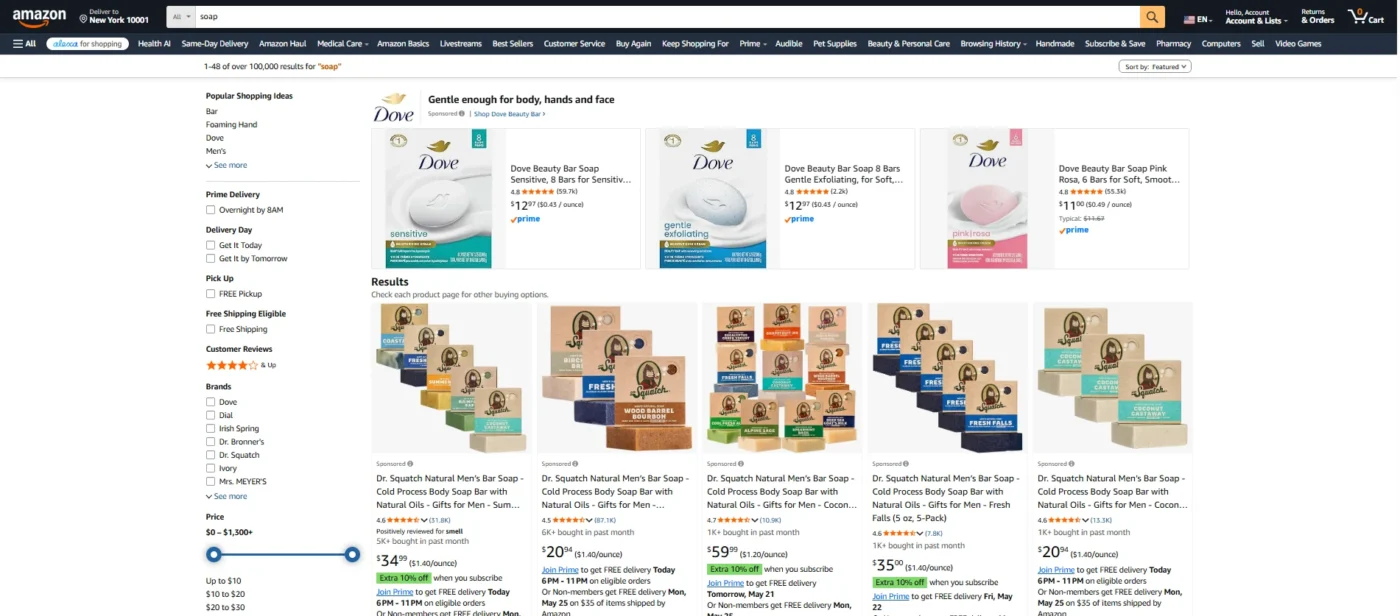
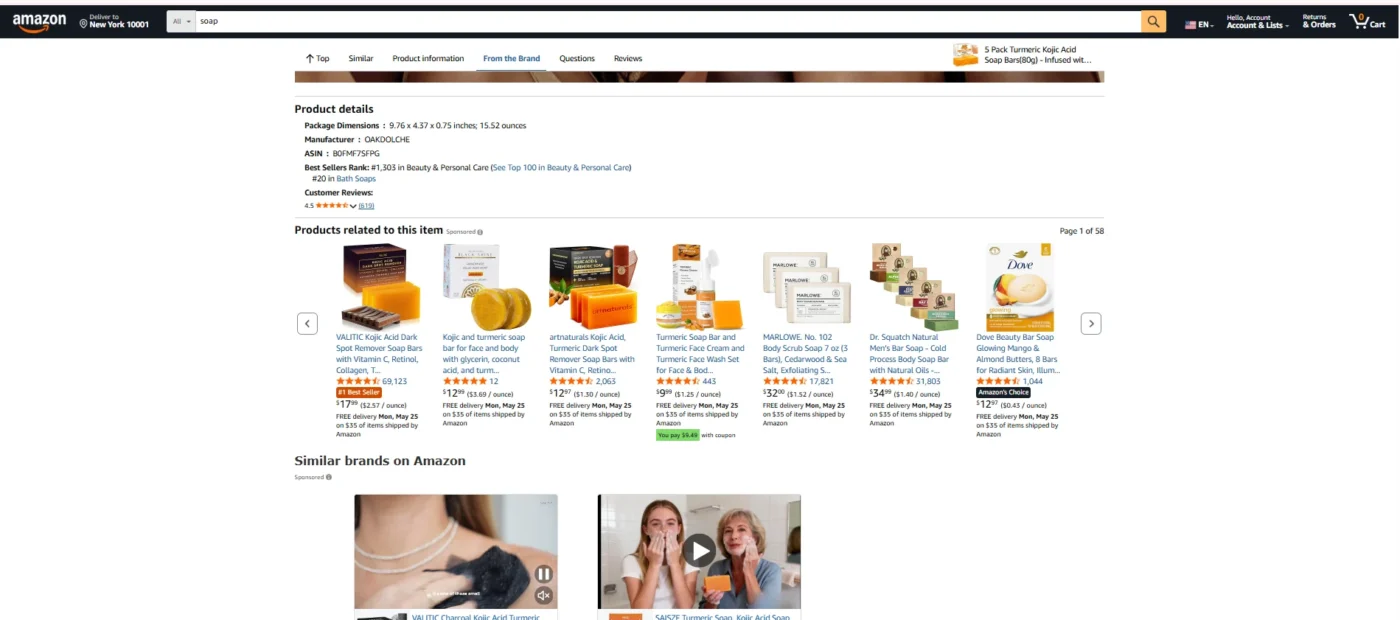
The top of the search is the most visible and most competitive placement. It typically drives the highest click-through rates, but also commands higher bids. Product page placements are often cheaper and excellent for conquest campaigns.
Sponsored Products vs Sponsored Brands vs Sponsored Display
There are three main Amazon ad types. Here is how they compare:
| Ad Type | What It Promotes | Where It Appears | Best For |
| Sponsored Products | Individual ASINs | Search results + product pages | Driving direct product sales |
| Sponsored Brands | Brand + multiple products | Top of search (banner format) | Brand awareness + new customer acquisition |
| Sponsored Display | Products or audiences | On and off Amazon | Retargeting + remarketing |
For most sellers, especially those just getting started with Amazon advertising, sponsored products are the right place to begin. They are the most straightforward to set up, the easiest to optimize, and they deliver the most predictable return on ad spend.
Amazon Sponsored Product Ads in 2026
Amazon’s advertising platform has matured significantly over the past two years. In 2026, the key changes you need to be aware of are:
- AI-powered bidding: Amazon’s dynamic bidding algorithm is now significantly more aggressive. If you are not actively monitoring your bid adjustments by placement, you can overspend rapidly.
- Retail-readiness scoring: Amazon now publicly scores your listing readiness before showing your ad. Poor images, low review counts, or thin bullet points will reduce your ad’s impression share even if your bid is competitive.
- Keyword consolidation: Amazon is increasingly matching broad and phrase match keywords to a wider range of search queries, making negative keyword management more important than ever.
- Sponsored Products in AI shopping results: With Amazon’s AI search features rolling out, sponsored product ads now appear in AI-generated product recommendations, a new placement opportunity in 2026.
Who Should Run Amazon Sponsored Product Ads?
Eligibility Requirements
- To run Amazon sponsored products ads, you need to meet the following requirements:
- You must have a Professional Seller account (Individual accounts are not eligible)
- Your products must be eligible for the Buy Box, without Buy Box eligibility, your ads will not serve
- Your product listings must comply with Amazon’s advertising policies, and restricted products and certain categories require pre-approval
- Your account must be in good standing, accounts with active policy violations may have advertising privileges suspended
If you are a vendor (selling directly to Amazon rather than through the marketplace), you access sponsored products through Amazon’s Vendor Central advertising dashboard rather than Seller Central.
Best Product Categories for Amazon Sponsored Ads ROI
While Amazon sponsored ads work across virtually every category, you will see the best return on ad spend when your products have:
- Healthy margins: A minimum 30–40% gross margin gives you enough room to bear Amazon advertising costs while remaining profitable. Products with thin margins get squeezed quickly.
- Strong review velocity: Products with 15+ reviews and a 4.2-star rating or above convert at dramatically higher rates. Running ads on a listing with 3 reviews and a 3.8 rating is a waste of budget.
- Clear search demand: The category should have proven search volume. Products that people do not actively search for on Amazon are better suited for Sponsored Display or off-Amazon advertising.
- Competitive pricing: If your price is significantly higher than comparable products, even the best ad campaign will not overcome the conversion gap.
When NOT to Use Sponsored Products
Experienced sellers know that not every product deserves an ad budget. Avoid running sponsored product ads when:
- Your product has fewer than 10 reviews or a rating below 4.0, fix the listing first
- Your inventory is low (under 30 units), and ads will accelerate stockouts and hurt your organic rank
- Your product has a known quality or sizing issue generating high return rates, and ads increase problems as much as they increase successes
- Your listing has poor-quality images, missing bullet points, or thin product descriptions. The Best Practice Score must be above 85 before you spend on ads
How to Create Amazon Advertising Sponsored Product Ads: Step by Step
This is the section most new sellers get stuck on. Follow these steps exactly, and you will have your first Amazon sponsored product ads live campaign within 20 minutes.
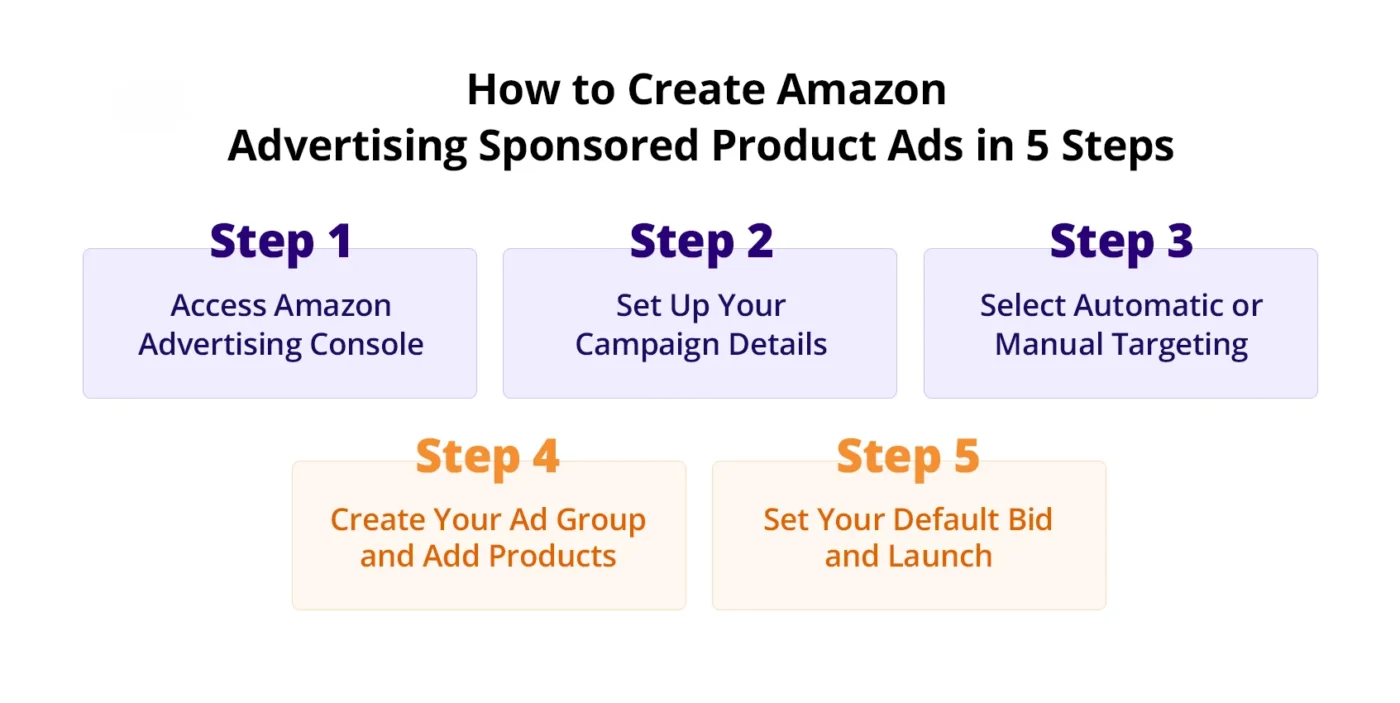
Step 1: Access Amazon Advertising Console
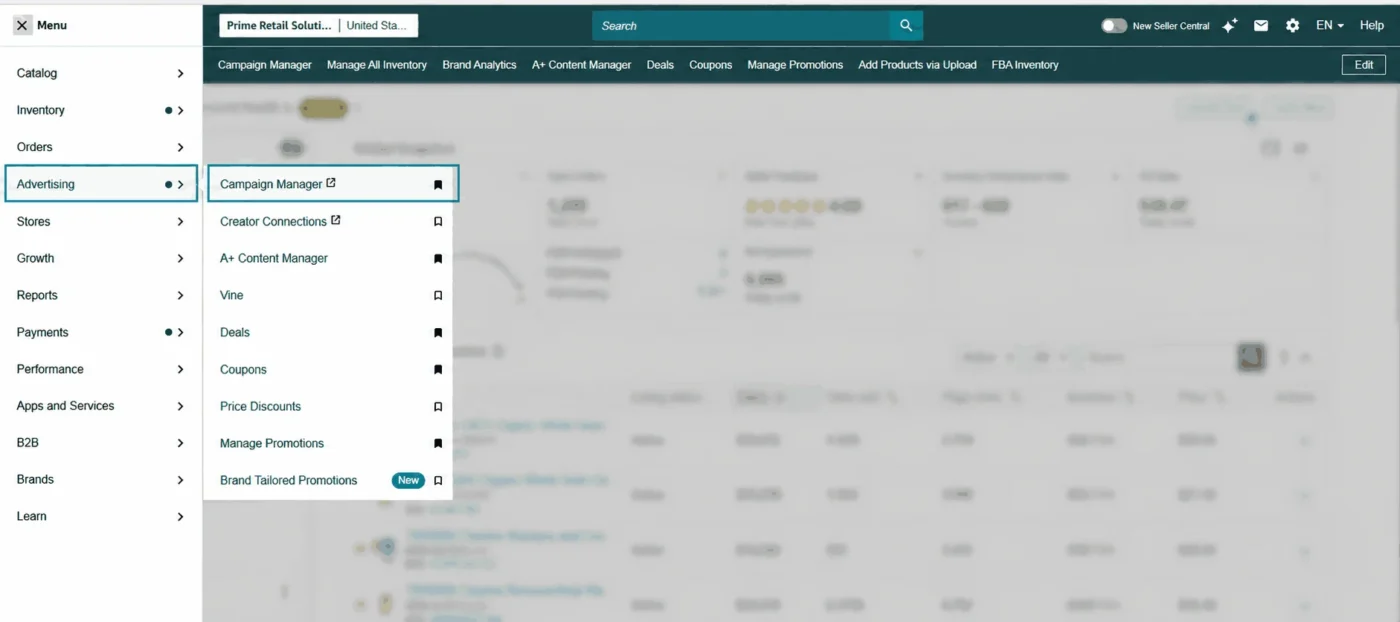
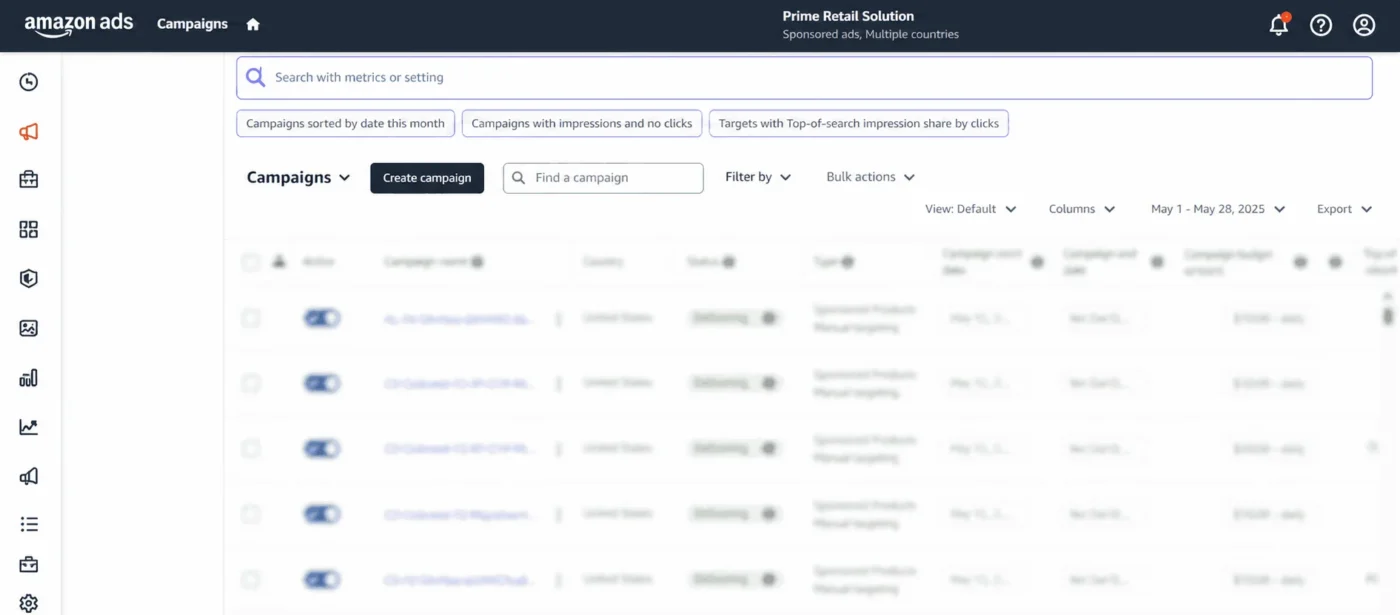
Log into your Seller Central account. From the main navigation, go to Advertising > Campaign Manager. This opens the Amazon Advertising Console, which is where all your sponsored product campaigns live.
Click the yellow ‘Create campaign’ button in the top right corner. When prompted to choose a campaign type, select ‘Sponsored Products.’
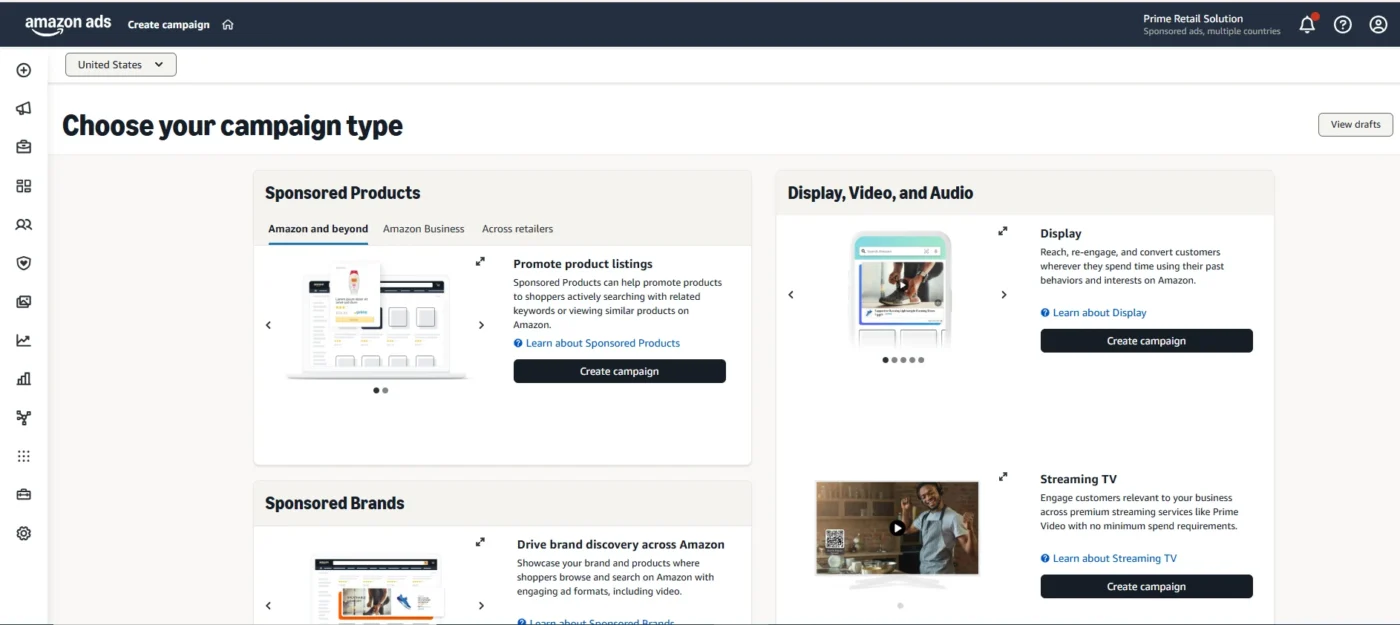
Step 2: Set Up Your Campaign Details
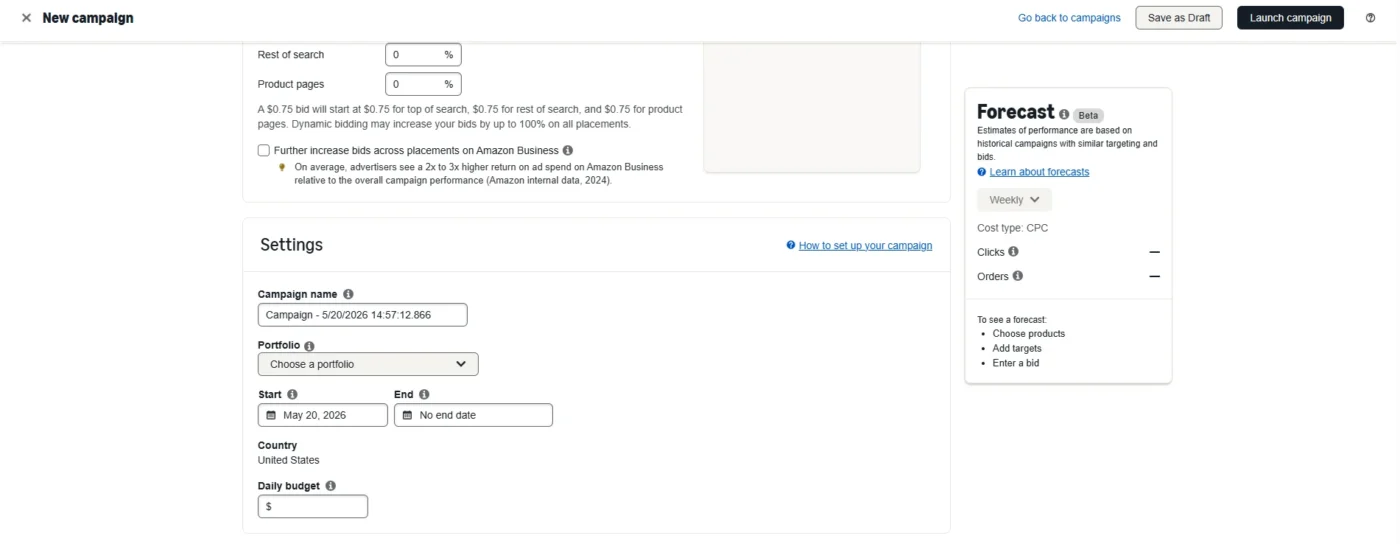
You will now see the campaign setup screen. Fill in the following fields:
- Campaign name: Use a consistent naming convention from day one. A good format is: [Product],[Targeting Type], [Match Type]. Example: ‘Yoga Mat, Manual, Exact’. This makes filtering and reporting much easier as your account grows.
- Portfolio: If you have multiple product lines, group campaigns into portfolios for cleaner budget management. Optional but highly recommended.
- Daily budget: Start conservatively. For a new campaign, $15–30 per day is sufficient to gather meaningful data. You can always increase it once you see performance. Do not start with a large budget until you have confirmed the campaign is converting.
- Start date: Set to today. Leave the end date blank unless you are running a time-limited promotion.
- Targeting type: Choose between Automatic and Manual targeting. For your very first campaign on a new product, start with Automatic. For your primary scaling campaigns, use Manual. This is explained in detail in Section 4.
Step 3: Select Automatic or Manual Targeting
Doing targeting for Amazon ads is one of the most important decisions in your campaign setup.
- Automatic targeting lets Amazon decide which search queries to show your ad for, based on your product listing. It requires zero keyword research to launch and is excellent for discovering what customers are actually searching for when they find your product. The downside is less control over where your budget goes.
- Manual targeting gives you full control. You choose the exact keywords and/or ASINs you want to target. This is where experienced sellers spend most of their time because it allows precise bid management and optimization. Use keyword targeting to appear in search results, or product targeting to appear on specific competitor product pages.
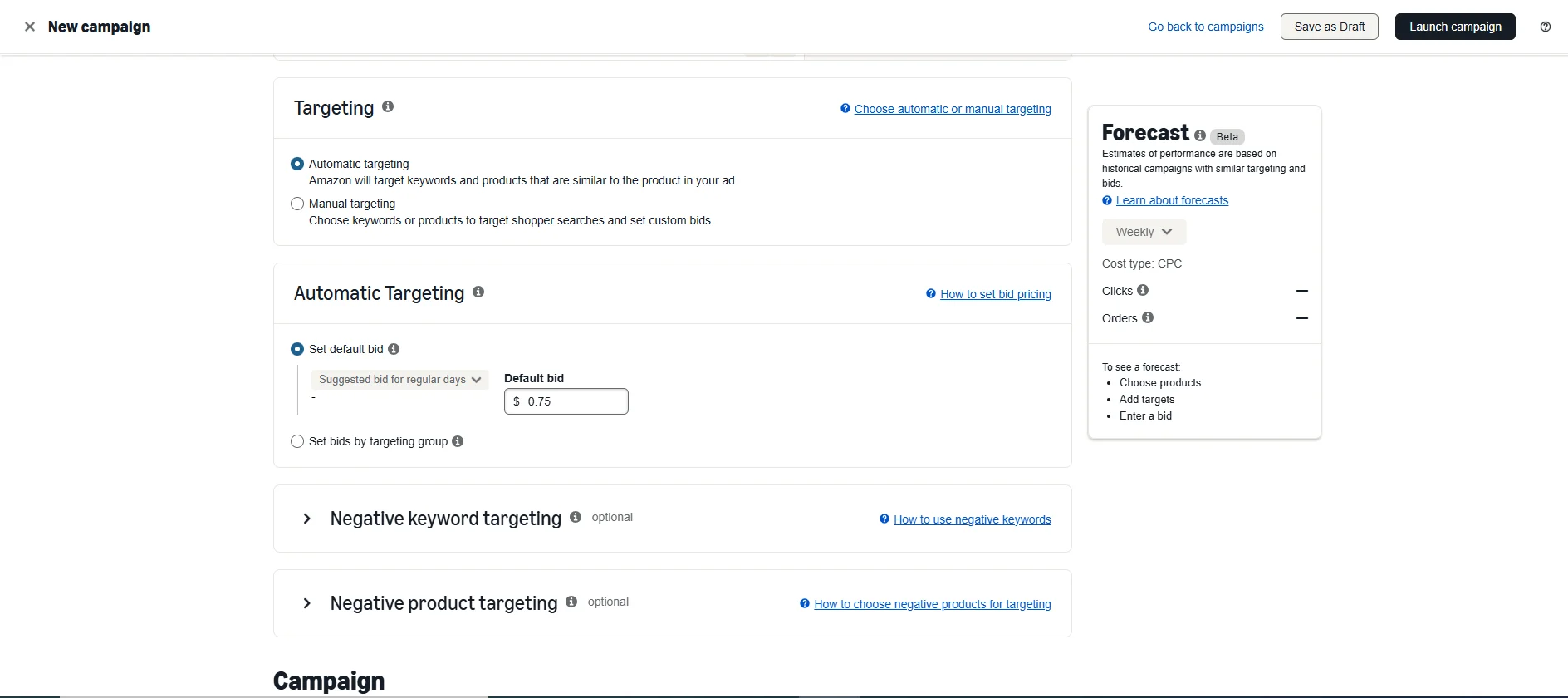
Pro Tip: The best strategy in 2026 is to run both simultaneously. Use an auto campaign at a low bid ($0.50–0.75) to discover new search terms, and a manual campaign at higher bids to aggressively target your best-performing keywords.
Step 4: Create Your Ad Group and Add Products
Within your campaign, you will create at least one ad group. An ad group contains the products you want to advertise and the targeting (keywords or ASINs) for those products.
Best practice is to group similar products, for example, all colour variants of the same product in one ad group. Do not mix unrelated products into the same ad group, as this makes bid management and reporting very messy.
Search for your product by ASIN or product name and add it to the ad group. Then either enter your keywords (manual) or proceed to the bid settings (auto).
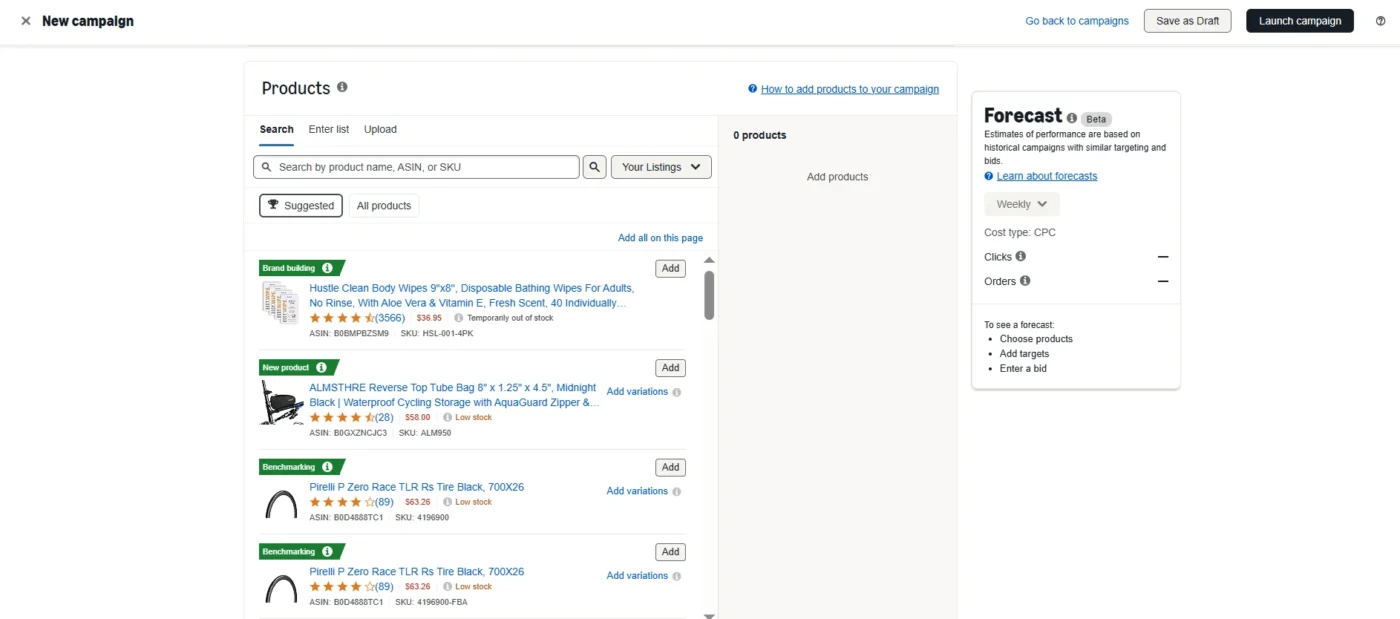
Step 5: Set Your Default Bid and Launch
For your first campaign, Amazon will suggest a bid range based on competitive data for your category. A good starting point is to bid at the midpoint of the suggested range. Avoid bidding at the very top of the range until you have confirmed your conversion rate justifies the spend.
Review everything on the summary screen, then click ‘Launch Campaign.’ Your campaign will typically go live within 1–2 hours. You will not see meaningful data for the first 24–48 hours, so resist the urge to make changes immediately.
Keyword Targeting Strategy for Amazon Sponsored Products
Getting your keyword strategy right is what separates profitable campaigns from budget-burning ones. Here is how to approach it properly.
Broad vs Phrase vs Exact Match: When to Use Each
Amazon has three keyword match types, and each serves a different purpose in your campaign structure:
| Match Type | How It Works | Example Keyword | Best Used For |
| Broad match | Shows ad for queries containing your keyword words in any order, plus close variants and related terms | yoga mat | Discovery: finding new search terms you haven’t thought of |
| Phrase match | Shows ad for queries containing your keyword phrase in the same order, with words before or after allowed | “yoga mat” | Balance between reach and relevance |
| Exact match | Shows ad only for the exact keyword or very close variants, no extra words | [non slip yoga mat] | Maximum control: your best-converting, most profitable keywords |
In practice, most well-structured accounts use exact match for their core high-intent keywords at high bids, phrase match for mid-tier expansion, and broad match (with aggressive negatives) purely for discovery. Never use broad match as your primary campaign type without a strong negative keyword list.
How to Find the Best Keywords for Amazon Sponsored Ads
You have several methods available to build your keyword list:
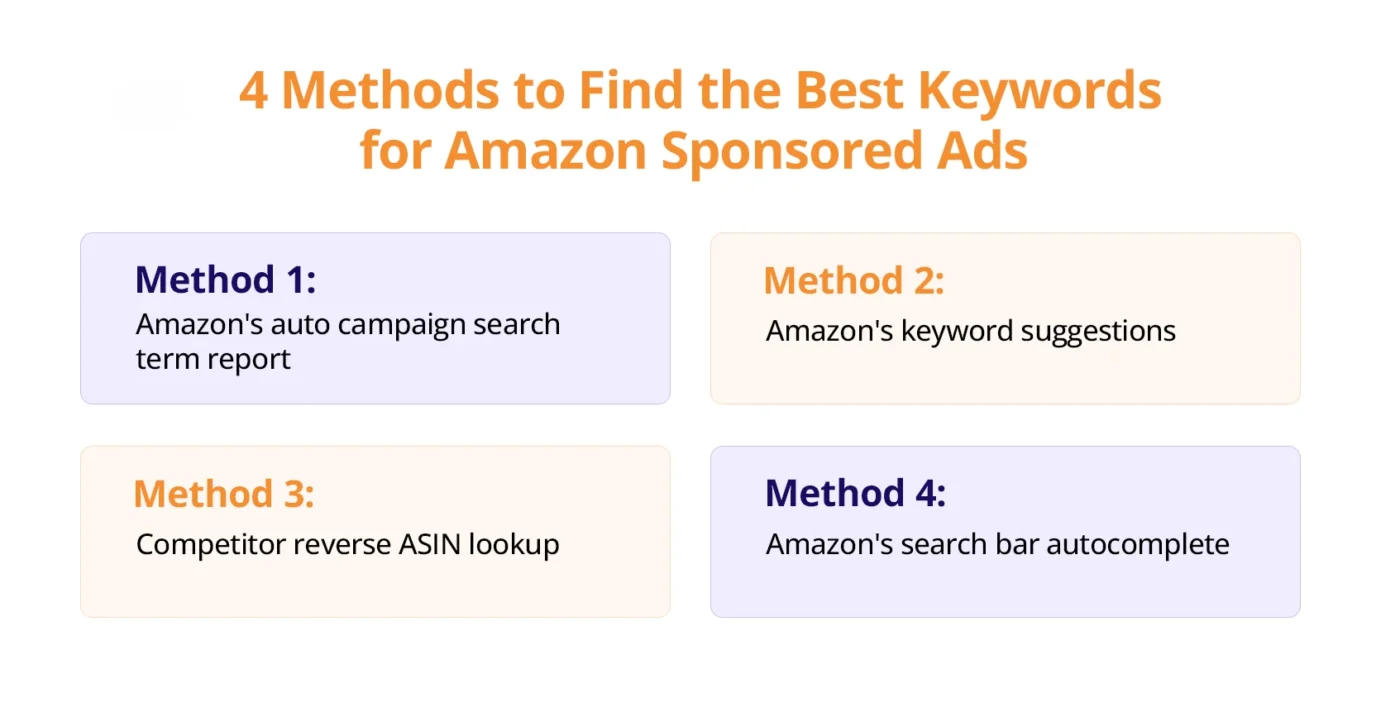
Method 1: Amazon’s auto campaign search term report: This is the most underused and most valuable source of keywords available to you. Run an auto campaign for 2–4 weeks, download the search term report, and you will see exactly which customer queries led to clicks and conversions. These are real buyer phrases, use them in your manual campaigns.
Method 2: Amazon’s keyword suggestions: When setting up a manual campaign, Amazon automatically suggests keywords based on your ASIN. These are a solid starting point, but they are also what every competitor sees, so they tend to be competitive.
Method 3: Competitor reverse ASIN lookup: Tools like Helium 10 (Cerebro) or Jungle Scout allow you to enter a competitor’s ASIN and see which keywords they rank for both organically and in ads. This is one of the fastest ways to find high-value keywords you may have missed.
Method 4: Amazon’s search bar autocomplete: Type your primary keyword into Amazon’s search bar and review the autocomplete suggestions. Each suggestion represents a real, high-volume search query. Do this for 8–10 seed keywords, and you will build a solid initial list quickly.
Negative Keywords: The Most Underused Tool in Amazon Advertising
Negative keywords tell Amazon which search queries you do NOT want your ads to show for. They are the most powerful lever for reducing wasted spend, and most sellers do not use them enough.
Add negative keywords when:
- A search term has generated 10+ clicks with zero sales, and it is consuming budget without converting
- A search term is clearly irrelevant to your product (e.g, if you sell premium yoga mats, ‘cheap yoga mat’ or ‘kids yoga mat’ may not convert)
- A search term has a very high ACoS that cannot be justified by the lifetime value of the customer
Weekly Task: Every Monday, pull your search term report and add at least 5–10 new negative keywords. This single habit, done consistently, can reduce wasted spend by 20–35% over 90 days.
Bidding and Budget: How to Spend Smarter on Amazon Sponsored Ads
How Amazon’s CPC Auction Works in 2026
Amazon uses a second-price auction for sponsored product ads. This means you pay one cent above the second-highest bidder’s bid, not your maximum bid. If you bid $1.50 and the next highest bidder is at $1.20, you pay $1.21 per click.
However, Amazon’s dynamic bidding system adjusts your bids in real time based on the likelihood of conversion. This means the actual CPC you pay can be higher or lower than your set bid, depending on placement and intent signals.
Dynamic Bids: Down Only vs Up and Down vs Fixed
You have three bidding strategies to choose from:
| Bidding Strategy | What Amazon Does | When to Use It |
| Dynamic bids: down only | Reduces your bid in real time when a conversion is deemed less likely | Best for new campaigns, protects budget while learning |
| Dynamic bids: up and down | Raises bids by up to 100% when conversion is likely, lowers when not | Use only on mature, profitable campaigns with proven CVR |
| Fixed bids | Your bid stays exactly as set, no adjustments | Use for very controlled tests or when you want full predictability |
For most sellers, ‘dynamic bids down only’ is the safest default for campaigns that are still in the learning phase. Switch to ‘up and down’ only when you have 30+ days of data showing consistent conversion rates.
How to Set a Starting Bid
If you have no historical data, use this formula as your starting point:
Starting Bid = (Average Sale Price × Target ACoS × Conversion Rate) ÷ 100
Example: Your product sells for $30, your target ACoS is 20%, and the category average conversion rate is 10%.
Starting bid = ($30 × 0.20 × 0.10) = $0.60 per click
This gives you a data-driven baseline rather than guessing. Adjust up or down based on competition in your category, highly competitive categories like supplements or electronics will require higher bids to win meaningful impressions.
Daily Budget: Avoiding ‘Budget Exhausted by Noon’
One of the most common and costly mistakes sellers make is setting a daily budget that runs out before the peak shopping hours of the day (typically 6 PM to 10 PM in the buyer’s local time zone). When your budget runs out, your ads stop serving, and you miss the highest-converting window.
As a rule of thumb, set your daily budget at 3x your target daily ad spend. This gives Amazon room to distribute your budget effectively throughout the day without artificial throttling. If you consistently hit your daily budget cap before the evening, increase it.
Bid Adjustments by Placement
In your campaign settings, you can apply a bid multiplier to specific ad placements. This allows you to bid more aggressively for ‘top of search’ placements without overpaying for product page placements.
Use your placement performance report to see your ACoS broken down by placement. If the top of search has a significantly lower ACoS than product pages for your campaigns, it makes sense to apply a 50–100% bid increase for that placement and reduce product page exposure.
Reading Amazon Sponsored Products Reports and Key Metrics
The 6 Metrics Every Seller Must Track
| Metric | What It Means | Healthy Benchmarks |
| ACoS (Advertising Cost of Sale) | Ad spend ÷ ad revenue × 100. Your direct ad profitability metric. | Category-dependent |
| TACoS (Total ACoS) | Ad spend ÷ total revenue × 100. Measures impact on your whole business. | Under 10% for mature products |
| CTR (Click-Through Rate) | Clicks ÷ impressions × 100. How often people click after seeing your ad. | 0.3–0.5% is typical; above 0.5% is strong |
| CVR (Conversion Rate) | Orders ÷ clicks × 100. How often clicks turn into purchases. | 10–15% is typical for most categories |
| CPC (Cost Per Click) | What you pay each time someone clicks your ad. | Varies by category, monitor trends |
| ROAS (Return on Ad Spend) | Ad revenue ÷ ad spend. Inverse of ACoS. | A ROAS above 4x is generally healthy |
What Is a Good ACoS for Amazon Sponsored Products?
Your target Amazon ACoS depends entirely on your product’s margin and your current business goals. Here is how to think about it:
- Break-even ACoS = your gross margin percentage. If your product has a 40% margin, your break-even ACoS is 40%. Any ACoS below this means you are profitable on ads.
- Target ACoS = whatever keeps your net margin at an acceptable level after all costs. Most sellers target an ACoS that is 50–70% of their break-even ACoS.
- Growth-phase ACoS: For new products where you are deliberately buying visibility and rank, running at or slightly above break-even ACoS for 30–60 days is a viable strategy. The organic rank boost you earn from increased sales velocity will reduce your long-term advertising dependency.
| Category | Typical Competitive ACoS Range |
| Health & Personal Care | 15–35% |
| Home & Kitchen | 18–40% |
| Sports & Outdoors | 20–35% |
| Beauty | 15–30% |
| Pet Supplies | 20–40% |
| Electronics | 8–20% |
How to Download and Read Your Search Term Report
The search term report is the most important in Amazon advertising. It shows you every search query that triggered your ad, along with impressions, clicks, spend, and sales for each query.
- Go to Campaign Manager in Seller Central
- Click ‘Measurement & reporting’ in the left navigation
- Select ‘Sponsored Products search term report.
- Set the date range to the last 30 days
- Download the .xlsx file
In the report, focus on these columns: Search Term, Impressions, Clicks, Spend, Orders, Sales, and ACoS. Sort by Spend (highest first) to immediately see where your budget is going.
How to Interpret Search Term, Report Data
Every search term in your report falls into one of four categories. Here is what to do with each:
- High spend, high sales, low ACoS: These are your winners. Add them as exact match keywords in your manual campaign at an aggressive bid.
- Low spend, some sales: Promising terms. Add as a phrase or exact match and increase the bid to capture more impressions.
- High spend, zero or few sales: Wasted spend. Add as negative keywords immediately.
- Low spend, zero sales: Not enough data. Leave for now; revisit after another 2 weeks of data.
Common Amazon Sponsored Ads Mistakes and How to Fix Them
After reviewing thousands of Amazon advertising accounts, the same mistakes come up again and again. Here are the ones that cost sellers the most money, and how to fix them quickly.
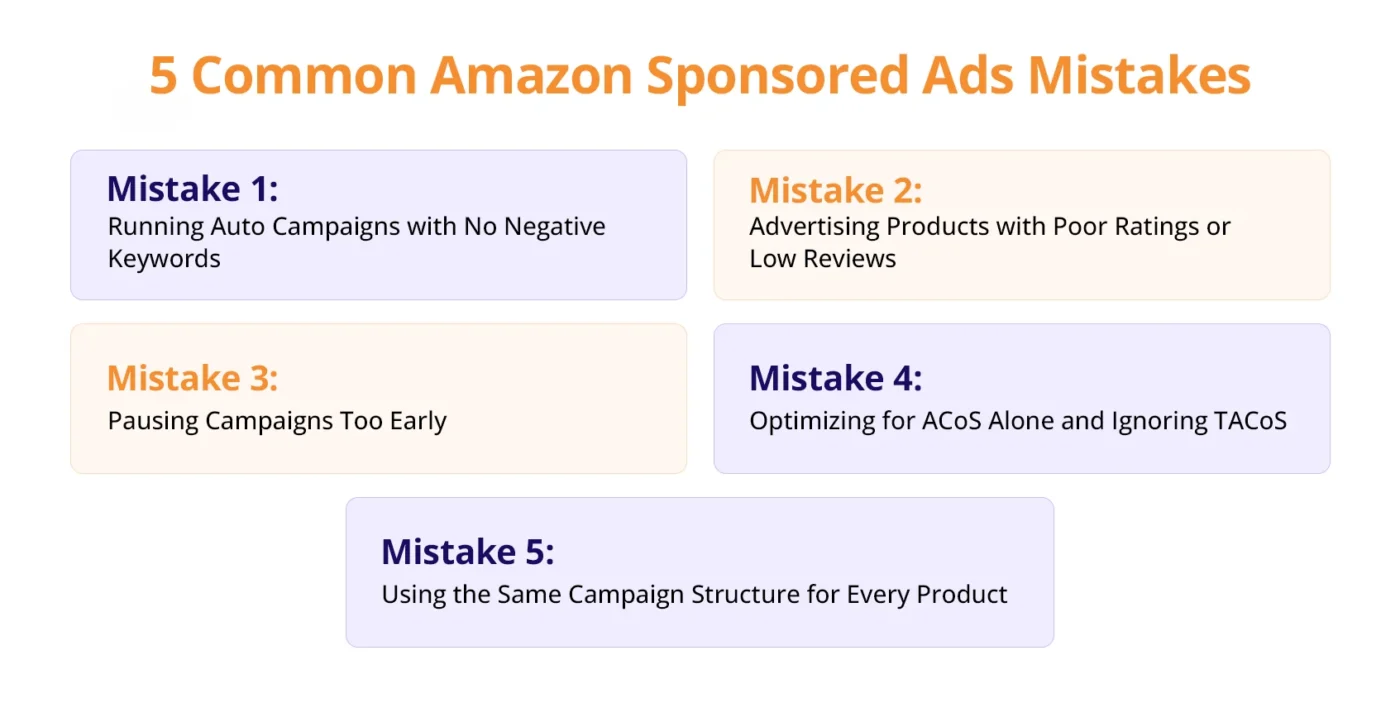
Mistake 1: Running Auto Campaigns with No Negative Keywords
Auto campaigns without negatives are a leaking tap. Amazon will happily spend your budget on loosely related or completely irrelevant queries. Sellers who have never downloaded their search term report are typically wasting 25–40% of their auto campaign spend on terms that will never convert.
The fix: Download your auto campaign search term report today. Add anything with 5+ clicks and zero sales as a negative exact match keyword. Do this every week going forward without fail.
Mistake 2: Advertising Products with Poor Ratings or Low Reviews
You can drive all the traffic in the world to a listing with 8 reviews and a 3.7-star rating, but it still will not convert. You are paying for clicks that will not become sales, driving up your ACoS and depleting your budget.
The fix: Set a rule: no campaign scaling until a product has at least 15 reviews and a 4.0+ rating. Use the Early Reviewer Program or Amazon Vine if you are a brand registered to accelerate legitimate review acquisition on new launches.
Mistake 3: Pausing Campaigns Too Early
New sellers frequently panic when they see high ACoS in the first week of a campaign and pause it immediately. This is almost always the wrong call. Amazon’s algorithm needs time to learn which placements and queries drive conversions for your specific product.
The 14-day rule: Give every new campaign a minimum of 14 days and at least $100–150 in total spend before making any pause decisions. Campaigns with insufficient data should be optimized (adjust bids, add negatives), not paused.
Mistake 4: Optimizing for ACoS Alone and Ignoring TACoS
ACoS measures the profitability of your advertising in isolation. But on Amazon, your ads also drive organic rank improvements, which means ads generate organic sales that never show up in your ACoS calculation. If you optimize ACoS too aggressively, you may cut ad spend that was quietly driving significant organic revenue growth.
The fix: Track both ACoS and TACoS. If your ACoS is 35% but your TACoS is 12%, your ads are working efficiently at the total business level. Use TACoS as your north star metric for mature products and ACoS as a day-to-day operational metric.
Mistake 5: Using the Same Campaign Structure for Every Product
A hero product generating $50,000 per month requires a fundamentally different campaign structure than a new product in the launch phase. Treating all products the same, same bid strategy, same budget allocation, same optimization routine, leads to underinvestment in winners and overinvestment in underperformers.
The fix: Segment your products into three tiers: Launch (new products needing rank building), Scale (proven products with healthy ACoS and growth potential), and Defend (mature products where you are protecting organic rank). Apply different bid strategies, budgets, and optimization rules to each tier.
Conclusion
Amazon Sponsored Product Ads are one of the most effective growth tools available to sellers, but long-term success rarely comes from simply increasing budgets or launching more campaigns.
Winning with Amazon PPC comes from building repeatable systems: monitoring search term reports, refining keyword targeting, eliminating wasted spend, and making decisions based on data instead of assumptions. Sellers who consistently optimize and improve their campaigns over time create a compounding advantage that becomes difficult for competitors to replicate. Small improvements made week after week can lead to significant gains in visibility, profitability, and market share over the long run.
If you’re struggling with campaign performance, inefficient ad spend, or building a scalable Amazon PPC strategy, AMZDUDES, a full-service Amazon agency, can help manage and optimize your advertising efforts from strategy through execution. Ready to turn Sponsored Product Ads into a predictable growth engine for your brand?
Book a free consultation call with AMZDUDES today.
FAQs
1. What are Amazon Sponsored Product Ads?
Amazon Sponsored Product Ads are pay-per-click (PPC) ads that promote individual product listings directly in Amazon search results and product detail pages. Sellers only pay when shoppers click on the ad.
2. How do Amazon Sponsored Product Ads work?
Sponsored product ads on Amazon work through a bidding auction system where sellers target keywords or products and set bids. Amazon determines ad placement based on bid amount, relevance, and conversion potential.
3. Are Amazon Sponsored Product Ads worth it?
Yes. Amazon-sponsored ads can significantly increase visibility and sales when paired with optimized listings, strong keyword targeting, and ongoing campaign management. Success depends on strategy and continuous optimization.
4. What is a good ACoS for Amazon Sponsored Products?
A good Amazon Sponsored Products ACoS depends on your product margin and goals. Most sellers target an ACoS below their break-even margin, while newer products may temporarily operate at higher ACoS levels to gain visibility and rank.
5. What is the difference between Sponsored Products and Sponsored Brands?
Sponsored Products promote individual ASINs within search results and product pages, while Sponsored Brands display multiple products and branding elements in banner-style placements focused on broader brand visibility and customer acquisition.