

Key Takeaways
- Amazon reimbursement audit is crucial: It helps sellers protect profit margins by identifying lost inventory, damaged units, return discrepancies, and unclaimed FBA reimbursements before claim deadlines expire.
- Follow 5 steps to perform an audit: Reviewing the right reports, tracking inventory adjustments, and cross-checking reimbursement records helps uncover money Amazon still owes you
- File a reimbursement claim: Accurate documentation, clear claim details, and timely follow-up improve approval rates and ensure faster reimbursement recovery.
- Get professional services: Expert reimbursement audit support helps sellers identify hidden claims and maximize recovered revenue.
- Build a stronger profit recovery system: Regular audits prevent long-term revenue loss and create better financial control for sustainable Amazon business growth.
In Amazon selling, small operational errors can quietly turn into major profit losses. Many sellers using Fulfillment by Amazon (FBA) lose money every month through unclaimed reimbursements tied to lost inventory, damaged units, incorrect fees, and customer return discrepancies, often without realizing it. An Amazon reimbursement audit helps uncover these hidden losses by identifying cases where Amazon owes you money.
Regularly auditing your FBA transactions allows you to recover missed funds and protect your profit margins. In this guide, we will explain why an Amazon reimbursement audit is crucial, steps to perform an audit, and filing a reimbursement claim to recover every dollar Amazon owes you.
Why Is Amazon Reimbursement Audit Crucial for Sellers
Amazon reimbursement audit is crucial for sellers because Amazon sellers who do not request FBA reimbursements lose 1–3% of their revenue annually. On a million-dollar account, that is up to thirty thousand dollars a year disappearing inside reports that most sellers look at once and never dig deeper.
Unclaimed FBA reimbursements impact profit margins and make it difficult to achieve other business objectives.
Amazon implemented a significant change to its reimbursement policy on March 31, 2025. This new policy fundamentally changes how sellers are compensated for items lost or damaged before a customer order, making reimbursement audits even more important.
Sellers often underestimate the scale of Amazon’s logistics operations. On any given day, millions of products are being moved, sorted, transferred, or returned. With such volume, even a 0.1% error rate translates to massive losses across the network.
Amazon has its system to detect discrepancies, but it still does not automatically surface every issue. Some losses are reimbursed proactively, while many remain unclaimed unless sellers perform regular Amazon reimbursement audits.
For sellers who fail to audit, they are susceptible to losing a good amount of their inventory value, which can silently erase profit margins without them even realizing it. FBA reimbursement is a profit recovery system, and sellers who treat it this way are less likely to lose their money to Amazon FBA errors.
Steps to Perform an Amazon Reimbursement Audit
Here is a comprehensive step-by-step process you can follow for Amazon audit reimbursement.
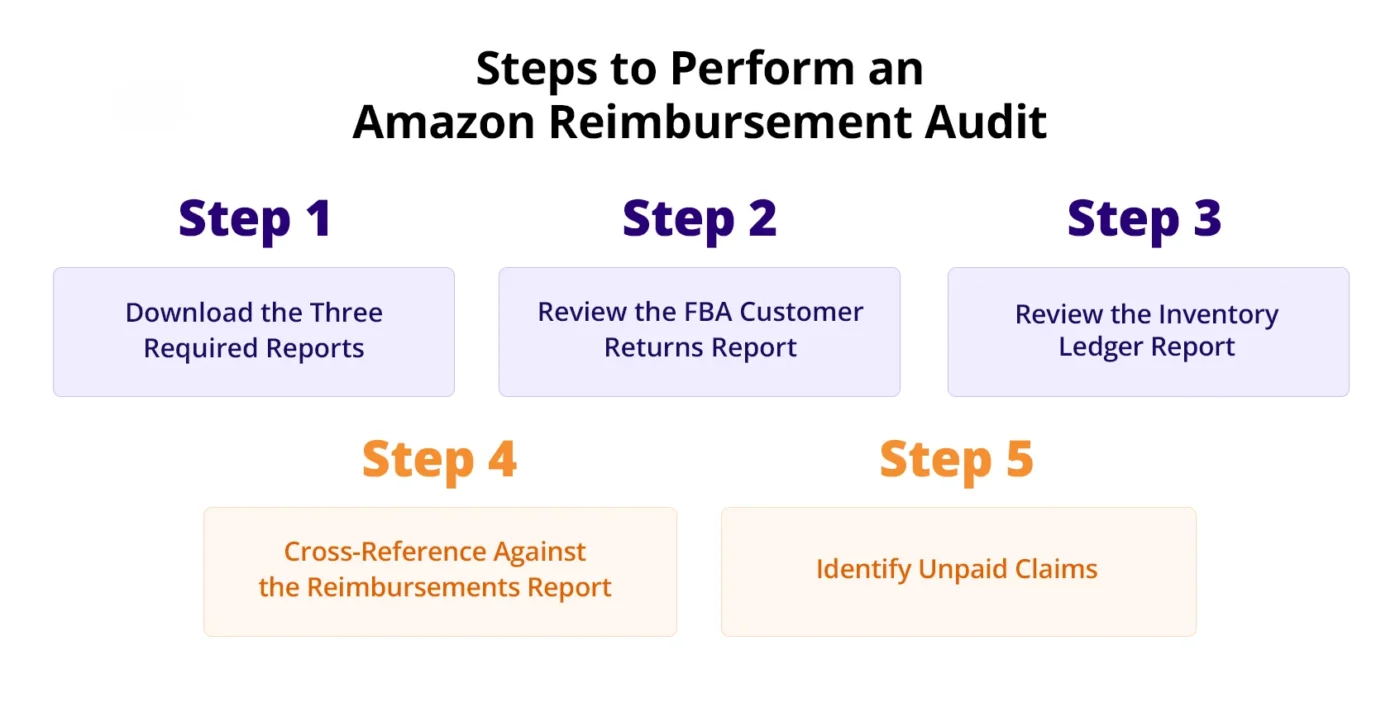
Step 1: Download the Three Required Reports
Every unpaid reimbursement in your account can be found by cross-referencing three reports already available in your Seller Central dashboard.
The three required reports are:
- FBA Customer Returns
- Reimbursements
- Inventory Ledger (Detailed View)
Download all three reports covering the same date range, at least the last ninety days, so you catch claims still inside the sixty-day window.
Step 2: Review the FBA Customer Returns Report
Seller Central → Reports → Fulfillment → Customer Concessions → FBA Customer Returns
The column that matters is Disposition. It tells you exactly what happened to every returned unit and who is responsible.
Filter the report and pull every row where Disposition is:
- DAMAGED
- CARRIER DAMAGED
These are units that Amazon or its carrier broke. Each one should have a matching reimbursement.
A unit can come back marked DAMAGED, and if the automatic reimbursement system does not catch it, nothing happens. You won’t receive any alert or email. That unit just disappears from your inventory with no payout. The only way you find out is by checking this report yourself.
Step 3: Review the Inventory Ledger Report
Seller Central → Reports → Fulfillment → Inventory → Inventory Ledger → Detailed View → Event Type: Adjustments
This report shows everything Amazon did with your inventory behind the scenes. Every adjustment, every removal, every unit that disappeared.
Filter the report and pull every row with a negative quantity where the reason is:
- Inventory misplaced
- Damaged at the Amazon fulfillment center
- Inventory disposed of
These are units Amazon lost, broke, or threw away. Each one should have a matching reimbursement. Every negative-quantity adjustment with a claimable reason code and no matching reimbursement is money Amazon owes you.
Step 4: Cross-Reference Against the Reimbursements Report
Seller Central → Reports → Fulfillment → Payments → Reimbursements
This report is your receipt file. Every row in this report is money Amazon has already paid you back.
For every flagged FNSKU from the Customer Returns report and the Inventory Ledger, search for a matching entry within sixty days of the event date.
Match on:
- FNSKU
- Date range
Do not match on FNSKU alone, because the same product can have multiple events. If a loss event from the Customer Returns report or the Inventory Ledger does not have a matching entry in the Reimbursements file, Amazon never paid you.
Step 5: Identify Unpaid Claims
After reviewing your reports, identify claims that should have triggered reimbursement but did not. Check for units marked as lost, damaged, or incorrectly processed where Amazon was responsible, but no reimbursement was issued. This includes damaged customer returns, missing units during FC transfers, short shipments, and inventory that never reached the warehouse.
Amazon’s system does not automatically surface every discrepancy, which is why many unpaid claims remain hidden inside reports. It is also important to check claim-filing windows because once the deadline passes, those claims are gone permanently, even if the evidence is clearly available. Identifying unpaid claims helps recover revenue that would otherwise remain unclaimed.
How to File a Reimbursement Claim
Before filing an Amazon reimbursement claim, confirm that your case meets Amazon’s FBA reimbursement policy requirements. If it meets the requirements, you can submit a claim for reimbursement. Amazon processes claims faster when the evidence is specific and matches its own report data. You need to be specific and provide exactly what is needed.
Gather Documentation
Strong documentation is critical for improving the success rate of your reimbursement claim. Gather invoices, receipts, shipment IDs, affected ASINs, quantities, and proof of delivery to Amazon, such as inventory receipts, to support your request.
If the issue involves damaged or returned inventory, include clear photos as additional evidence. Organizing documents properly and using a checklist can be helpful.
Open a Claim in Seller Central
Once your documentation is ready, log in to Seller Central and navigate to
Help > Contact Us > Selling on Amazon > Fulfillment by Amazon > FBA Inventory Reimbursement.
This is where you can officially submit your reimbursement request for review. Clearly explain whether the issue involves lost, damaged, or destroyed inventory, and include shipment references and order details.
Monitor Case Progress
After submission, Amazon reviews your claim and determines whether reimbursement is approved. During this stage, they may request additional documents, invoice verification, or clarification related to your case.
Responding quickly is important to prevent delays or case closure before resolution. Regularly checking your case log in Seller Central ensures you stay updated and can take immediate action if Amazon requests further information.
Confirm Reimbursement
If Amazon approves your claim, the reimbursement amount will appear in your Reimbursement Report or in the Payments section of Seller Central under Transaction View. Reviewing this confirms that the funds have been processed correctly.
Amazon Audit Reimbursement Services to Recover Every Dollar Amazon Owes You
Amazon reimbursement opportunities are often hidden inside complex reports, making them easy to overlook and extremely time-consuming to recover manually. Lost inventory, damaged units, incorrect fee charges, and return discrepancies can quietly reduce profitability if they are not identified and claimed within Amazon’s strict timelines.
AMZDUDES helps sellers recover this lost revenue through detailed audits and expert reimbursement analysis designed to uncover every eligible claim. Our skilled analysts work proactively to identify missed reimbursements, validate claims, and ensure you recover every dollar Amazon owes you. Don’t let your profits slip away through unclaimed reimbursements.
Conclusion
An Amazon reimbursement audit is a critical part of protecting your profitability as an FBA seller. Lost inventory, damaged units, return discrepancies, and missed reimbursements can quietly drain revenue if they are not identified and claimed on time. With Amazon’s updated reimbursement policy and strict claim windows, relying on automatic reimbursements is no longer enough.
By consistently reviewing your reports, identifying unpaid claims, and filing accurate reimbursement requests, you create a stronger profit recovery system for your business.
For sellers managing large inventories and high transaction volumes, professional audit support makes the reimbursement process faster, more accurate, and significantly more effective. As a reliable full-service Amazon agency, AMZDUDES provides expert Amazon audit reimbursement services designed to uncover hidden reimbursement opportunities, recover lost revenue, and ensure sellers reclaim every dollar Amazon owes them. Book a free Amazon reimbursement audit consultation now.
Frequently Asked Questions
What is an Amazon reimbursement audit?
An Amazon reimbursement audit is the process of reviewing your FBA reports to identify inventory losses, damaged units, incorrect fees, customer return issues, and other situations where Amazon owes you money. It helps sellers recover funds that were missed by Amazon’s automatic reimbursement system.
Why do Amazon sellers need regular reimbursement audits?
Regular Amazon reimbursement audits help sellers protect profit margins by identifying unclaimed reimbursements before claim deadlines expire. Since Amazon does not automatically reimburse every eligible issue, audits ensure sellers recover money tied to lost, damaged, or incorrectly processed inventory.
Does Amazon automatically reimburse all lost or damaged inventory?
No, Amazon does not always automatically reimburse every eligible case. While some reimbursements are processed proactively, many cases remain unclaimed unless sellers manually review reports and submit reimbursement claims through Seller Central.
Should I handle reimbursement audits manually or use a service?
Small sellers may manage audits manually, but for high-volume accounts, professional Amazon reimbursement audit services are often more efficient. Experts can identify hidden claims faster, reduce missed opportunities, and improve claim approval rates through accurate documentation and submission.
How can AMZDUDES help with Amazon reimbursement audits?
AMZDUDES provides detailed Amazon audit reimbursement services by reviewing your FBA reports, identifying missed claims, validating reimbursement opportunities, and managing the claim process. This helps sellers recover lost revenue and protect profitability without spending hours manually auditing reports.