
Key Takeaways
- Amazon PPC runs on an auction system where bids and keyword relevance decide ad placement and cost per click.
- There are three Amazon bidding types: Dynamic Bids (Down Only), Dynamic Bids (Up & Down), and Fixed Bids.
- Amazon allows bid adjustments by placement to bid higher for Top of Search, Product Pages, and Rest of Search.
- Sellers use two main bidding approaches: the Inch-Up method for control and the Fast & Sloppy method for faster data.
- Bids should be adjusted regularly. Increase for profitable keywords and reduce spend on high-cost, low-conversion terms.
Bid management on Amazon PPC campaigns plays a critical role in determining how profitable your ads actually are. It directly impacts how often your ads appear, and how much you pay for each click. To manage bids effectively and avoid wasted ad spend, it is essential to first understand how Amazon advertising bidding system works and how bids influence ad performance.
In this article, we’ll explain what Amazon bid management is, how it works, and what are the best practices for Amazon bidding.
What is Amazon Bid Management?
Amazon bid management is the process of setting, monitoring, and adjusting the bids on the Amazon ads. Amazon bid management along creatives and targeting completes the Amazon’s advertisement puzzle. Where creatives and audience targeting decides who’ll be seeing your ads and how, Amazon bids decide how often the ads will appear and how much you are going to pay for them.
How Amazon Bidding Works?
Amazon bidding is all about deciding how much you are willing to pay for a click on your ad to get the best results at the lowest cost. Every time you run a bid management amazon PPC campaign on Amazon, you are entering an auction for ad placement. In that auction, sellers bid on keywords. The seller with the highest bid and the best targeted keywords wins the auction.
Understand this as, imagine a shopper searching for “wireless noise-cancelling headphones.” Three sellers are bidding on related keywords:
- Seller A: “wireless noise-cancelling headphones” – $2.00
- Seller B: “noise-cancelling headphones” – $1.80
- Seller C: “headphones” – $1.50
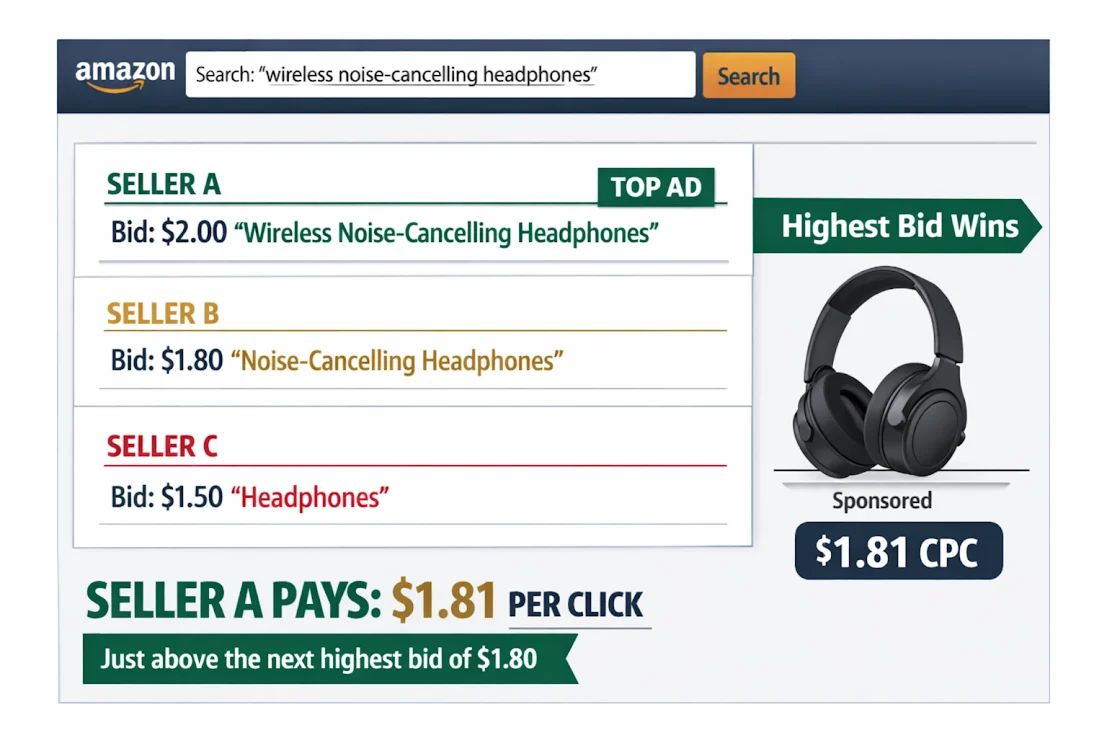
All keywords are relevant to the search. But Seller A wins the auction because their bid is the highest and most relevant. However, they don’t pay the full $2.00. Instead, they pay $1.81 per click that is just slightly more than the next highest bid.
Types of Amazon Bidding
Amazon provides sellers with several bidding options to control how much they pay for clicks. Understanding each type is key to match your ad spend with your business goals.
Amazon offers three types of biddings, each designed to balance risk and growth potential:
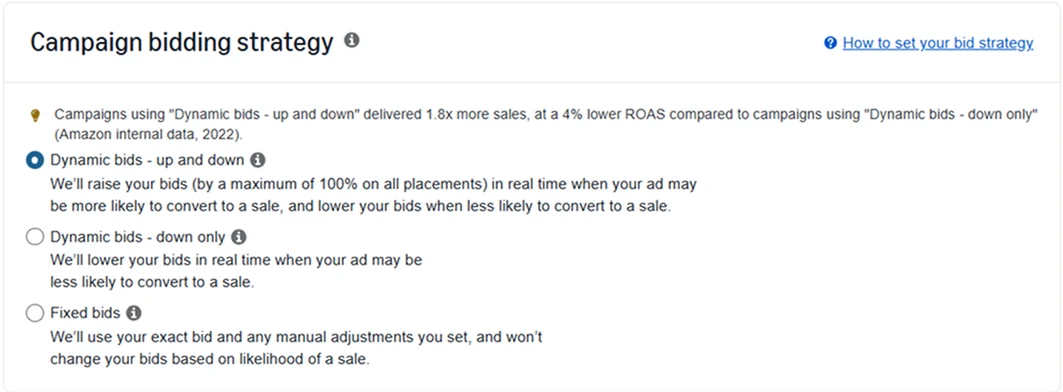
Dynamic Bids – Down Only
With the Down Only bidding, Amazon automatically lowers your bids for clicks that are less likely to convert into a sale. For example, if your ad appears for a less relevant search term or on a placement that historically performs poorly, Amazon may reduce your bid to reduce your ad cost.
This type of bidding is ideal for:
- Sellers who want to optimize for conversions while controlling their maximum bid.
- New advertisers who are testing campaigns.
- Campaigns with strict budgets that need careful cost control.
Dynamic Bids – Up and Down
Amazon adjusts your bids in both directions when you choose the Up and Down type. Bids can increase for clicks that are more likely to convert and decrease for clicks that are less likely to convert. For instance, if your ad appears for a highly relevant search query or on a top-performing placement, your bid may go up. Conversely, it will go down on low-performing opportunities. Bids can be adjusted up or down depending on performance.
This type is ideal for:
- Products with good historical performance data.
- Campaigns targeting high-demand placements.
- Advertisers with flexible budgets who can afford higher bids for more conversions.
Fixed Bids
With Fixed Bids, Amazon always uses the exact bid you set and does not adjust it for any auction. Unlike dynamic bidding, this means you may get more impressions but potentially fewer conversions for your ad spend. You can manually adjust your base bids to improve campaign performance.
This bidding type is ideal for:
- Campaigns with historical performance data and a clear target ACoS.
- Testing new products where you want full control over spend.
Choosing the right bid type depends on your campaign goals: dynamic bids work well for maximizing conversions, while fixed bids are ideal for strict budget control or high-performing keywords.
Amazon Bid Management by Placement
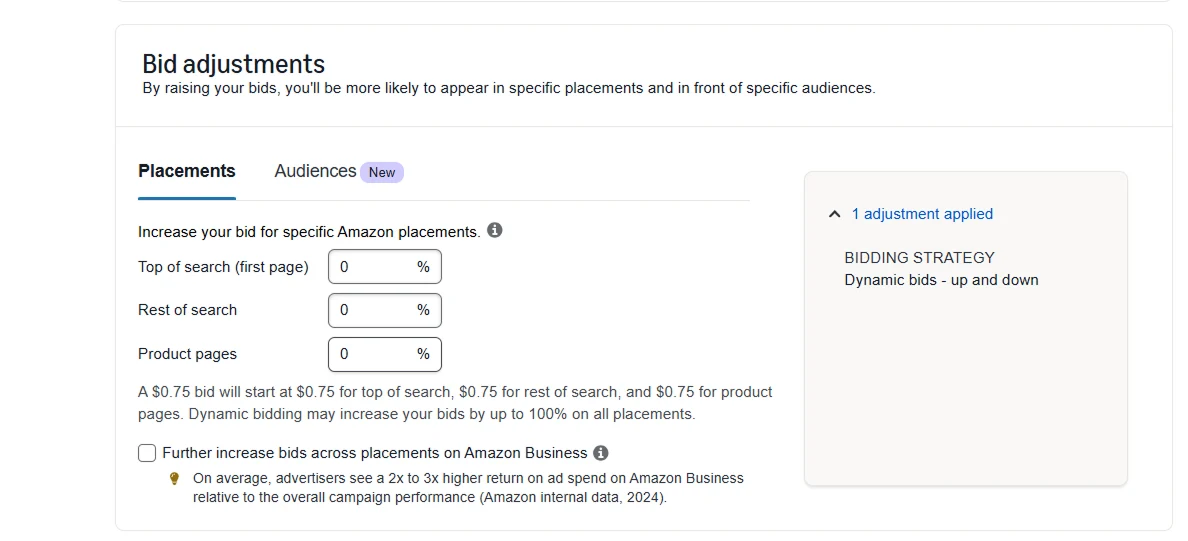
Amazon’s “Placement Bid Adjustments” feature lets advertisers adjust their bids for specific ad placements by a percentage increase, usually between 0% and 900%. This means you can increase your base bid for placements like:
- Top of Search (top two to three sponsored product ads on the first search results page)
- Product Pages (ads on the product detail pages)
- Rest of Search (all other placements in search results)
For example, if your base bid is $1.00 and you set a 50% placement adjustment for Top of Search, your bid for that placement becomes $1.50 before any dynamic bid adjustments by Amazon.
Different placements have different conversion rates and costs. This feature allows you to increase bids where conversions are strong and reduce spending on lower-performing placements, helping you get the most out of your ad budget.
How to Calculate Optimal Bids for Amazon Bid Management
To determine a starting bid for Amazon bid management, consider the following formula:
Bid = Target ACoS × Product Price × Conversion Rate
Target ACoS (Advertising Cost of Sale): This is the percentage of your product’s sales value that you’re willing to spend on ads. For example, if you’re okay spending $30 on ads to sell a $100 product, your Target ACoS is 30%.
Product Price: The retail price of your product (what the customer pays).
Conversion Rate: The percentage of people who click your ad and buy. It can be calculated the following way: Conversion rate = (Total number of orders / Total number of sessions) x 100%
For example, if your product price is $40, target ACoS is 30%, and conversion rate is 10%, your bid would be:
$40 × 0.30 × 0.10 = $1.20
This approach helps align your bids with profitability goals .
How to Bid on Amazon PPC Campaigns?
Now that you understand how Amazon’s bidding system works, the next step is knowing how and when to adjust your bids to improve performance, especially as a beginner.
Most sellers use two of the techniques to bid:
1. Inch Up Method
The Inch-Up Method involves increasing bids gradually over time.
Day 1 = 10 cents, 0 clicks, no conversions
Day 2 = 20 cents, 0 clicks, no conversions
Day 3 = 30 cents, 1 click, no conversions
Day 4 = 40 cents, 4 clicks, 2 conversions
Day 5 = 50 cents, 6 clicks, no conversions
Day 6 = 60 cents, 10 clicks, 3 conversions
This method allows you to find the lowest bid that provides you the most information. Once you actually get a conversion you will know exactly how much to bid.
2. Fast and Sloppy Method
The Fast and Sloppy Method focuses on speed. Sellers intentionally start with high bids to collect clicks.
Day 1 = $5 bid, 10 Clicks, 1 conversion
Day 2 = $5 bid, 9 clicks, 1 conversion
Day 3 = $4 bid, 8 clicks, 1 conversion
Total Cost = $14
Total Clicks = 27
The main goal of this method is to acquire data and this gives sellers a clear picture of what’s converting.
Amazon Recommendation on Amazon Bid Management
At its core, Amazon bid management is straightforward:
- If a keyword is profitable and could benefit from more traffic, increase the bid.
- If a keyword is costing too much and hurting profitability, lower the bid.
However, there is a point of low returns with this. Increasing bids can increase visibility and traffic but it also results in higher ACoS. Lower bids reduce cost but can also limit impressions and sales. Therefore finding the right balance is essential.
For example, imagine you are bidding $1.00 on a keyword that generates sales at a 25% ACoS. You can increase the Amazon PPC bid range to $1.50 to capture more impressions. While clicks and sales increase, your ACoS jumps to 38%, cutting into margins. In this case, the extra traffic isn’t worth the higher cost. Reducing the bid slightly may deliver fewer impressions but restore profitability.
When to Increase Amazon Bids?
You should consider raising bids in two key situations:
1. When a keyword is profitable below your target ACoS
If a keyword is generating sales at an ACoS lower than your target, it is a strong performer. Increasing the bid can help you capture more impressions and boost sales. In most cases, it’s better to earn higher total revenue at a healthy ACoS than to limit a keyword that is already working.
2. When a keyword isn’t getting enough traffic
If a keyword has very few or no clicks (for example, fewer than 4–5 clicks in a week), your bid may be too low to win competitive placements. These kinds of Amazon PPC bid problems can be solved by increasing the bid. This can improve visibility, help the ad start receiving clicks, and allow you to evaluate whether the keyword can convert.
When to Lower Bids?
Lowering bids is just as important as increasing them. Here’s when it makes sense:
1. When ACoS is higher than your target
If a keyword is spending too much and pushing your ACoS above your target, lowering the bid helps reduce cost per click and brings performance closer to your profitability goals.
2. When a keyword gets clicks but no sales
If a keyword receives many clicks without converting, it’s a signal that traffic may not be relevant. For example, if your product converts at around 10%, then 10 clicks without a sale is often a sign of poor performance. Reducing the bid minimizes wasted ad spend while you reevaluate Amazon PPC keyword research.
Effective Bid Optimization Strategies for Amazon PPC Success
It’s not enough to set the right base bid; you must also learn to tweak your bids based on performance. Here are 4 strategies you can use right now to boost your PPC bids’ performance:
1. Bid Higher When Launching a New Product
When you launch a new product you should bid higher than your category’s average CPC to gain initial traffic and visibility. As new products often rank low on search results, it is hard for them to generate clicks and conversions.
By bidding higher at launch:
- Your ads appear in more searches
- You collect Amazon PPC bid data quickly
- Can get Amazon PPC suggested bid
Once sales start coming in, you can slowly reduce bids and focus on profitability.
2. Lower Bids on Poor-Performing Keywords
When optimizing your Amazon PPC campaigns, lowering bids on Amazon PPC keywords that don’t deliver sufficient conversions is an effective Amazon PPC bid strategy. These keywords are wasting your ad spend so you can stop unnecessary spend and redirect your budget to keywords that actually sell.
3. Bid Higher on Almost-Ranked Keywords
Almost-ranked keywords are those that:
- Get conversions
- Appear on page 2 or bottom of page 1
A small bid increase can push these keywords into top positions, where visibility and conversions improve.
By increasing bids slightly:
- You improve ranking faster
- You increase sales velocity
- You get more value from keywords that are already working
This is one of the highest-impact optimizations you can make.
4. Bid Higher During High-Volume Sales Seasons
During high-traffic periods like Prime Day, or Christmas, raising your bids is usually a smart move. You will often see higher conversion rates in these periods as shoppers are more intent on making purchases.
Competition is also tougher in these periods, so you need to bid higher to ensure that your product appears in higher positions.
Tools for Amazon Bid Management
The right tools help sellers automate bid adjustments, analyze performance data, and scale Amazon PPC bid optimization across multiple campaigns.
Bulksheets for Scaling Bid Changes
Bulksheets are the fastest way to update bids. It allows you to update bids across thousands of keywords at once. Moreover it has a simple standardized template with fields like keyword, match type and performance metrics. This enables you to make changes more efficiently.
Dashboards for Tracking Performance
Performance dashboards make it easier to monitor CPC, ACoS, and bid impact throughout the day. By viewing data in near real time, you can quickly spot trends, and make smarter bid adjustments at both the campaign and account level.
Conclusion
Amazon bid management is about finding the right balance between visibility and profitability. With our guide you can have better control of ad cost. The key to effective Amazon bid management is to rely on data, evaluate performance regularly and make calculated adjustments accordingly.
If you want expert support to implement this at scale, AMZDUDES offers the best Amazon PPC bid management services 2026. Along with this AMZDUDES also provides amazon PPC bid optimization services that are designed to optimize bids and enhance performance. Book a consultation to scale your ads with confidence.
FAQs
What is bid management in Amazon PPC advertising?
Bid management in Amazon PPC is the strategic process of adjusting the amount you pay per click for specific keywords to maximize visibility and sales. It involves analyzing performance metrics to ensure you are winning competitive ad placements.
How often should I adjust bids on Amazon PPC campaigns?
It actually depends on how you manage your business. Daily monitoring is recommended in the early stages to track ad spend, click-through rates, and impressions, ensuring the PPC campaign performs as expected. For the keywords either performing outstanding or performing very slow, you can change the bids based on the last 30 days data.
Should I use dynamic bids or fixed bids on Amazon?
Dynamic bids work best when you want Amazon to increase or lower bids based on conversion likelihood. On the other hand, fixed bids are ideal if you want full control over spend and already have strong performance data. The right choice depends on your campaign goals and budget.
How do I know when to increase or lower Amazon bids?
Increase bids when a keyword is profitable and below your target ACoS or not getting enough impressions. Lower bids when a keyword is spending too much, has a high ACoS, or receives clicks without conversions.
What is the best way to manage bids for new products on Amazon?
For new products, start with conservative bids and use Dynamic Bids – Down Only. Collect data first, then gradually increase bids on keywords that show early conversion signals.