
Key Takeaways
- An Amazon account suspension is not usually permanent. Most suspensions can be reversed through a well-structured appeal, but rushed or generic responses significantly reduce your chances.
- Amazon typically gives 17 days to respond to a suspension notice. The clock starts the moment the notification is issued, not when you read it.
- The suspension email and Account Health Dashboard together tell you exactly why the account was suspended in most cases. Section 3 suspensions are the exception and require investigation to identify the underlying concern.
- A Plan of Action must cover three specific components in a specific order: Root Cause, Corrective Action, and Preventive Measures. Vague, apologetic, or defensive appeals are the most common reason POAs get rejected.
- Prevention is meaningfully cheaper than reinstatement. Monitoring Account Health metrics weekly, keeping supplier documentation ready, and responding to warnings before they escalate stops most suspensions before they happen.
Few emails hit a seller as hard as one from Amazon Seller Performance with the subject line indicating an account suspension. Revenue stops. Inventory becomes stranded. Customer relationships are put at risk. The urgency to fix the problem often leads sellers into the biggest mistake of the entire process: submitting a rushed, incomplete appeal that gets rejected and makes reinstatement even harder.
This guide covers what an Amazon seller account suspension actually is, why it happens, how to identify the exact cause, how to structure an appeal that Amazon will actually accept, what to do if your first appeal is rejected, and how to prevent future suspensions.
What Happens the Moment Your Amazon Account Is Suspended
Your Seller Central account remains accessible, but almost every selling function is disabled the moment the suspension takes effect. All your active listings are paused and become unavailable to buyers, cutting off new sales immediately. Any pending payouts are held in your account balance rather than released to your bank account, and Amazon may continue to hold this balance until the account is either reinstated or officially closed. Existing FBA inventory becomes stranded in Amazon’s fulfillment centers, still incurring storage fees but generating no revenue.

Suspension Notification and Appeal Timeline
You typically receive a notification email to the address associated with your Seller Central account, and a matching notice appears on your Account Health Dashboard. Amazon usually gives 17 days from the date of the suspension notice to respond with a Plan of Action, though the exact window can vary depending on the type of suspension. The clock starts running from when Amazon issues the notice, not when you open the email, so delay costs you time to prepare a proper response.
Suspended vs. Deactivated vs. Denied Accounts
It is worth understanding that Amazon uses slightly different terms for different account status changes. A “suspended” account can typically be reinstated through a successful appeal. A “deactivated” account has been closed after Amazon determined the seller could not or did not resolve a suspension, but reinstatement is still possible in many cases with a strong appeal. A “denied” account has been permanently rejected, usually after multiple failed appeals or in severe policy violation cases. Most sellers use these terms interchangeably, but the language on your notice matters because it signals how serious Amazon considers the case and how much runway you have.
The Most Common Reasons Amazon Suspends Seller Accounts
Understanding the exact reason for your Amazon suspended account is the foundation of every successful appeal. Amazon suspends accounts across several broad categories, each requiring a different response.
Poor Performance Metrics
Amazon tracks three specific performance metrics that directly affect selling privileges:
- Order Defect Rate (ODR) must stay below 1 percent. It includes negative feedback, A-to-Z Guarantee claims, and chargeback disputes.
- Late Shipment Rate must stay below 4 percent for Seller Fulfilled orders.
- Pre-Fulfillment Cancellation Rate must stay below 2.5 percent.
Crossing any of these thresholds can trigger a suspension. In many cases, Amazon warns you before suspending, but if the metrics deteriorate quickly or if you have received prior warnings that were not addressed, suspension can follow without additional notice. Monitoring your Amazon Account Health Rating regularly helps you identify performance risks early and take corrective action before they result in enforcement.
Selling Prohibited or Restricted Products
Amazon has extensive lists of prohibited categories including certain weapons, drug paraphernalia, tobacco, adult content, and category-specific restrictions that vary by marketplace. Understanding Amazon product compliance requirements before listing in a new category is the most reliable way to avoid this specific trigger entirely. Restricted categories require pre-approval before listing, including many electronics, health and beauty products, groceries, and jewellery.
Listing a product in a prohibited category, or in a restricted category without approval, is one of the most common suspension triggers, particularly for newer sellers who did not verify category rules before creating listings.
Inauthentic Product Complaints and IP Infringement
If a customer reports your product as inauthentic, or if a brand owner files an intellectual property complaint against your listing, Amazon can suspend the specific ASIN or your entire account depending on the pattern.
Inauthentic complaints require documentation to resolve: original supplier invoices from the past 365 days showing the specific product, quantities matching your sales volume, verifiable supplier contact information, and where applicable, authorization letters proving you are permitted to resell the brand.
IP infringement complaints require you to either provide proof that you are authorized to sell the branded product or demonstrate that the complaint was filed in error.
Listing Policy Violations and Manipulated Reviews
Amazon takes review manipulation extremely seriously. Any attempt to solicit positive reviews through incentives, discounts, free products, or third-party review services can trigger immediate suspension. Amazon’s algorithms are sophisticated at detecting review patterns that suggest manipulation, and once flagged, the suspension is difficult to reverse.
Other listing policy violations include: using competitor brand names or trademarks in your titles or bullet points, misrepresenting product condition, manipulating variation relationships, and using prohibited claims (medical, therapeutic, curative claims for non-approved products).
Linked Accounts
Amazon’s multiple accounts policy requires each seller to operate one account per business unless explicit permission for a second account has been granted. If Amazon detects a link between your account and another suspended or deactivated account, whether through shared IP addresses, payment methods, bank accounts, tax IDs, or ownership, your account can be suspended even if you personally did nothing wrong.
Linked account suspensions are among the most difficult to reverse because they often involve historical connections the seller may not even remember or may have inherited when acquiring a business.
Section 3 Violations: Amazon’s Broadest Suspension Right Explained
Section 3 refers to Section 3 of the Amazon Services Business Solutions Agreement, the contract every seller agrees to when registering. This section gives Amazon broad discretion to suspend accounts for reasons not tied to a single specific policy violation.
When you receive a Section 3 suspension notice, the language is typically vague: “we have removed your selling privileges” or “we have decided to close your account” without specifying which policy was violated. Amazon uses Section 3 when they suspect a pattern of behavior rather than a discrete incident, including suspected fraud, review manipulation across multiple ASINs, connections to previously banned accounts, or general concerns about business practices.
Section 3 suspensions are the most difficult to appeal because you have to identify the likely underlying concern yourself and address it in your Plan of Action without Amazon telling you what to fix. These cases are also the most common reason sellers hire a professional reinstatement service.
How to Find the Exact Reason For Your Amazon Account Suspension
Check Your Amazon Suspension Email
Two sources tell you why your account was suspended. First, read the suspension email carefully. Amazon typically states the reason clearly in the first paragraph, along with a reference to the specific policy that was violated.
Review Your Account Health Dashboard
Second, log into Seller Central and navigate to Performance > Account Health. The dashboard shows performance metrics, policy violation warnings, and any active notices requiring your response.
What to Do If the Suspension Reason Is Unclear
If your suspension email is vague and the Account Health Dashboard does not clarify the specific issue, you are likely dealing with a Section 3 suspension. In that case, review your account history for recent listings that may have triggered concerns, any customer complaints you received, and any warnings or performance notices from the past 90 days. The clue to the underlying issue is usually somewhere in this recent history.
How to Get Your Amazon Account Reinstated: Step-by-Step
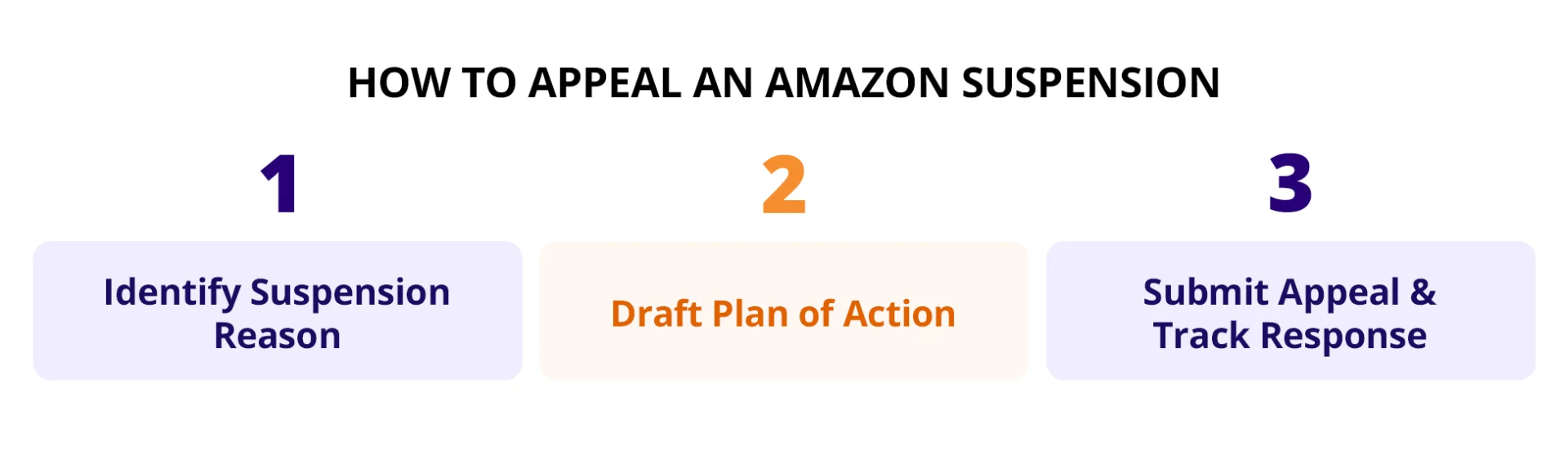
The reinstatement process rewards preparation and patience over speed. Rushing to submit an appeal within hours of receiving the suspension notice is one of the most common reasons for rejection. Amazon expects a thoughtful, evidence-based response, not a quick apology. The five steps below walk through the sequence that consistently produces the best outcomes.
Step 1: Identify the Exact Reason for Suspension
Before you write a single word of your appeal, understand exactly why your account was suspended. Read the notification email carefully. Note the specific policy Amazon cites. Check your Account Health Dashboard for related warnings or performance issues. If you have multiple performance notifications, identify which one is directly tied to the current suspension rather than trying to address every historical warning in one appeal.
For clear cases with a stated policy violation, your path forward is straightforward: address that specific issue. For Section 3 or ambiguous cases, investigate your recent account activity to identify the likely underlying concern.
Step 2: Gather Documentation Before Writing Your Plan of Action
Amazon’s appeal reviewers evaluate your case primarily on evidence, not on the strength of your written argument. Before drafting your Plan of Action, gather everything that supports your position:
- Original supplier invoices from the past 365 days if the issue involves product authenticity
- Tracking data and delivery confirmations if performance metrics are the issue
- Customer service records showing how complaints were handled
- Photos of updated packaging, labeling, or product changes if quality issues were cited
- Screenshots of updated listings, corrected content, or new compliance measures
- Any authorizations or brand licensing agreements relevant to your products
- Documentation of process changes you have implemented or will implement
A Plan of Action without supporting evidence is significantly weaker than one with documented proof of corrective action.
Step 3: Write a Clear, Structured Plan of Action
Your Plan of Action is the core document of the appeal. It should be structured, factual, and specific.
For now, understand that your Plan of Action needs to accomplish three things: acknowledge the root cause of the suspension clearly, demonstrate specific corrective actions you have already taken, and outline preventive measures that will ensure the issue does not recur.
Step 4: Submit Through the Correct Channel in Seller Central
Navigate to your Account Health Dashboard in Seller Central. If the suspension is eligible for appeal through the standard interface, you will see a “Reactivate your account” or “Appeal” button at the top of the page.
Click through the appeal interface, complete any Amazon-required questionnaires or compliance quizzes, upload your supporting documentation, and paste or type your Plan of Action into the appeal text field. Submit only after you have thoroughly reviewed everything.
Do not email [email protected] or similar addresses as your primary appeal channel. Amazon requires appeals to go through the Account Health interface. Emails outside that channel are typically ignored or routed back to the same review team without adding value.
Step 5: Wait, Then Follow Up Appropriately If You Do Not Hear Back
Standard appeal review takes 48 to 72 hours in typical cases and up to several weeks for complex situations, particularly Section 3 suspensions or cases requiring additional investigation.
Do not submit multiple appeals asking about status or repeatedly resubmitting the same POA. Multiple submissions can flag your case for negative review and slow the process further. After 7 to 10 days without response, a single polite follow-up through the Account Health interface is appropriate. Beyond that, if you have received no response after two to three weeks, escalation to Amazon’s Managing Director channel is the next step.
How to Write a Plan of Action That Actually Works
The Plan of Action (POA) is the single most important document in the reinstatement process. Most rejections happen not because the underlying issue was uncorrectable, but because the POA was written poorly.
The Three Required Components
Every effective POA covers three sections in this specific order:
Root Cause: A clear, factual statement of what caused the suspension. Not an excuse. Not a defense. A direct acknowledgment of the underlying issue.
Corrective Action: The specific steps you have already taken to resolve the issue. Not what you will do in the future. What you have done, right now, that has resolved the immediate problem.
Preventive Measures: The systems, processes, and controls you have implemented that will ensure the issue does not recur. This is where you demonstrate that Amazon can trust your account going forward.
What Amazon Actually Wants to See in Each Section
In the Root Cause section, Amazon wants specificity. “Our Order Defect Rate rose above 1 percent because we were experiencing shipping delays with a specific carrier during a high-volume period” is a specific root cause. “We had some shipping issues” is not.
Do not blame customers, competitors, Amazon itself, or unforeseen circumstances as the primary root cause. Even if external factors contributed, Amazon wants to see that you take responsibility for the outcome and understand what specifically in your operation led to the problem.
In the Corrective Action section, Amazon wants evidence of completed actions. “We have switched our primary shipping carrier from Carrier A to Carrier B for all orders shipping to the East Coast, effective November 15” is corrective action. “We plan to review our shipping process” is not.
Reference the documentation you are submitting alongside the POA. “See attached tracking data showing on-time delivery rate of 98 percent for the past 30 days” makes your corrective action verifiable rather than aspirational.
In the Preventive Measures section, Amazon wants to see systems, not intentions. “We now conduct a weekly review of shipping performance every Monday, and any carrier whose on-time delivery rate falls below 95 percent for the week is placed on immediate review” is a preventive measure. “We will monitor our shipping more carefully” is not.
The strongest preventive measures involve specific people, specific frequencies, specific metrics, and specific escalation paths that would catch the problem before it recurred.
Common Mistakes That Get POAs Rejected
Length and vagueness. Amazon reviewers process thousands of appeals. A POA that runs three pages of narrative context, apologies, and explanations of extenuating circumstances is significantly less effective than a POA that fits on one page with clear headers, bullet points, and factual statements.
Emotional language. “We are devastated” or “our business will collapse” or “please have mercy” adds no useful information. Amazon does not make reinstatement decisions based on the seller’s emotional state. Keep the tone professional and factual throughout.
Defensive framing. Even if you believe the suspension was unfair, arguing your innocence is significantly less effective than acknowledging the issue and demonstrating that it has been resolved. Amazon reviewers are looking for evidence that the account is now safe to reinstate, not evidence that the original decision was wrong.
Missing corrective action. A POA that describes the root cause and lists future preventive measures without demonstrating actions already taken is one of the most commonly rejected patterns. Amazon needs to see that the current problem has been resolved, not just that you plan to prevent similar problems in the future.
What to Do If Your Appeal Is Rejected
If Amazon rejects your first appeal, do not panic and do not immediately resubmit a modified version of the same document. Rejection is a signal that something in your first submission did not address what Amazon actually needed to see.
Understanding Why the First Appeal Failed
Amazon typically provides some explanation of why the appeal was rejected. Read this response carefully. Common rejection reasons include:
- Root cause was not clearly identified or was dismissive
- Corrective action was described as future intent rather than completed action
- Preventive measures were vague or lacked specific systems
- Documentation was missing, insufficient, or not clearly connected to the claims in the POA
- The POA addressed the wrong issue (particularly common with Section 3 suspensions)
The rejection is diagnostic information. Use it to identify what specifically to strengthen in your next submission.
Rewrite Rather Than Reformat
Do not simply add a paragraph to your original POA. Rewrite it from scratch, addressing the specific concerns Amazon raised in the rejection response. Add stronger documentation. Tighten the language. Make the root cause more specific. Demonstrate more clearly that corrective actions are completed, not planned.
Then submit the revised appeal through the same Account Health channel.
The Managing Director Escalation Path
If two or three well-constructed appeals have been rejected without a clear path to resolution, escalation to Amazon’s executive escalation team becomes appropriate. This is done by emailing [email protected] or the current Managing Director’s public email address (the specific address changes periodically, so verify the current one before sending).
The escalation email should be short, respectful, and professional. Briefly summarize your case, note that multiple standard appeals have been submitted without resolution, and request review by the executive team. Attach your most recent POA and supporting documentation.
Executive escalation is not a magic solution, but it does route your case to a different team that reviews with fresh eyes. Success rates for escalation are meaningfully higher for cases where the standard appeal team has reached a stalemate.
When to Hire an Amazon Reinstatement Service
Consider a professional Amazon account suspension service in specific situations:
- Section 3 suspensions where the underlying cause is unclear
- Multiple failed appeals where you cannot identify what needs to change
- Cases involving intellectual property complaints where documentation is complex
- Historical suspensions on linked accounts that need to be resolved before a new account can operate
- Situations where the financial impact of prolonged suspension exceeds the cost of professional help by a significant margin
A professional Amazon reinstatement service brings pattern recognition across many similar cases, direct experience with what specific POA structures Amazon accepts, and in some cases, direct escalation channels that individual sellers cannot access. The typical cost is $500 to $2,500 for standard cases and higher for complex Section 3 or IP cases.
For high-revenue accounts where every week of suspension costs meaningfully more than the service fee, professional help usually pays for itself quickly.
How to Avoid Future Account Suspensions
Reinstatement is expensive, stressful, and time-consuming. Prevention is significantly cheaper.
Monitor Account Health Metrics Weekly
Check your Account Health Dashboard at the same time each week and track the trend of your key metrics, not just the current numbers. Amazon Order Defect Rate, Late Shipment Rate, and Cancellation Rate are the three metrics that most directly affect suspension risk.
A rising trend in any metric at an otherwise acceptable current level is a warning signal worth acting on before the threshold is breached. Waiting until you are close to or over a threshold gives you less time to correct the underlying issue.
Keep Supplier Invoices and Product Documentation Ready at All Times
If Amazon requests supplier documentation, you typically have very limited time to provide it. Suppliers you have not communicated with in months may take days or weeks to respond to urgent documentation requests, particularly if they are international.
Maintain organized supplier records for every product you sell: original purchase invoices from the past 12 months minimum, supplier contact information verified within the past 90 days, product authenticity documentation, and brand authorization letters where applicable. If you are asked for these documents on 24 hours’ notice, you should be able to provide them.
Respond to Policy Warnings Before They Escalate
Amazon typically issues warnings before suspending accounts. Every policy warning in your Account Health Dashboard is an opportunity to address the issue before it becomes a suspension. Sellers who ignore warnings or acknowledge them without taking corrective action are the ones most likely to face full suspension later.
When you receive a warning, treat it with the same seriousness as a suspension notice. Identify the root cause, take corrective action, document what you did, and where appropriate, respond in the Account Health interface with a summary of your response.
Never Operate Multiple Accounts Without Written Amazon Approval
Operating multiple seller accounts without Amazon’s explicit permission is one of the most severe policy violations and one of the most frequently detected. Amazon’s systems catch account linkages through IP addresses, payment methods, bank accounts, tax IDs, browser fingerprints, and shared inventory locations.
If you have a legitimate business reason to operate a second account, such as a separate business entity with distinct products and separate operations, request permission through Seller Central before opening the second account. Approved second accounts require documented business justification and Amazon’s written consent. Never assume you can operate parallel accounts and address it later.
Conclusion
An Amazon account suspension is stressful, but it is rarely the end of the road. Most Amazon suspended account cases can be resolved through a well-structured appeal that clearly identifies the root cause, demonstrates completed corrective action, and outlines specific preventive measures. The sellers who successfully get their Amazon account reinstated are the ones who take the time to prepare a proper response rather than rushing to submit within hours of the notification.
If your Amazon account is currently suspended, or you want to reduce the risk of future compliance issues, AMZDUDES, a full service Amazon agency, can help. Our Amazon Account Reinstatement Services support sellers through every stage of the reinstatement process, from identifying the root cause of the suspension and preparing a strong Plan of Action to communicating with Amazon and restoring account health. Beyond reinstatement, we provide proactive account health monitoring and compliance support to help protect your business from future suspensions and keep your store operating with confidence.
Book a free consultation today.
Frequently Asked Questions
Why is my Amazon account suspended?
Amazon suspends accounts for six main reasons: performance metrics falling below required thresholds (ODR, Late Shipment Rate, Cancellation Rate), selling prohibited or restricted products, inauthentic product complaints and IP infringement, listing policy violations including review manipulation, operating multiple accounts without approval, and Section 3 violations that give Amazon broad discretion to close accounts. The specific reason for your suspension is stated in the notification email and, in most cases, on your Account Health Dashboard. If the notice is vague, you are likely dealing with a Section 3 suspension requiring investigation.
What does “Amazon account suspended due to unusual activity” mean?
An Amazon account suspended due to unusual activity notice typically means Amazon’s systems detected patterns they consider inconsistent with normal seller behavior. This can include sudden spikes in sales volume, changes in listing patterns, suspicious login activity, or connections to accounts that have previously been suspended. These suspensions often fall under Section 3 or are precursors to Section 3 suspensions. The appeal should focus on demonstrating that your account activity is legitimate, providing documentation of your business operations, and addressing any specific patterns that may have triggered the flag.
How long does Amazon account reinstatement take?
Standard appeal reviews take 48 to 72 hours for straightforward cases such as performance metric suspensions with clear corrective evidence. Complex cases including IP complaints, Section 3 suspensions, or cases requiring additional documentation can take several weeks. Section 3 suspensions specifically can take a month or longer to resolve, particularly if the initial appeal is rejected and revisions are required.
Can Amazon permanently ban my seller account?
Yes, in severe cases. If multiple appeals fail, if the underlying violation is serious enough (major fraud, sustained review manipulation, dangerous product sales), or if Amazon determines the seller cannot be trusted to operate compliantly, the account can be permanently closed with no further right of appeal. Most standard suspensions are not permanent, but repeated policy violations after reinstatement can lead to permanent closure.
How do I appeal an Amazon account suspension?
To appeal an Amazon account suspension, log into Seller Central and navigate to Performance, then Account Health. Click “Reactivate your account” at the top of the dashboard. Complete any Amazon-required questionnaires, upload supporting documentation, and submit a well-structured Plan of Action covering root cause, corrective action, and preventive measures. Do not email [email protected] or similar addresses as your primary appeal channel. Amazon requires appeals to be submitted through the Account Health interface.
Should I hire an Amazon account suspension service?
Consider a professional Amazon account suspension service when your case involves a Section 3 suspension where the underlying cause is unclear, multiple standard appeals have been rejected, intellectual property complaints requiring complex documentation, historical suspensions on linked accounts affecting your current account, or when the financial impact of continued suspension significantly exceeds the service cost. For simple performance metric suspensions with clear corrective evidence, most sellers can successfully self-appeal.
What is the difference between an Amazon suspension appeal and a Plan of Action?
An Amazon suspension appeal is the overall process of contesting the suspension through Amazon’s Account Health interface. The Plan of Action is the core written document within that appeal explaining what caused the suspension, what you have done to correct it, and how you will prevent it from recurring. The appeal includes the POA plus supporting documentation, any completed questionnaires or compliance quizzes Amazon requires, and the formal submission through Seller Central.
Can I get my Amazon account reinstated if it was closed years ago?
Yes, in many cases. Amazon can review historical suspensions and reinstate accounts that have been inactive or closed for years, provided you can provide a strong Plan of Action addressing the original issue. This is particularly relevant for sellers who want to return to Amazon after a previous suspension or for sellers whose new accounts have been flagged due to historical linked account issues. The process is more difficult for older suspensions because documentation may be harder to reconstruct, but it is possible.