
Key Takeaways
- Successful SEO for Amazon products is built around Amazon’s A10 algorithm, which prioritizes relevance, conversion rate, and seller authority signals.
- Effective Amazon product SEO starts with structured keyword research using competitor ASIN analysis, search demand data, and a three-tier keyword strategy.
- Product titles, bullet points, backend search terms, and descriptions should balance keyword optimization with strong conversion-focused copy.
- High-quality images, reviews, and A+ Content may not directly impact keyword indexing but significantly influence conversion rates and organic rankings.
- External traffic sources combined with Amazon Attribution can strengthen authority signals and support long-term organic ranking growth.
If you’ve spent any time selling on Amazon, you already know that getting your product in front of buyers isn’t just about having a great product, it’s about making sure Amazon’s algorithm understands exactly what you’re selling, who it’s for, and why it should rank above your competitors. That’s what SEO for Amazon products is all about.
This guide walks you through every step of the process, from keyword research to conversion optimization, in the exact sequence you should follow to do SEO for Amazon products.
How Amazon’s A10 Algorithm Actually Ranks Your Products
First, you need to understand what Amazon’s algorithm is actually scoring. A10, the current iteration of Amazon’s ranking engine, evaluates three core signals:
- Relevance: Does your listing match what the buyer searched for? This is determined by where and how your keywords appear across your title, bullets, backend fields, and description.
- Conversion rate: When shoppers land on your listing, do they buy? A higher conversion rate indicates to Amazon that your product better meets demand than your competitors’. This is the most weighted signal.
- Seller authority: Your overall account health, order defect rate, fulfilled-by-Amazon (FBA) status, and sales history all contribute to how much trust Amazon extends to your listing.
Here’s the important thing to understand: these three signals feed each other. A well-optimized listing improves relevance, which drives more qualified traffic, which improves your conversion rate, which builds authority. When you do SEO for Amazon products correctly, you’re not just stuffing keywords, you’re engineering a listing that performs at every stage of the funnel.
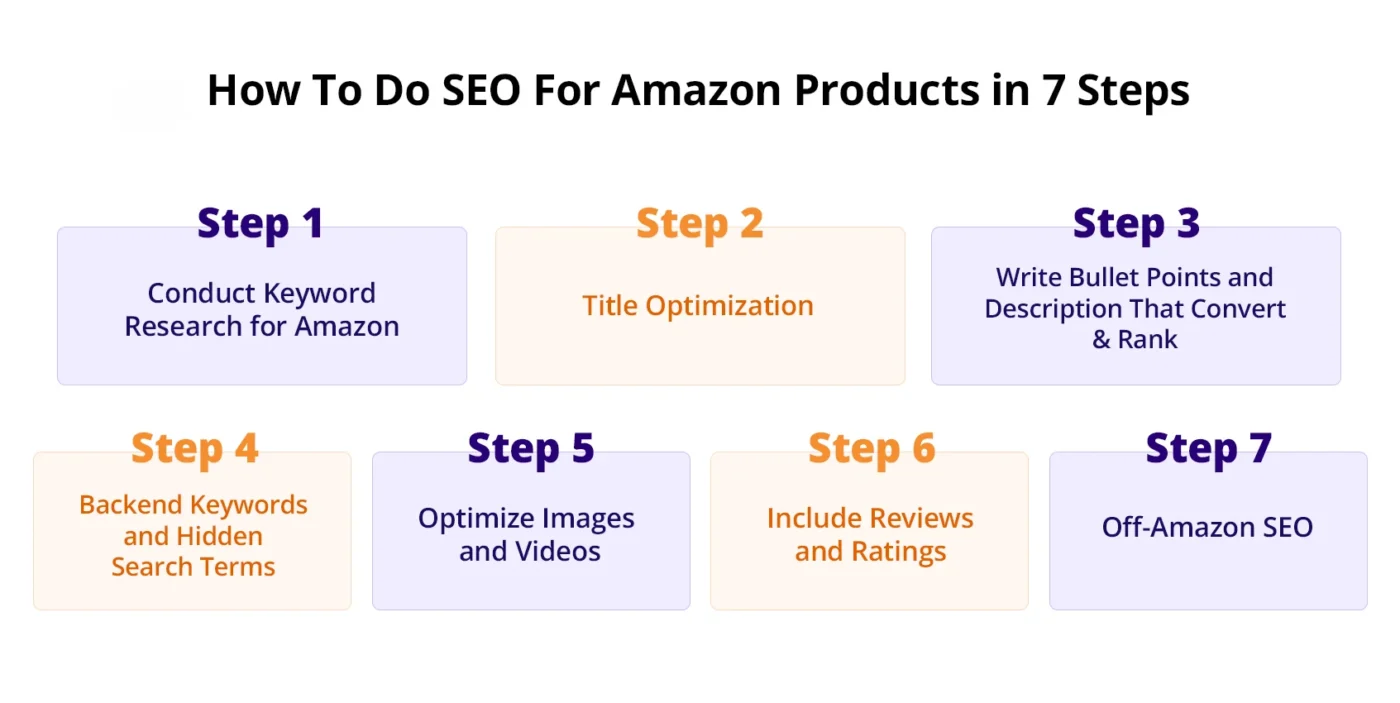
Step 1: Conduct Keyword Research for Amazon
The biggest mistake sellers make is treating Amazon keyword research the same as Google keyword research. Amazon buyers are further down the purchase funnel, they’re not looking for information, they’re looking to buy. Your keyword strategy needs to reflect that.
Reverse-ASIN Your Top 3 Competitors
The fastest way to build a high-intent keyword list is to start with what’s already working for your competitors.
Here’s the exact process:
- Open Helium 10’s Cerebro tool (or Jungle Scout’s Reverse ASIN tool).
- Identify your top 3 organic competitors, the products that consistently appear above you for your main search term.
- Enter their ASINs into Cerebro.
- Filter the results by Search Volume (minimum 300/month) and Organic Rank (position 1–20).
- Export the list. These are keywords your competitors are ranking for organically, and they should be on your radar.
Now cross-reference this with Amazon Brand Analytics (available in Seller Central if you’re brand-registered). Under the Search Frequency Rank report, you can see which search terms are driving the most clicks to your category. This is first-party Amazon data, it’s more accurate than any third-party tool.
Build Your 3-Tier Keyword Map
Once you have your raw keyword list, organize it into three tiers:
Tier 1: Primary Keywords (1–3 keywords) These are your highest-volume, most relevant search terms. They go in your product title. Example: “stainless steel water bottle” for a hydration product.
Tier 2: Secondary Keywords (5–15 keywords) Mid-volume, high-intent terms. These go in your bullet points and product description. Example: “leakproof water bottle for gym”, “insulated bottle 32oz”.
Tier 3: Backend Keywords (remaining relevant terms) Lower volume, long-tail, and supporting phrases. These go in your backend search term fields. Example: “BPA-free flask”, “sports drinking bottle stainless”.
Find Low-Competition, High-Intent Keywords
Not every high-volume keyword is worth targeting, especially on a new or mid-authority listing. To find the best entry points:
- Filter your keyword list for terms with 300–3,000 monthly searches and fewer than 200 competing ASINs on the first page.
- Check the Helium 10 Keyword Difficulty score, aim for anything under 60 when you’re not yet in the top 10 organically.
- Prioritize four-to-six-word phrases that include a specific use case or feature. These convert at a higher rate because the buyer already knows what they want.
Step 2: Title Optimization
Your product title is the most heavily weighted field in Amazon’s relevance algorithm. It’s also the first thing a buyer reads. Getting it right means balancing keyword placement with readability, and understanding that both Amazon and the human reading it need to be satisfied.
Follow Amazon’s Category-Specific Title Formula
Amazon has official style guides for every product category. While the exact format varies, the foundational structure looks like this:
Brand + Primary Keyword + Key Differentiator + Size/Variant/Pack Quantity
For example:
- Wrong: HydraMax Bottle Stainless BPA Free Gym Water 32oz Insulated
- Right: HydraMax Stainless Steel Water Bottle 32oz | Insulated, Leakproof, BPA-Free, Ideal for Gym and Outdoor Use
The second version leads with the primary keyword, reads naturally, and communicates value at a glance.
Always check your category’s style guide in Seller Central under Inventory > Add a Product > Category Listing Report. Amazon will suppress your listing for title violations in competitive categories.
Include Your Primary Keyword in the First 80 Characters
On mobile, which now accounts for over 60% of Amazon browsing, your title gets cut off after roughly 80 characters. Everything after that is invisible unless the buyer taps to expand.
This means your primary keyword must appear in the first 80 characters. Your brand name should come first (Amazon favors brand-titled products), immediately followed by your main keyword phrase.
Use a character counter while writing your title. Count spaces. Don’t assume.
A/B Test Your Title Using Manage Your Experiments
If you’re brand-registered, you have access to Manage Your Experiments in Seller Central. Use it.
Run a title A/B test for a minimum of 4 weeks. Test one variable at a time, keyword placement, order of features, presence or absence of a differentiating phrase. Amazon will show each version to 50% of traffic and report which drives a higher click-through rate (CTR) and conversion rate (CVR).
Most sellers never do this. The ones who do consistently outrank competitors with similar products because they compound small conversion improvements over time.
Step 3: Write Bullet Points and Description That Convert & Rank
Your five bullet points are where relevance and conversion intersect. They need to do two jobs simultaneously: help Amazon index your listing for secondary and long-tail keywords, and persuade a real person to hit “Add to Cart.”
The FACTO Bullet Framework
Each bullet point should follow this structure:
- F — Feature: What is the specific feature?
- A — Action: What does that feature do?
- C — Context: In what situation or use case?
- T — Trust signal: Why should the buyer believe you?
- O — Objection handled: What concern does this address?
Here’s an example for a travel pillow:
“ERGONOMIC MEMORY FOAM SUPPORT: Contours to the natural curve of your neck to prevent stiffness on flights over 3 hours. Clinically tested by 500+ frequent flyers. No more waking up with a sore neck in the middle seat.”
That single bullet hits a feature, explains the benefit, provides context (flights over 3 hours), a trust signal (tested by 500+ flyers), and handles the main objection (neck pain during travel).
Not every bullet needs all five elements. But every bullet needs at least F + A + C. The rest is conversion optimization.
Place Keywords in Bullets Naturally
Here’s where your Tier 2 keywords come in. Distribute them across your five bullets, one or two per bullet, woven naturally into the sentence. Amazon indexes every word in your bullets, so placement matters, but so does readability.
What you should avoid: “water bottle stainless steel 32oz BPA free insulated leakproof gym outdoor sports”, this is keyword stuffing, and it hurts both conversion and indexation.
What you should do: use each secondary keyword once, in a sentence that reads naturally to a human buyer. Amazon’s algorithm is sophisticated enough to identify unnatural keyword patterns, and shoppers will bounce off a listing that reads like a word salad.
A+ Content vs Basic Description: When Each One Wins
If you’re brand-registered, A+ Content replaces your product description and is always worth using. A+ Content allows you to add comparison charts, lifestyle imagery, expanded feature sections, and brand story modules, all of which improve conversion rate.
What A+ Content does not do: it does not get indexed for keywords by Amazon’s algorithm. This is a common misconception. The text inside A+ Content modules is not crawled for keyword ranking purposes.
This means your basic product description (if you don’t have A+) is still a valuable keyword field. Use it. Write 200–400 words that naturally incorporate your remaining Tier 2 keywords and tell a complete product story. If you do have an A+, all your keyword work needs to happen in the title, bullets, and backend fields.
Step 4: Backend Keywords and Hidden Search Terms
The backend of your Amazon listing is invisible to buyers but fully visible to Amazon’s indexation engine. These fields are where you capture all the keywords that didn’t fit naturally into your title and bullets, and they’re one of the most underused levers in Amazon product SEO.
Fill All 250 Bytes Without Wasting a Single Character
Amazon gives you 250 bytes in the Search Terms field (note: bytes, not characters, some special characters count as 2 bytes). Here’s how to use every single one:
- No commas: Amazon treats spaces as separators. Commas waste bytes.
- No repeated words: If a keyword already appears in your title, you do not need it in your backend. Amazon already indexes it.
- No brand names (yours or competitors’): This violates Amazon’s terms of service and can result in listing suppression.
- No quotation marks or special characters.
- Use spaces between terms, not punctuation.
A well-structured backend field looks like this:
“leakproof flask hiking camping trail running outdoor adventure travel commuter dishwasher safe wide mouth lid”
Every word adds a new keyword combination Amazon can match to relevant searches.
Use the Supporting Keyword Fields for Long-Tail and Niche Terms
Beyond the Search Terms field, your listing has additional backend fields that are often ignored:
- Subject Matter: Add use-case keywords here. “hydration for marathon training”, “daily water intake tracker”.
- Intended Use: Be specific. “hiking, “office, “gym, “camping”, each one opens up a new set of search matches.
- Target Audience: “athletes”, “students”, “outdoor enthusiasts”, Amazon uses this to match your product to lifestyle-based searches.
Also, use this section to add:
- Common misspellings of your product name or category term (e.g., “watter bottle”, “stailess steel”)
- Abbreviations buyers actually type (“BPA free”, “SS flask”, “32 oz”, and “32oz” as separate entries)
- Spanish or regional language equivalents if your product sells across a multilingual marketplace
Step 5: Optimize Images and Videos
Here’s something most sellers don’t connect: your images don’t directly affect keyword indexation, but they have an enormous indirect effect on your Amazon SEO ranking, because they drive your conversion rate, and conversion rate is one of Amazon’s top ranking signals.
Main Image Rules That Maximize CTR From Search Results
Your main image is the only thing a buyer sees before they decide whether to click your listing. It appears in search results next to your title and price. Treat it like a billboard.
Amazon’s requirements for main images:
- Pure white background (RGB 255, 255, 255), no props, no text, no logos other than what’s on the product itself
- Product must fill at least 85% of the frame
- Minimum 1,500 × 1,500 pixels (ideally 2,000 × 2,000px to enable zoom)
- JPEG format, sRGB color space
Beyond compliance, optimize for the search results page. Look at your product in its search context, surrounded by competitor thumbnails. Does it stand out? Does it communicate the product instantly? Test different angles, shadows, and product configurations against your CTR data.
The 7-Image Sequence Strategy
You have up to 9 image slots. Here’s the sequence that converts best across most product categories:
| Slot | Purpose | What It Shows |
| 1 | Hero shot | Clean product on white, maximum fill |
| 2 | Scale/context | Product next to a recognizable object or in-use |
| 3 | Feature callout | Close-up with text callouts on key features |
| 4 | Lifestyle | Product in the hands or environment of your target buyer |
| 5 | Comparison chart | Your product vs. generic alternatives, your wins only |
| 6 | Social proof | Review quotes or aggregate rating displayed visually |
| 7 | Multi-pack / variant | What comes in the box, all included accessories |
This sequence mirrors the buyer’s decision-making process: What is it → How big is it → What makes it special → Do I see myself using it → How does it compare → Can I trust it → What exactly am I getting.
Alt Text and File Naming for Google Image Indexation
This is the most overlooked off-Amazon SEO lever for product listings. When Google crawls Amazon product pages, it reads image file names and alt text. Most sellers upload images named IMG_4892.jpg, which tells Google and Amazon absolutely nothing.
Before uploading, rename your files descriptively:
- stainless-steel-water-bottle-32oz-insulated-hydramax.jpg
- leakproof-gym-water-bottle-wide-mouth-lid.jpg
This contributes to your listing appearing in Google Image Search, which drives external traffic to your Amazon page, and external traffic that converts is one of the signals that improves your A10 authority score.
Step 6: Include Reviews and Ratings
Reviews affect your Amazon product SEO in two ways: directly, by improving your conversion rate (which feeds the ranking algorithm), and indirectly, by increasing the keyword-rich text on your listing page that Amazon indexes.
How Review Velocity Affects Your Rank in the First 30 Days
The first 30 days after a product launch are the most important window for your organic ranking trajectory. Amazon’s algorithm gives a ranking boost to new listings, but only if they demonstrate conversion and review velocity during this period.
The two compliant tactics to accelerate early reviews:
- Amazon Vine: Available to brand-registered sellers, Vine sends your product to Amazon’s vetted reviewer community in exchange for honest reviews. You can enroll up to 30 units. Vine reviews typically appear within 2–4 weeks and carry high trust signals with the algorithm.
- Buyer-Seller Messaging (Request a Review button): In Seller Central, use the “Request a Review” button (available for each order between 5 and 30 days after delivery). This sends Amazon’s standardized review request. It’s fully compliant. Use it for every single order.
What you should not do: never request reviews via email outside of Amazon’s system, never incentivize reviews, never use third-party review services that violate Amazon’s terms. The short-term gain is not worth the permanent listing removal risk.
Responding to Negative Reviews as an Indexation Tactic
When you respond to a customer review in Seller Central, your response text appears on the product page and is crawled by Amazon. Most sellers write generic responses like “We’re sorry to hear about your experience.”
You should take a different approach. Write keyword-rich, genuinely helpful responses that address the specific concern raised. For example:
“Thank you for your feedback on the HydraMax 32oz stainless steel water bottle. We’ve noted your concern about the lid seal and want to make this right. Our insulated water bottle features a triple-lock leakproof mechanism. If yours isn’t performing as expected, please contact us directly for an immediate replacement.”
That response uses natural secondary keywords (stainless steel water bottle, insulated water bottle, leakproof), demonstrates seller responsiveness (which Amazon tracks), and contributes keyword density to your listing page, all in one action.
Step 7: Off-Amazon SEO
One of the most significant shifts in Amazon’s A10 algorithm compared to its predecessor is how much weight it gives to external traffic. When traffic flows to your listing from outside Amazon and converts, it tells the algorithm that your product has authority beyond the platform. That directly boosts your organic rank.
Build a Blog or Comparison Page That Ranks on Google
The highest-quality source of external traffic is organic Google traffic from content you own. Here’s the exact content structure that works:
Step 1: Create a blog post or landing page targeting a Google search query related to your product. Examples:
- “Best insulated water bottles for hiking”
- “How to choose a stainless steel water bottle”
Step 2: Structure the content as a hybrid how-to + buying guide. Address the search intent (informational) while positioning your product as the recommended solution.
Step 3: Include a clear CTA button linking to your Amazon listing using an Amazon Attribution link (see below). This tracks the traffic source and signals to Amazon that the sale came from external discovery.
A 1,500–2,000-word post targeting a medium-competition Google keyword can rank within 60–90 days if your domain has basic authority. The compounding effect of Google rankings that funnel to your Amazon listing is one of the most durable SEO strategies available to private label sellers.
Set Up Amazon Attribution Links
Amazon Attribution is a free tool in Seller Central (under the Advertising menu) that gives you trackable links for external traffic sources. Every time someone clicks your Attribution link, visits your listing, and makes a purchase, Amazon records that event and credits your listing with an external conversion.
Setup takes under 10 minutes:
- Go to Advertising > Amazon Attribution in Seller Central.
- Create a new campaign and select the product you want to track.
- Generate a tracking tag for your traffic source (blog, Instagram, YouTube, etc.).
- Use this link in all external content pointing to your Amazon listing.
Beyond SEO, Attribution data tells you exactly which external channels are driving conversions, so you can double down on what’s working.
Which External Traffic Sources Convert Best
Not all external traffic is equal. Based on what consistently performs across category types, here’s how the main sources rank for conversion quality:
- Pinterest: Exceptionally high purchase intent, especially for home, kitchen, beauty, and outdoor categories. Pinterest users are often in active research/buying mode. Create product pins with keyword-rich descriptions and link directly to your listing via Attribution.
- YouTube: Product review and demonstration videos drive highly qualified traffic. A 5-minute honest product review from a relevant creator can generate consistent conversions for 12–24 months. Commission micro-influencers (10K–100K subscribers) in your niche rather than large channels, the audience trust is higher, and the cost is lower.
- Instagram/TikTok: High traffic volume but lower conversion rates than Pinterest and YouTube. More effective for brand awareness and review generation than for direct Amazon rank impact.
Regardless of platform, always route external traffic through Amazon Attribution links. The data you collect is as valuable as the traffic itself.
Conclusion
Amazon SEO is not a one-time task or a checklist you complete once and forget. The sellers who consistently win on Amazon understand that ranking growth comes from building systems and improving them over time. Strong keyword research, optimized titles, persuasive content, backend search terms, high-converting images, review generation, and external traffic all work together as part of a larger ecosystem.
Small improvements across each area create a compounding effect that strengthens visibility, increases conversions, and builds long-term ranking authority. The brands that dominate search results rarely rely on shortcuts; they are consistently refining and optimizing every part of the customer journey.
If you’re struggling with product visibility, low rankings, or creating a scalable SEO strategy, AMZDUDES, a full-service Amazon agency, can help optimize your listings, strengthen your search presence, and build a long-term growth system for your brand. Ready to improve your rankings and turn Amazon SEO into a sustainable growth engine?
Book a free consultation call with AMZDUDES today.
FAQs
1. What is SEO for Amazon products?
SEO for Amazon products is the process of optimizing product listings to improve visibility and rankings in Amazon search results through keyword optimization, conversion improvements, and authority-building strategies.
2. How does Amazon SEO work?
Amazon SEO works through the A10 algorithm, which evaluates product relevance, conversion rate, seller performance, and customer engagement signals to determine rankings.
3. What are the most important Amazon SEO ranking factors?
The biggest Amazon product SEO factors include keyword relevance, conversion rate, product reviews, click-through rate, listing quality, sales history, and external traffic signals.
4. How do I find keywords for Amazon SEO?
You can find keywords for SEO for Amazon products using reverse ASIN tools like Helium 10, Amazon Brand Analytics, competitor analysis, search term reports, and Amazon autocomplete suggestions.
5. Does external traffic help Amazon SEO?
Yes. External traffic from blogs, Pinterest, YouTube, social media, and other channels can improve Amazon rankings when it converts effectively and is tracked using Amazon Attribution.