
Key Takeaways
- The Amazon Dangerous Goods program allows approved FBA sellers to store and fulfill hazardous products, but each ASIN must pass Amazon’s compliance review process individually.
- Products such as lithium batteries, aerosols, perfumes, cleaning chemicals, and hand sanitizers commonly trigger an Amazon hazmat review due to their hazardous classifications.
- A complete and compliant Safety Data Sheet (SDS) is one of the most important requirements for Amazon FBA hazmat approval, and missing or outdated documentation is a leading cause of rejection.
- Amazon dangerous goods approvals are marketplace-specific, meaning approval in one marketplace does not automatically apply across other Amazon regions.
- Sellers who proactively manage documentation, packaging standards, and compliance requirements reduce the risk of inventory holds, listing suppression, and costly account issues.
If you sell on Amazon, or plan to, there is one compliance area that can stop your business cold overnight: dangerous goods. A single mislabeled product, a missing Safety Data Sheet, or an unresolved Amazon hazmat review can get your ASIN suppressed, your shipment rejected at the fulfillment center, or, in serious cases, your account suspended.
The good news is that the Amazon dangerous goods program is navigable. Thousands of sellers successfully ship batteries, aerosols, cleaning products, and other regulated items through FBA every day. What separates them from sellers who get stuck is knowing exactly what Amazon requires, preparing the right documentation, and following the process in the right order.
This guide walks you through every step, from understanding what qualifies as a dangerous good to enrolling in the FBA dangerous goods program to getting your hazmat approval and staying compliant long-term.
What Are Amazon Dangerous Goods?
Amazon dangerous goods, also called hazmat, are products that contain substances capable of posing a risk to health, safety, or the environment during storage or transportation. Amazon defines these products in alignment with international transport regulations, specifically the IATA (International Air Transport Association) and DOT (Department of Transportation) frameworks.
In plain terms: if your product contains a flammable, corrosive, toxic, pressurized, or reactive substance, it likely falls under Amazon’s dangerous goods classification.
This matters to you as an FBA seller because Amazon stores and ships your inventory on your behalf. When a hazardous product is stored or transported incorrectly, the consequences can be severe, including fires, chemical exposure, and regulatory violations. Amazon takes this seriously, and so should you.
What many sellers don’t realize is that common, everyday products are classified as dangerous goods. Nail polish, phone chargers with lithium batteries, spray paint, hand sanitizer, insect repellent, these are not exotic industrial chemicals. They are mainstream consumer products that sit squarely on the Amazon dangerous goods list. If you sell in categories like health and beauty, electronics, automotive, home improvement, or grocery, there is a real chance your products are affected.
Ignoring this is not an option. Amazon proactively flags ASINs during listing creation or at the point of shipment. If your product is flagged and you haven’t gone through the proper approval process, your inventory will be held, your listing deactivated, and you will receive a compliance request that you must resolve before selling again.
Amazon’s Dangerous Goods Categories: The Complete Amazon Dangerous Goods List
Amazon’s classification system follows the nine hazard classes established by the United Nations and IATA. Understanding which class your product falls into is the first thing you need to determine, everything else in the compliance process depends on it.
Here is a breakdown of each class with real product examples you are likely to encounter as an FBA seller:
- Class 1: Explosive Products designed to explode or combust rapidly. This includes certain fireworks, airbag inflators, and novelty explosive items. Most Class 1 products are prohibited from FBA entirely.
- Class 2: Gases Compressed, liquefied, or dissolved gases. This includes aerosol sprays (hairspray, cooking spray, air freshener), CO2 cartridges, and butane lighters. Aerosols are among the most commonly flagged products in this class.
- Class 3: Flammable Liquids Liquids with a flash point below 60°C. This covers a wide range of consumer products: nail polish, nail polish remover, perfumes and colognes, paint thinner, fuel additives, and most alcohol-based hand sanitizers. If you sell beauty or personal care products, this class is critical to understand.
- Class 4: Flammable Solids Solid materials that are easily ignited or may cause fire through friction. This includes certain matches, fire starters, and some metallic powders.
- Class 5: Oxidizers and Organic Peroxides. Substances that release oxygen and intensify combustion in other materials. This includes pool chemicals, hair bleaching products, and some laundry additives.
- Class 6: Toxic and Infectious Substances Products that can cause harm through ingestion, inhalation, or skin contact. This class includes pesticides, rodenticides, and certain cleaning concentrates.
- Class 7: Radioactive Materials Products emitting ionizing radiation. These are almost universally restricted from FBA.
- Class 8: Corrosive substances that can damage living tissue or corrode materials on contact. Drain cleaners, oven cleaners, battery acid, and certain rust removers fall here.
- Class 9: Miscellaneous Dangerous Goods A catch-all class that includes lithium batteries (both standalone and in equipment), dry ice, magnetized materials, and environmentally hazardous substances. Lithium batteries are by far the most common Class 9 product in FBA and deserve special attention.
A critical point: a product does not need to be dangerous in use to be classified as a dangerous good. What matters is its chemical composition and behavior during transport and storage. Amazon evaluates this at the ingredient and material level, not just by how you market the product.
Check If Your Product Is Flagged: How the Amazon Hazmat Review Works
The Amazon hazmat review is Amazon’s system for evaluating whether a product is a dangerous good before it is accepted into an FBA fulfillment center. Understanding how this review is triggered and what happens during it, saves you significant time and frustration.
What Triggers an Amazon Hazmat Review?
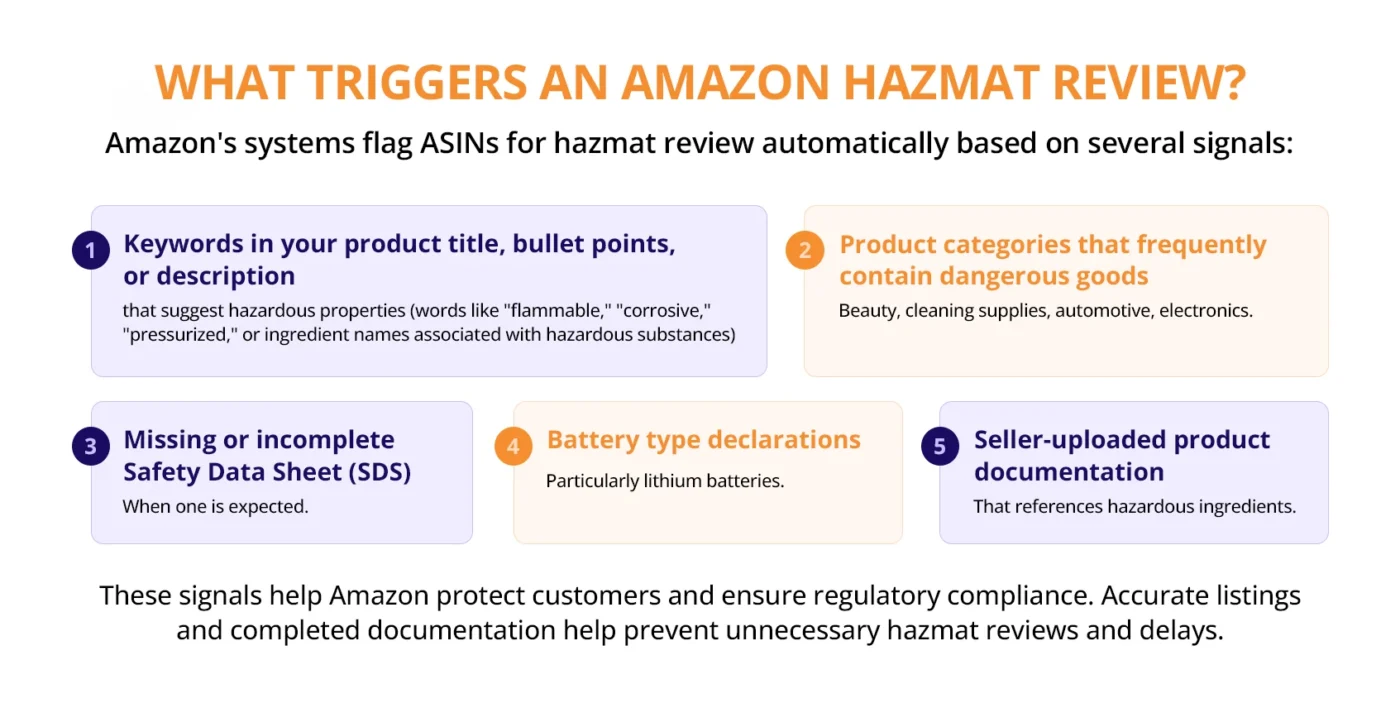
Amazon’s systems flag ASINs for hazmat review automatically based on several signals:
- Keywords in your product title, bullet points, or description that suggest hazardous properties (words like “flammable,” “corrosive,” “pressurized,” or ingredient names associated with hazardous substances)
- Product categories that frequently contain dangerous goods (beauty, cleaning supplies, automotive, electronics)
- Missing or incomplete Safety Data Sheet (SDS) when one is expected
- Battery type declarations, particularly lithium batteries
- Seller-uploaded product documentation that references hazardous ingredients
What happens during the review?
Once flagged, your ASIN enters a review queue. During this period, you cannot send new inventory of that product to FBA. If inventory is already at a fulfillment center, Amazon may place it in a hold status.
Amazon’s dangerous goods review team, a specialist compliance function, evaluates the available product information against its classification criteria. They may request additional documentation from you, typically an SDS or a battery exemption sheet.
The review results in one of three outcomes:
- Not a dangerous good: the product is cleared, and you can proceed normally with no restrictions.
- Dangerous good (approved): the product is classified as hazmat and enrolled in the FBA dangerous goods program, allowing it to be stored and shipped under hazmat conditions.
- Dangerous good (not approved): the product either cannot be sold via FBA or requires additional documentation before it can be reconsidered.
How Long Does the Amazon Hazmat Review Take?
Amazon’s published guidance indicates reviews typically take up to four business days once you submit the required documentation. In practice, complex cases or periods of high submission volume can extend this to two to three weeks. Plan your inventory shipments accordingly, do not create shipments for flagged ASINs before the review is resolved.
How Do You Check Your Review Status?
In Seller Central, go to Inventory > Manage FBA Inventory > and look for the “Dangerous Goods Status” column. You can also access the FBA Inventory page and filter by “Hazmat Review” to see all ASINs currently under review and their status.
Enroll in the FBA Dangerous Goods Program: Eligibility and Requirements
The Amazon FBA hazmat program, formally called the FBA Dangerous Goods program, is the framework that allows approved sellers to store and fulfill hazardous products through Amazon’s fulfillment network. Not every seller is automatically enrolled, and not every product is automatically eligible.
Who is Eligible for the FBA Dangerous Goods Program?
Any professional seller account can participate in the FBA Dangerous Goods Program. Individual seller accounts are generally not eligible. Beyond account type, eligibility is determined product by product, there is no blanket enrollment. Each ASIN must be individually reviewed and approved.
What Products Can be Enrolled?
Amazon maintains a list of permitted dangerous goods that can be stored and fulfilled through FBA. Broadly, these fall into three categories:
- Fully permitted: Products that meet all packaging, labeling, and documentation requirements and fall within Amazon’s approved hazard classes and quantity limits
- Conditionally permitted: Products that require specific documentation, special packaging, or are limited to certain fulfillment centers (Amazon has dedicated hazmat FCs)
- Prohibited: Products that Amazon will not accept under any circumstances via FBA, these include Class 1 explosives, most Class 7 radioactive materials, certain Class 6 toxic substances, and products exceeding maximum quantity thresholds
What Documentation Does the Amazon FBA Hazmat Program Require?
For most dangerous goods, you will need to provide one or more of the following:
- Safety Data Sheet (SDS): The primary document for classifying and managing chemical hazards. Required for the majority of liquid, gas, and chemical products. Must follow the GHS 16-section format.
- Battery exemption sheet: Required for lithium battery products (UN 38.3 test summary is also commonly requested)
- Dangerous goods exemption sheet: Used to declare that a product, despite appearing hazardous, meets the criteria for a limited quantity or excepted quantity exemption
- Product label images: Amazon may request images of your current product label showing any hazard pictograms
Key Restrictions to Know Before Enrolling:
- Maximum net quantity per unit is typically 500ml or 500g for most liquid and solid dangerous goods
- Aerosol products must not exceed a specified internal pressure threshold
- Certain dangerous goods can only be stored at Amazon’s designated hazmat fulfillment centers. You cannot select just any FC when creating your shipment
How to Get Your Amazon FBA Hazmat Approval: The Exact Submission Process
Getting your Amazon FBA hazmat approval is a step-by-step process inside Seller Central. If you follow it precisely, most approvals go through without complications. Here is the exact path.
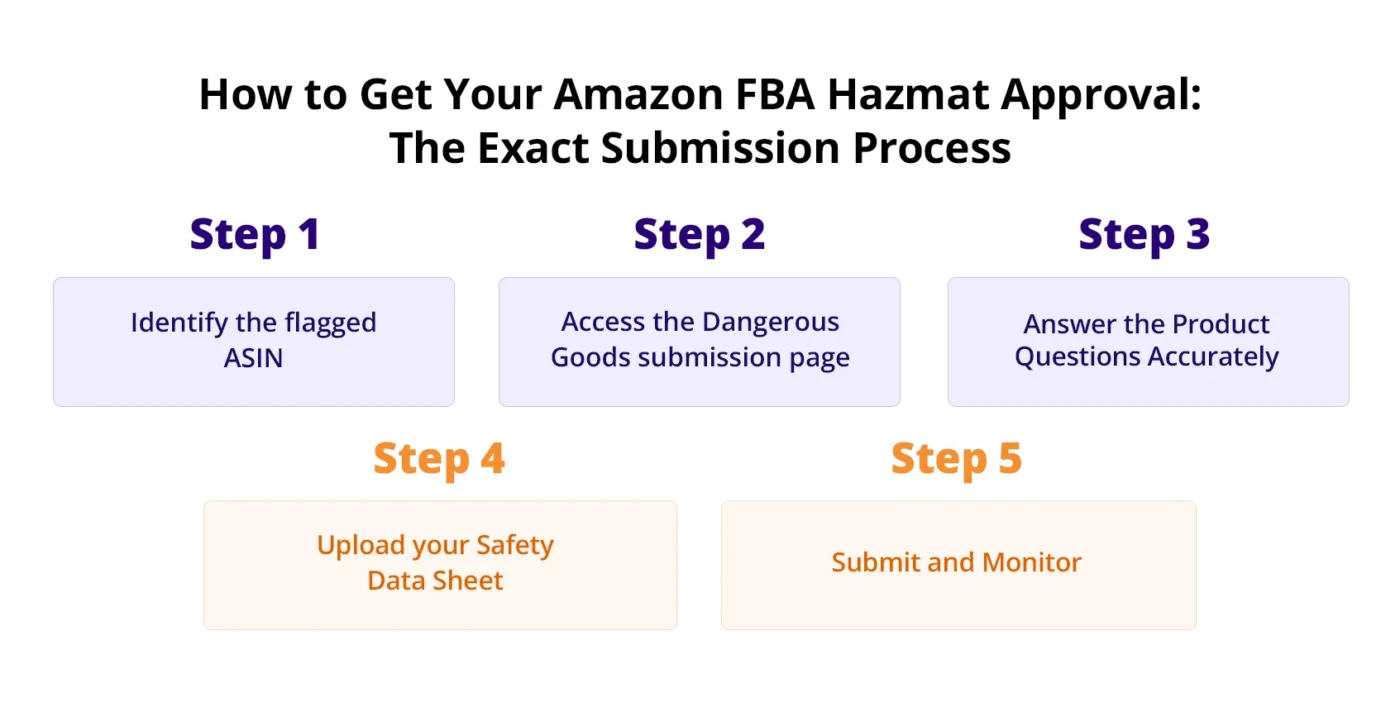
Step 1: Identify the flagged ASIN
Go to Seller Central > Inventory > Manage FBA Inventory. Look for ASINs with a “Hazmat Review Required” or “Not Fulfilled by Amazon – Dangerous Goods” status. These are the ASINs you need to resolve.
Step 2: Access the Dangerous Goods submission page
Click on the ASIN in question. You will see an option to “Submit dangerous goods information.” This takes you to the compliance submission form for that specific product.
Step 3: Answer the Product Questions Accurately
Amazon will ask you a series of questions about your product:
- Does the product contain a battery? If yes, what type?
- Does the product contain pressurized gas?
- Does the product contain a liquid, powder, or solid with hazardous properties?
- Does the product come with an SDS?
Answer these based on the actual product composition, not how you want Amazon to classify it. Misrepresenting your product here can result in account action if discovered later.
Step 4: Upload your Safety Data Sheet
If your product requires an SDS, upload it in PDF format. Amazon’s system accepts English-language SDS documents; if your manufacturer provides the SDS in another language, you will need a compliant English translation.
The SDS must:
- Be in GHS 16-section format
- Include the exact product name matching your ASIN
- Show a date of issue or revision within the past three years
- Be signed or issued by the manufacturer or a qualified safety professional
Step 5: Submit and Monitor
After submission, you will receive a confirmation that your information is under review. Monitor the status in Seller Central under the Dangerous Goods status column. If Amazon needs additional information, they will send a notification to your registered email and your Seller Central notifications inbox.
Do not create FBA shipments for this ASIN until the status shows “Approved” or “Not a Dangerous Good.” Sending inventory before resolution will result in it being rejected or held at the fulfillment center.
How to Prepare Your Safety Data Sheet (SDS) the Right Way
The Safety Data Sheet is the single most important document in the Amazon hazmat approval process. It is also the most common reason for rejection. An incomplete, outdated, or incorrectly formatted SDS will delay your approval and may result in outright rejection of your submission.
Here is what you need to know to get this right the first time.
What is an SDS, and Why Does Amazon Require It?
An SDS (formerly called an MSDS, Material Safety Data Sheet) is a standardized document that describes the physical, chemical, and hazardous properties of a substance, along with instructions for safe handling, storage, emergency response, and disposal. Amazon requires it because it is the global standard for communicating chemical hazard information, and it gives their fulfillment center teams the information they need to safely handle your product if something goes wrong.
The GHS 16-Section Format
Amazon requires SDS documents to follow the Globally Harmonized System (GHS) format, which organizes information into exactly 16 sections:
- Identification
- Hazard(s) identification
- Composition/information on ingredients
- First-aid measures
- Fire-fighting measures
- Accidental release measures
- Handling and storage
- Exposure controls / personal protection
- Physical and chemical properties
- Stability and reactivity
- Toxicological information
- Ecological information
- Disposal considerations
- Transport information
- Regulatory information
- Other information
All 16 sections must be present and completed. Amazon’s reviewers will check each section. Missing sections, even ones that seem irrelevant to your product, will trigger a rejection.
How to Obtain a Compliant SDS
Your best source is always the product manufacturer or chemical supplier. If you are sourcing from a manufacturer, request the SDS explicitly before placing your first order. Any reputable manufacturer of a chemical-containing product will have one.
If you are a brand owner formulating your own product, you will need to commission an SDS from a qualified safety professional or use specialist SDS-authoring software. This is not a document you should write yourself unless you have formal chemistry and regulatory training, inaccuracies in an SDS can create serious legal liability beyond the Amazon context.
Critical Details that Must Match Your ASIN
The product name on your SDS must match, or clearly correspond to, the product name on your Amazon listing. If you sell “XYZ Daily Facial Cleanser 150ml” and your SDS says “XYZ Facial Cleanser Formulation B,” Amazon’s reviewers may reject it as non-matching. Get this detail right before submitting.
SDS Expiry: the Three-Year Rule
Amazon requires that your SDS has been issued or revised within the past three years. An SDS dated more than three years ago will be rejected. If your manufacturer has not updated the SDS, request a re-issue, even if the formulation hasn’t changed, they can reissue with a new revision date.
Label and Package Your Hazmat Products for FBA Shipment
Approval from Amazon’s dangerous goods review is not the finish line. Before your products can be received at an FBA fulfillment center, they must be correctly labeled and packaged. Non-compliant packaging is one of the most common reasons FBA shipments are rejected at the receiving dock.
GHS Hazard Labeling
Products classified as dangerous goods must display the appropriate GHS hazard pictograms on their retail packaging. These are the standardized diamond-shaped icons representing hazard classes, flame (flammable), skull and crossbones (toxic), corrosion (corrosive), and so on.
If your product is manufactured for markets where these labels are required by law (which includes the US, EU, and most major markets), your manufacturer should already be applying them. If your product is not currently labeled correctly, work with your manufacturer to update the label before shipping inventory to Amazon.
Inner and Outer Packaging Requirements
Amazon has specific requirements for how dangerous goods are packaged within the shipping box:
- Liquids must have leak-proof inner packaging and absorbent material sufficient to contain the entire contents in the event of a spill
- Pressurized products (aerosols) must be protected against accidental activation during transit, and dust caps must be in place
- Products must be individually sealed and cannot rely on the outer shipping box as the primary containment
Quantity Limits Per Box
There are maximum quantity limits for dangerous goods per individual shipment box. For most Class 3 flammable liquids, this is typically 1 litre net quantity per inner receptacle and a maximum net quantity per outer box as specified in IATA limited quantity provisions. Your SDS Section 14 (Transport Information) will specify the applicable UN number and quantity limits, use this as your reference.
Lithium Battery Packaging: A Special Case
Lithium batteries are the most widely mishandled product category in the Amazon dangerous goods program. Amazon distinguishes between:
- Lithium-ion batteries (rechargeable): UN 3480 (standalone) or UN 3481 (in or with equipment)
- Lithium metal batteries (non-rechargeable): UN 3090 (standalone) or UN 3091 (in or with equipment)
For most consumer electronics and accessories, you are dealing with lithium-ion batteries in equipment (UN 3481). The key requirements are:
- Battery state of charge must not exceed 30% for standalone cells
- Batteries must be protected against short circuit (insulated terminals, individual packaging)
- The box must display the lithium battery handling label (Class 9 mark) if above the small quantity threshold
- A UN 38.3 test summary proving the battery has passed the required safety tests may be required by Amazon
Creating Your FBA Shipment for Hazmat Products
When you create a shipment in Seller Central for a dangerous goods product, the system will automatically route it to a hazmat-designated fulfillment center. You cannot manually override this. Do not attempt to send dangerous goods in a standard shipment routed to a non-hazmat FC, it will be rejected and returned at your cost.
Common Reasons Amazon Rejects Hazmat Submissions and How to Fix Each
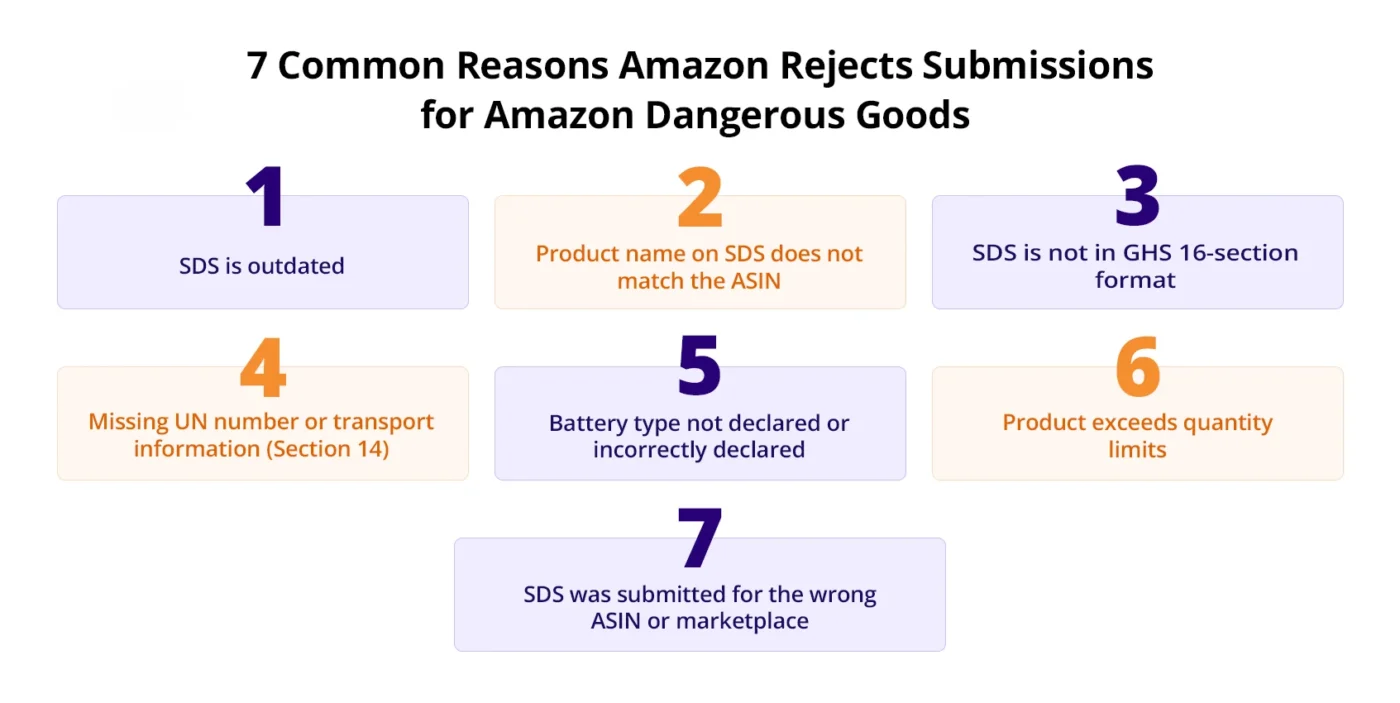
If your Amazon hazmat review comes back with a rejection or a request for additional information, you are not alone. This is where many sellers lose time, going back and forth with Amazon’s compliance team without understanding the specific issue. Here are the seven most common rejection reasons and exactly how to resolve each one.
1. SDS is outdated
Problem: Your SDS was issued or last revised, more than three years ago.
Fix: Contact your manufacturer and request a reissued SDS with a current revision date. Even if the formulation hasn’t changed, the document date must be within three years. Do not alter the date on an existing document, this constitutes document fraud and will result in account suspension if discovered.
2. Product name on SDS does not match the ASIN
Problem: The product name on your SDS differs from the product name on your Amazon listing, leading reviewers to question whether the SDS covers the specific product being reviewed.
Fix: Either update your Amazon listing title to match the SDS (if the SDS name is the more official one), or request a revised SDS from your manufacturer that references the exact product name as it appears on your listing. Add a cover note in your submission explaining the naming relationship if there is a legitimate reason for a minor difference.
3. SDS is not in GHS 16-section format
Problem: Your SDS follows an older MSDS format with fewer sections, or it has been auto-generated by a system that does not produce fully compliant output.
Fix: You need a new SDS. An old-format MSDS is not acceptable, Amazon requires the full GHS format. Commission a new SDS from a qualified provider if your manufacturer cannot supply one.
4. Missing UN number or transport information (Section 14)
Problem: Section 14 of the SDS (Transport Information) is incomplete or lists “not regulated” when the product is in fact regulated.
Fix: Work with your SDS author to complete Section 14 accurately. This section must include the UN number, proper shipping name, hazard class, packing group (if applicable), and marine pollutant status. If the product genuinely is not regulated for transport, the SDS must explain why, not simply leave the section blank.
5. Battery type not declared or incorrectly declared
Problem: Your product contains a lithium battery, but you did not declare the battery type in your submission, or you declared it as alkaline when the product actually uses lithium-ion cells.
Fix: Obtain the battery exemption sheet and UN 38.3 test summary from your battery manufacturer or the product OEM. Resubmit with accurate battery type information, lithium-ion or lithium metal, and the supporting documentation.
6. Product exceeds quantity limits
Problem: Your product’s net quantity (volume or weight of hazardous material per unit) exceeds the maximum permitted for FBA. This is common with larger-format cleaning products, industrial-sized aerosols, or bulk liquid products.
Fix: If the product genuinely exceeds Amazon’s quantity limits, it cannot be sold through FBA. Consider whether you can reformulate the product to a smaller unit size, or whether merchant-fulfilled (FBM) is a viable alternative channel for this SKU.
7. SDS was submitted for the wrong ASIN or marketplace
Problem: The SDS was uploaded to the correct account but linked to a different ASIN, or it was submitted in the wrong regional marketplace (a UK SDS submitted for a US ASIN, for example).
Fix: Resubmit through the correct ASIN’s compliance submission page. Ensure you are in the correct marketplace in Seller Central before starting the submission. Amazon’s compliance systems are marketplace-specific, an approval in Amazon.co.uk does not carry over to Amazon.com.
Conclusion
The Amazon Dangerous Goods program can feel overwhelming at first, especially when you’re dealing with hazmat reviews, SDS requirements, classification rules, and ongoing compliance standards. But sellers who take the time to understand the process and build a structured approach gain access to opportunities many competitors avoid entirely.
Success comes from getting the details right: maintaining accurate documentation, submitting complete compliance information, and staying ahead of Amazon’s evolving requirements. Cutting corners with dangerous goods compliance can lead to inventory restrictions, listing disruptions, or even account-level consequences that cost far more in the long run.
If you’re facing hazmat review issues, SDS challenges, or need help navigating Amazon compliance requirements, AMZDUDES, a full-service Amazon agency, can help manage the process from start to finish and keep your business protected. Ready to simplify Amazon Dangerous Goods compliance and avoid costly mistakes?
Book a free consultation call with AMZDUDES today.
FAQs
What is Amazon’s dangerous goods program?
The Amazon dangerous goods program is Amazon’s compliance framework for the storage, handling, and fulfillment of products classified as hazardous materials. It covers all FBA sellers whose products fall under hazmat classification, requiring them to submit documentation, get product-level approval, and comply with packaging and labeling requirements before their inventory can be accepted at fulfillment centers.
What products are on the Amazon dangerous goods list?
The Amazon dangerous goods list includes products across all nine UN hazard classes. Common examples include lithium batteries and electronics containing them, aerosol sprays, flammable liquids (perfumes, nail polish, hand sanitizer), cleaning concentrates, pesticides, and corrosive chemicals. If your product contains any substance with hazardous properties in transport, it likely appears on this list.
How long does the Amazon hazmat review take?
Amazon states the Amazon hazmat review takes up to four business days once complete documentation is submitted. In practice, complex cases or high-volume periods can extend this to two to three weeks. Do not plan inventory shipments around the minimum, build in at least two weeks from submission to expected approval when launching a new dangerous goods ASIN.
What is an SDS, and do I always need one for Amazon?
An SDS (Safety Data Sheet) is a GHS-format document describing the hazardous properties and safe handling procedures for a chemical product. Most liquid, aerosol, and chemical products require one for Amazon FBA hazmat approval. Products that contain batteries but no chemical hazards typically need a battery exemption sheet instead of an SDS.
Can I sell lithium batteries on Amazon FBA?
Yes, lithium batteries can be sold through FBA as part of the Amazon FBA hazmat program, provided they meet Amazon’s requirements: correct UN classification declaration, compliant packaging, UN 38.3 test documentation, and the appropriate handling label. Standalone battery cells have stricter requirements than batteries installed in equipment.
What happens if Amazon finds hazmat at a fulfillment center without documentation?
If undeclared dangerous goods are received at an FBA fulfillment center, Amazon will place the inventory on hold and issue a compliance notice. You will be given a limited window to provide the required documentation. If you cannot resolve the hold, Amazon may return the inventory to you or, in cases where the product poses an active safety risk, dispose of it. Repeat violations of this nature are grounds for account suspension.
Does Amazon hazmat approval in one marketplace apply to others?
No. Amazon’s dangerous goods approvals are marketplace-specific. An approval on Amazon.com does not automatically apply to Amazon.co.uk, Amazon.de, or any other regional marketplace. You must complete the submission and review process separately in each marketplace where you sell.
What is the difference between a dangerous good and a restricted product on Amazon?
Dangerous goods are products that require special handling, documentation, and approval due to their hazardous physical or chemical properties. Restricted products are products that Amazon limits or prohibits for legal, regulatory, or policy reasons, these may include certain supplements, medical devices, or age-restricted items. A product can be both a dangerous good and a restricted product simultaneously.
Can I sell dangerous goods as a merchant-fulfilled (FBM) seller?
Amazon’s dangerous goods program specifically governs FBA fulfillment. As an FBM seller, you are responsible for your own shipping and must comply with carrier regulations (USPS, UPS, FedEx, DHL) for hazardous materials. You are not subject to Amazon’s FBA dangerous goods documentation requirements, but you are fully subject to carrier and DOT/IATA regulations, which are equally rigorous.
What is the FBA dangerous goods program fee?
Amazon does not charge a separate enrollment or application fee for the FBA Dangerous Goods Program. However, dangerous goods stored at hazmat-designated fulfillment centers are subject to standard FBA storage and fulfillment fees, which may be slightly higher than standard rates depending on product size and hazard class. Check Seller Central’s fee schedule for current rates.