

Key Takeaways
- AHR is your real-time risk indicator: Amazon Account Health Rating (0–1000) measures your compliance level, and a score of 200+ keeps your account in the healthy zone.
- Three core areas drive your account health: Customer Service Performance, Policy Compliance, and Shipping Performance directly determine your account health rating.
- Severity and resolution speed impact your score: Critical and unresolved violations reduce your AHR faster, while timely corrective actions help restore it.
- 4 steps to improve AHR: Respond within 24 hours, ship on time, maintain product quality, and strictly follow Amazon policies to improve AHR.
- Consistency protects long-term growth: Proactive monitoring, quick issue resolution, and operational discipline are essential to maintaining a stable and scalable Amazon business.
Keeping your Amazon account in good shape is crucial to succeeding on Amazon. Amazon now evaluates sellers through a structured risk system known as the Account Health Rating (AHR). The Account Health Rating score (AHR) is a measure of your selling account’s compliance with Amazon’s policies.
Rather than reacting only when major issues arise, Amazon now continuously monitors violations, patterns, and risk signals to assess your account’s overall health.
Understanding how AHR works is critical for long-term survival and growth on the platform. In this guide, we’ll explain what Amazon Account Health Rating is, how it is calculated, what impacts it, and how you can proactively manage it to protect and scale your business.
What is Amazon AHR?
Amazon Account Health Rating (AHR) is a metric that measures the account’s compliance with Amazon’s policies and its risk of deactivation. The AHR score is on a scale from 0 to 1000, with lower scores indicating a higher risk of deactivation, and higher score (200 or above) is considered “healthy”.
According to Amazon, your AHR reflects:
- The number and severity of unresolved policy violations
- The timeliness of your responses
- Corrective action taken by you
- Recent fulfillment activity
Generally, the AHR score can be broken down into three distinct zones: Healthy, At Risk, and Deactivated. Each of these zones has its own “score range” and associated color code.
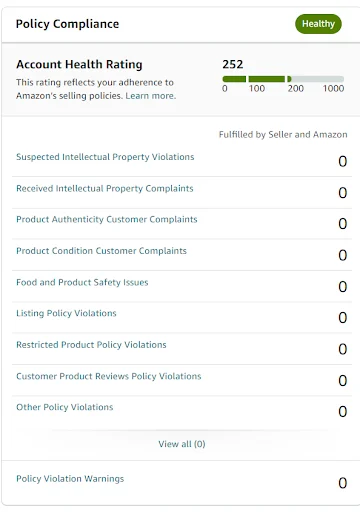
- Green: An AHR score at 200 or higher is in the Healthy range and will appear in green color. The score may fluctuate even without listing violations, but will only fall below this number in case of a listing violation. The healthy range is ideal for your account health.
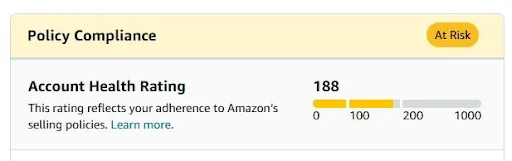
- Yellow: When the score is between 100 and 200, this is considered “At Risk”. This appears in the yellow font along with a banner stating “Your Account is at Risk of Deactivation”. In this case, you must address any listing violations as soon as possible to avoid further score drops.
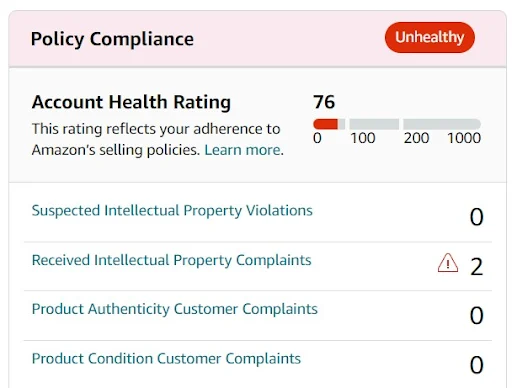
- Red: If your score falls below 100, this appears in red color font, and this means your account is eligible for deactivation. In this case, you need to address any listing violations immediately. Once violations are resolved and the score increases to above 100, the account will be stabilized.
How is AHR Calculated?
AHR is calculated based on your compliance with Amazon’s standards and policy requirements. The rating is influenced by factors such as Order Defect Rate, Late Shipment Rate, and policy violations. Each violation carries a certain weight depending on its severity. There are four severity levels: critical, high, medium, and low. Typically, each violation ranges from 2 to 8 points, but critical violations can carry significantly higher weight and have a much stronger impact on your overall score.
Amazon evaluates both the total number of active violations and their severity. Unresolved and repeated issues reduce your Account Health Rating more aggressively, while successfully addressing violations and maintaining strong Amazon performance metrics helps improve your score over time.
Key Factors Affecting Amazon Account Health
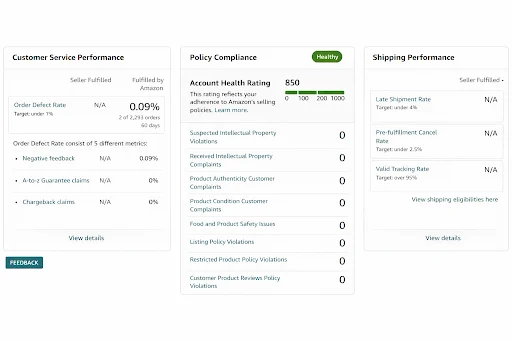
In your Amazon Seller Central account, under Account Health, there are three main components of your Amazon Account Health Rating. These factors determine the overall stability of your account and directly influence your risk of deactivation.
1. Customer Service Performance
In customer service performance, Order Defect Rate (ODR) is a key metric. The percentage of customer satisfaction with your service is called Order Defect Rate. It is one of the most crucial factors of a seller’s account health rating.
Amazon considers an ODR above 1% to be problematic as it can significantly lower the account health rating. A lower ODR is better for account health, and maintaining an ODR below 1% is essential for preserving a healthy account rating and avoiding penalties.
2. Policy Compliance
Amazon Policy Compliance helps sellers maintain their Amazon Account Health Rating by ensuring they adhere to all Amazon policies. It is essential to follow Amazon’s rules and regulations to protect your account from violations like:
- Suspected intellectual property violations
- Received intellectual property complaints
- Product authenticity and customer complaints
- Product condition customer complaints
- Food and product safety issues
- Listing policy violations
- Restricted product policy violations
- Customer product reviews policy violations
- Other policy violations
By adhering to Amazon’s policies, sellers can ensure their account health rating remains in good standing and that they can sell on Amazon without interruptions.
3. Shipping Performance
The late shipment rate is also considered when calculating a seller’s account health rating. Amazon considers customer satisfaction a priority, and that’s why it expects sellers to meet the defined standards of the platform.
Amazon defines a preset range of Late Shipment Rate (LSR). A healthy account should have an LSR of 4% or less. A high rate of late shipments can negatively affect a seller’s account health rating.
How to Improve Account Health Rating?
Now that you understand how Amazon Account Health Ratings work, let’s explore the practical steps you can take to improve your score.
1. Respond to Customers Quickly
Customers always appreciate quick responses, and Amazon takes this into account when determining your rating. It is highly recommended to respond to inquiries and complaints within 24 hours or earlier if possible. Make sure that you resolve customers issues at the earliest possible time so they won’t turn to negative feedback. Keep your responses professional and informative, and ensure your customers are satisfied with their purchases.
2. Ship Product On-Time
Shipping performance directly influences AHR, and improving it will definitely improve your Amazon Account Health Rating. Make sure your products are shipped within the time frame specified by the customer. Consistent delays can quickly push your account into an “At Risk” category.
To ensure on-time shipping, you must have a reliable shipping process and accurate inventory levels in place.
3. Sell Quality Products
Customers expect the products they purchase to be of high quality, and if your products fail to meet expectations, it can lead to negative reviews, returns, authenticity complaints, or condition-related violations. These issues directly impact your Account Health Rating and can trigger policy warnings. Make sure your products are of the highest quality and are accurately described.
Providing consistent quality and transparent descriptions also builds long-term customer trust and protects your account from unnecessary violations.
4. Strictly Follow Amazon’s Policies
Policy compliance is the backbone of a healthy Amazon account. Amazon has several policies that are designed to protect customers and ensure a safe shopping experience. These policies cover everything from payment processing to product reviews. It is essential to understand these policies and strictly follow them when operating your Amazon account.
Also, stay updated with Amazon policy changes and ensure all listings comply with category guidelines.
Conclusion
Account health at Amazon is a necessary part of sustaining an effective presence on the platform. Sellers need to understand the factors that affect their Account Health Rating and take measures to improve their account health rating.
This blog serves as a comprehensive guide for sellers to understand AHR and what they can do to improve it to be able to ensure a strong presence on Amazon.
If you need expert support in managing performance metrics, AMZDUDES also provides professional Amazon account management services.
Book a free consultation to get strategic guidance customized to your account.
Frequently Asked Questions
What does the Amazon account health score mean?
The Amazon account health score refers to the numerical rating (0–1000) that indicates how well your seller account complies with Amazon’s policies and performance standards. A higher score reflects a lower risk of deactivation, while a lower score signals unresolved violations or performance issues that may put your account at risk.
What happens if my AHR falls below 100?
If your score drops below 100, your account becomes eligible for deactivation. You must resolve violations immediately and submit corrective actions to increase your score.
Does resolving violations improve my AHR immediately?
Yes. Once a violation is successfully resolved, its impact on your score decreases, and your AHR can improve accordingly.
How can I monitor my Account Health Rating?
You can track your AHR directly inside Seller Central under the Account Health dashboard, where you’ll see your current score, active violations, and risk level.
How can I prevent my account from going “At Risk”?
Maintain strong operational metrics, respond to customers at the earliest, ship on time, sell authentic products, and resolve any policy notifications immediately.