Key Takeaways
- 4 Benefits of Display Ads: Display ads allows you to reach new shoppers, retarget interested buyers, increase brand visibility, and drive more conversions.
- Evaluate Targeting Options: Choose between audience, views, purchases, or contextual targeting to reach shoppers most likely to buy.
- Optimize With Three Strategies: Choose reach to build awareness, page visits to bring shoppers back to your listing, and conversions to drive sales.
- Create Display Ad Campaigns in 10 Easy Steps: Follow along to create a full campaign in 10 steps possibly involving around 10 clicks.
- Use Effective Tips for Best Results: Test creatives, refine audiences, control spend, and continuously optimize based on performance data.
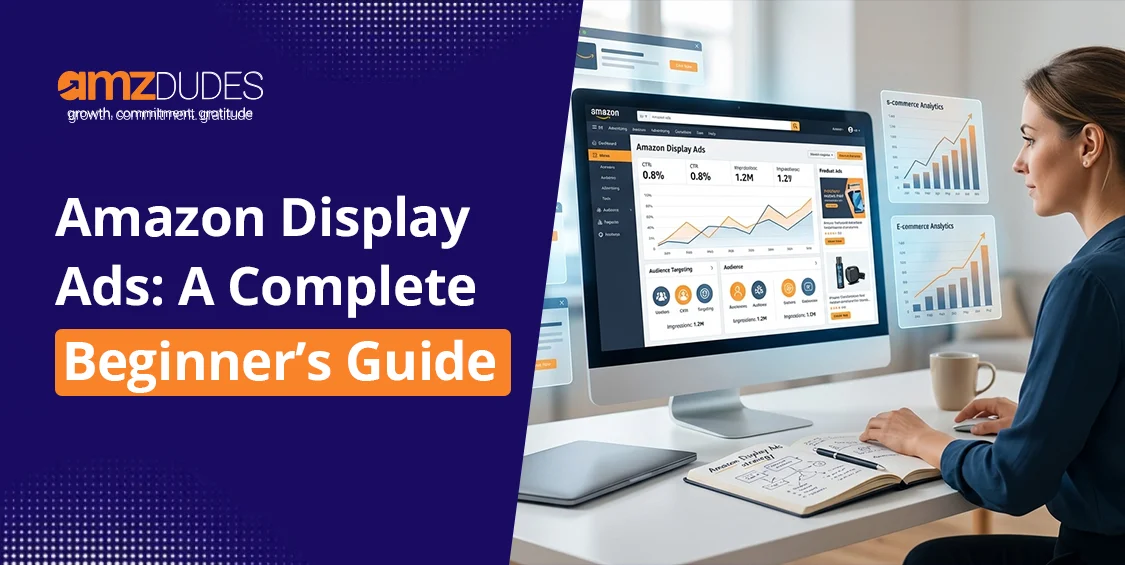
Amazon offers a variety of advertisement products to give you control over who or what your ad is targeting, as well as where your ad can appear. Sponsored Display Ads are a powerful part of Amazon’s advertising, specifically designed to help you reach your target audience both on and off Amazon.
However, many sellers, especially beginners, struggle to understand when to use Sponsored Display Ads and how targeting really works. Without a clear strategy, these ads can easily underperform.
In this guide, we’ll break down how Sponsored Display Ads work, where they appear, the targeting options available, and how you can use them in the best way to increase visibility, retarget interested shoppers, and drive more conversions.
What are Amazon Display Ads?
Amazon sponsored ads, formerly known as “Amazon Product Display Ads,” are advertising formats that allow brands to promote their products with higher targeting. Display ads give you control over who or what your ad is targeting, as well as where your ad can appear. The main purpose of sponsored display ads is to place ads in high intent locations where shoppers are most likely to engage.
Display ads enable brands to engage with potential customers throughout their buying journey, both on and off Amazon. This advertising solution offers the ability to retarget an audience who has shown interest in your product in the past. For example, if a shopper views your product detail page but leaves without making a purchase, Sponsored Display Ads allow you to show your product to that same shopper again.
Where do Amazon Display Ads Appear?
Sponsored Display Ads can appear in multiple high-visibility placements, both on Amazon and off Amazon.
Search Results Page
These ads can appear within Amazon search if customers are searching with related product keywords. These stay visible to customers and are effective in drawing the attention of customers who are browsing on Amazon.
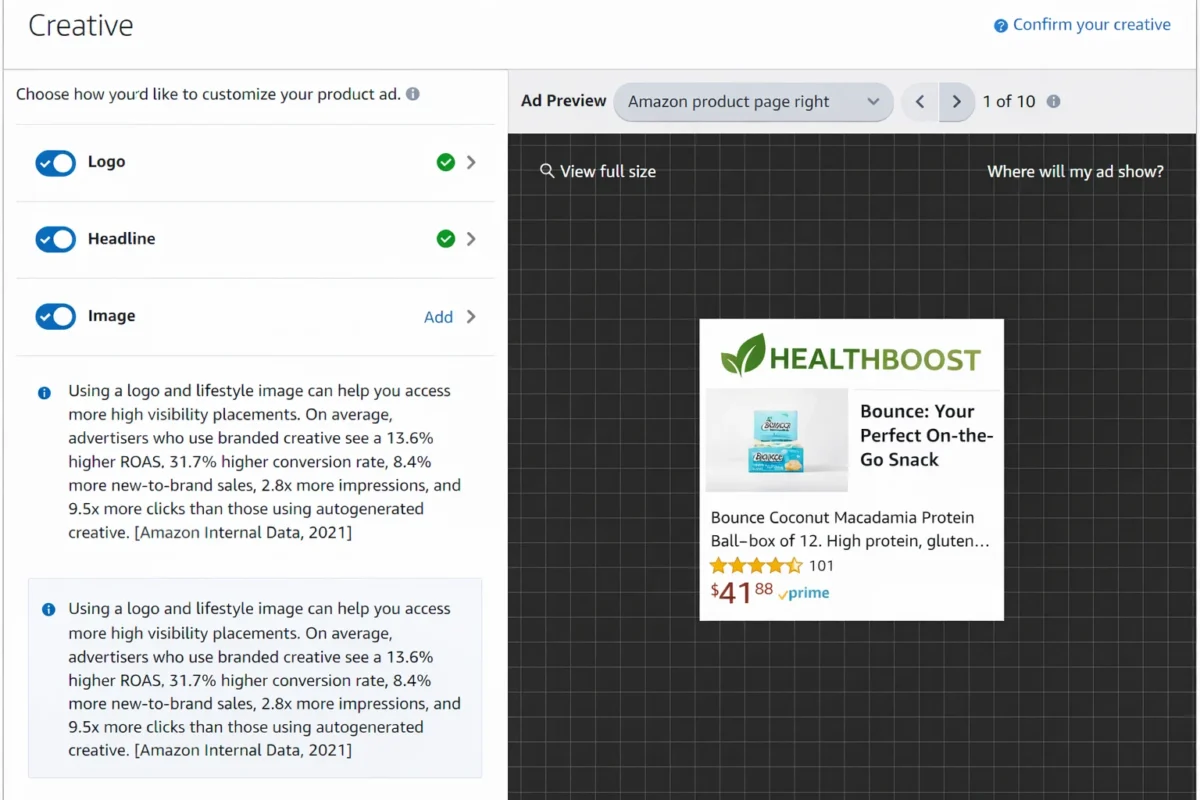
Product Detail Pages
Sponsored ads can be shown on similar products or competitors pages. These ads are effective for capturing high intent buyers who are already evaluating their options for purchase.
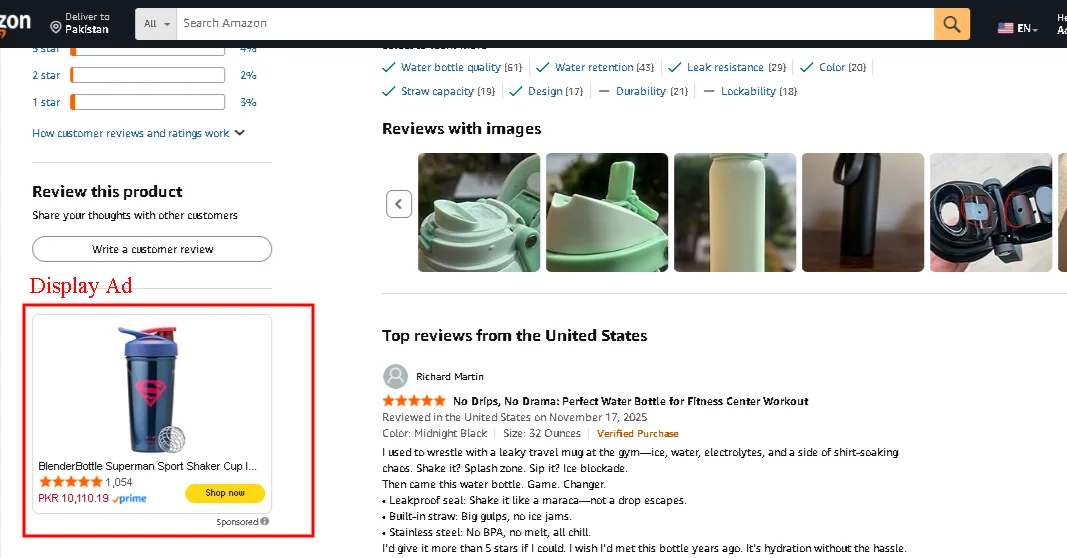
Customer Review Pages
Sponsored Display Ads can appear on review pages to capture the attention of high intent buyers.
Off Amazon.com

Amazon Display Ads Eligibility
To get started with Amazon Display Ads, you must be a professional seller on Amazon and enrolled in the Amazon Brand Registry. Furthermore, your products must be within eligible categories for Amazon advertising display ads. Also, Sponsored Ads are available only for the following marketplaces:
- America – US, Canada, Mexico, and Brazil
- Europe – UK, Germany, Spain, France, Netherlands, Italy, Sweden, Poland, and Turkey
- Asia Pacific – Australia, Japan, India, and Singapore
- Middle East – Saudi Arabia and United Arab Emirates
Benefits of Amazon Display Ads
Amazon Sponsored Display ads offer numerous advantages when utilized properly. These can be beneficial for your brand in many ways.
Increases Visibility and Reach
With reach that extends beyond Amazon, Amazon Display Ads enhances product exposure. This constant exposure can increase brand recognition and push customers to consider your product when making a purchase.
Targeted Advertising
Amazon Display Ads allow you to target potential customers based on various relevant factors such as their interests, behavior, and demographics. This helps brands reach high intent buyers and increase chances of conversion.
Cost-Effective
Amazon Display Ads work on cost-per-click (CPC), where you only pay for clicks on your ad. Amazon display ads PPC (Pay Per Click) reduces wasted ad spend by ensuring your budget is used on engaged users who are most likely to make a purchase.
Increases Sales and Conversions
Display ads are targeted and only attract interested customers, which has a high chance of conversion. With this retargeting strategy, you can convert visitors into buyers.
Amazon Display Ads Targeting Options
Amazon Display Ads offer multiple targeting methods designed to match different campaign goals.
1. Contextual Targeting
With Sponsored Display Ads, you have the flexibility to select from various targeting options that match your campaign goals. When choosing contextual targeting, you will find two options to target your audience.
a. ASIN Targeting
When you choose ASIN targeting, your ads will be shown to shoppers who are browsing similar products to yours. This increases the chances that they notice your product and click on it. Once they click on it, they are directed to your product page where they can learn more and make a purchase.
b. Category Targeting
With category targeting, you can show your Sponsored Display Ads to shoppers who are browsing products in similar categories. For example, if you sell a protein powder, your ads can appear to shoppers exploring related categories like sports nutrition, workout supplements, or fitness accessories. This increases the chances of them discovering and considering your product.
2. Audience Targeting
Audience targeting in Sponsored Display Ads lets you show your ads to people based on what they have already done on Amazon, not just what they are searching for.
a. Views Remarketing
By choosing remarketing, you can show your ads to shoppers who previously viewed your product or a similar product. This helps bring back interested shoppers and push them towards purchase. You can target particular shoppers who have viewed your product pages within lookback windows of 7, 14, 30, 60, or 90 days.
b. Purchases Remarketing
Purchasing remarketing allows you to engage with customers by analyzing their past shopping behavior. This can be used to re-engage customers who have already purchased your product or a similar product.
Lookback windows let you target shoppers based on their purchase history within a specific timeframe. For purchase remarketing, Amazon offers lookback windows of 7, 14, 30, 60, 90, 180, and 365 days.
3. Amazon Audiences
Amazon offers different segment options based on shopper behavior, interests, and lifestyle signals collected across its platform.
a. In-market: These are customers who have past shopping history related to your product or category. They are the ones likely to purchase items of a specific product category.
b. Lifestyle: Shoppers whose actions indicate an interest in a certain lifestyle based on shopping and content consumption on Amazon.
c. Interests: Engage with shoppers with common interests as identified by Amazon, which is based on their browsing history and purchase signals.
d. Life Events: Individuals whose behavior indicates they are experiencing a significant life change, like getting married or moving to a new home.
Optimization Strategies in Sponsored Display Ads
With Sponsored Display campaigns, Amazon offers three different types of bid optimization:
1. Optimize for Reach
This strategy is designed to maximize impressions and expose your brand to as many relevant shoppers as possible. Amazon display ads costs are calculated based on viewable impressions, charging you per 1,000 views (vCPM).
This strategy is best suited for:
- Brand awareness campaigns
- New product launches
- Expanding visibility in competitive categories
While conversions may be low initially, this model helps build early awareness and introduce your product to new shoppers.
2. Optimize for Page Visits
This option focuses on driving traffic to your product detail pages, and you will be charged based on a per-click (CPC).
This strategy works well for:
- Increasing product consideration
- Retargeting shoppers who showed interest
- Improving listing engagement
This is most effective to bring interested shoppers back to your product page.
3. Optimize for Conversion
This option is designed to drive sales by showing ads to shoppers most likely to purchase, and you will be charged based on a per-click (CPC).
This strategy is ideal for:
- Retargeting high-intent audiences
- Promoting best-selling or well-reviewed products
- Maximizing return on ad spend (ROAS)
This yields the best results if your product has a strong listing, as shoppers are likely to evaluate your product before making a purchase.
How To Create Sponsored Display Ads On Amazon?
Creating Sponsored Display Ads is a straightforward process:
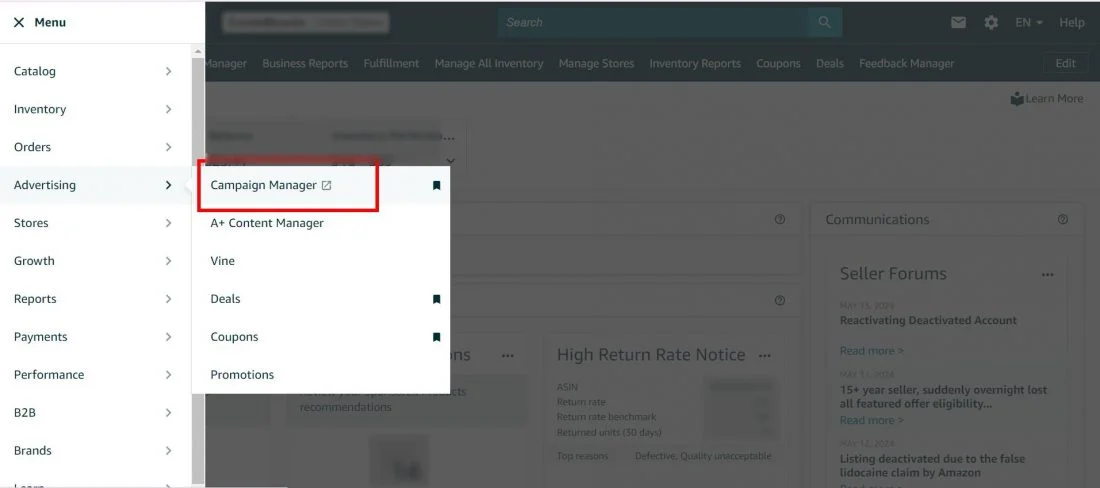
1. Log in to your Amazon Seller Central, and click on the Campaign Manager option.
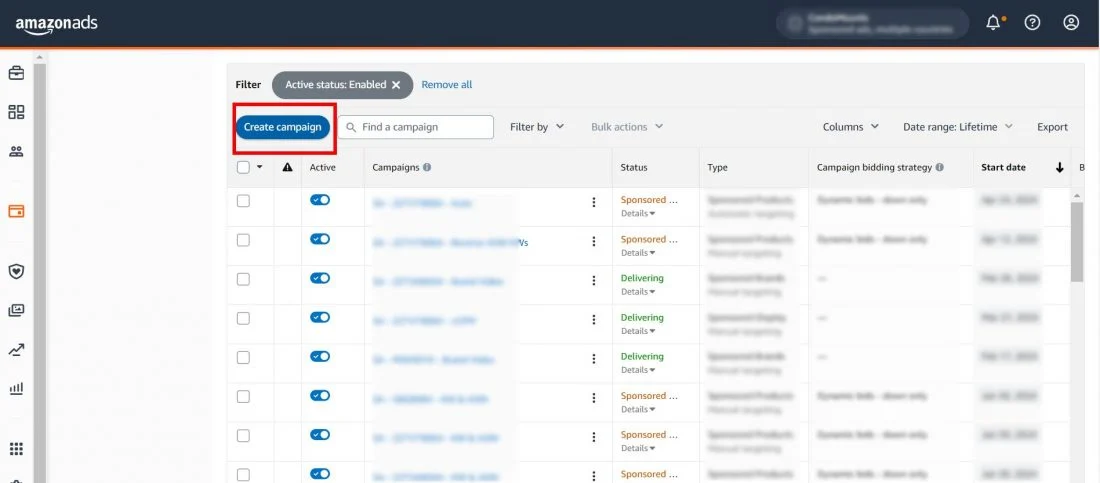
2. Click on “Create campaign” and select the “Sponsored Display” option from the list.
3. Enter the name of your campaign as well as the date range, your preferred budget, and the portfolio you want to choose.
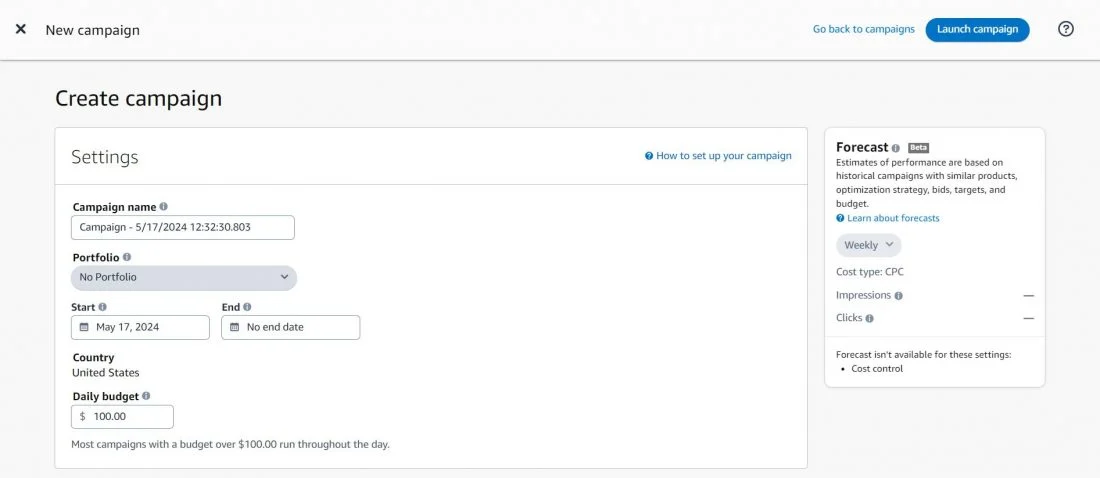
4. Enter the name of the ad group you desire to label yours.
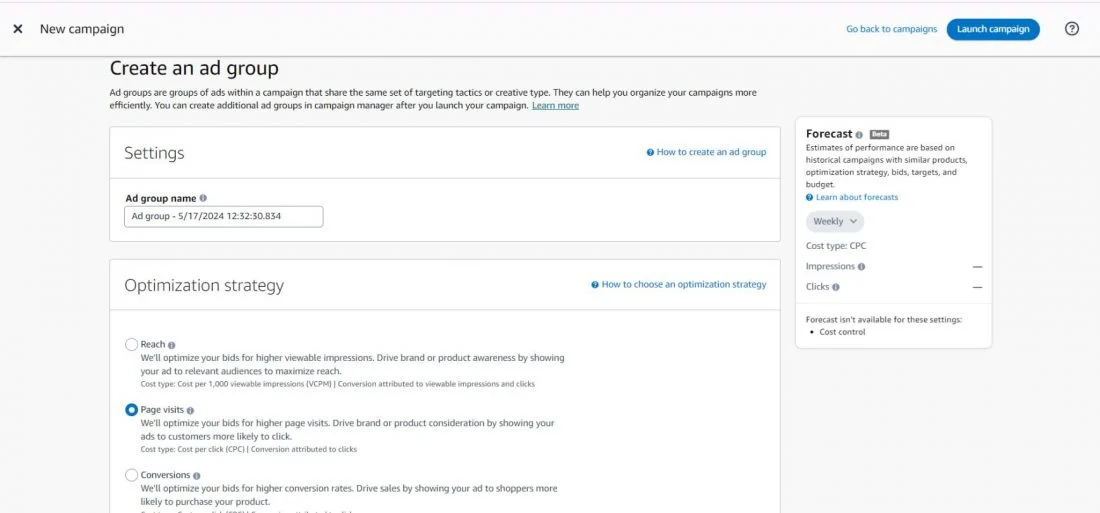
After this, the next step involves selecting the ‘Bidding Strategy’ for the campaign. We have discussed all three types earlier, so you can choose whichever suits your campaign goal. For better understanding, we are choosing “optimize for conversion” in the next step. You can also select this option if you are unsure about which strategy to choose, as it has a better ROAS (Return on Ad Spend) as compared to the other two options.
5. Choose the ‘Optimization Strategy’ for the campaign.
6. Choose the ad format displaying your campaign.
Currently, there are two ad formats available for Amazon Sponsored Display Ads:
- Image: This format allows you to promote your product using an image. You can either add a custom image yourself, or Amazon will fetch creatives from your listings.
- Video: This format allows you to promote your product with a video creative that plays in a loop.
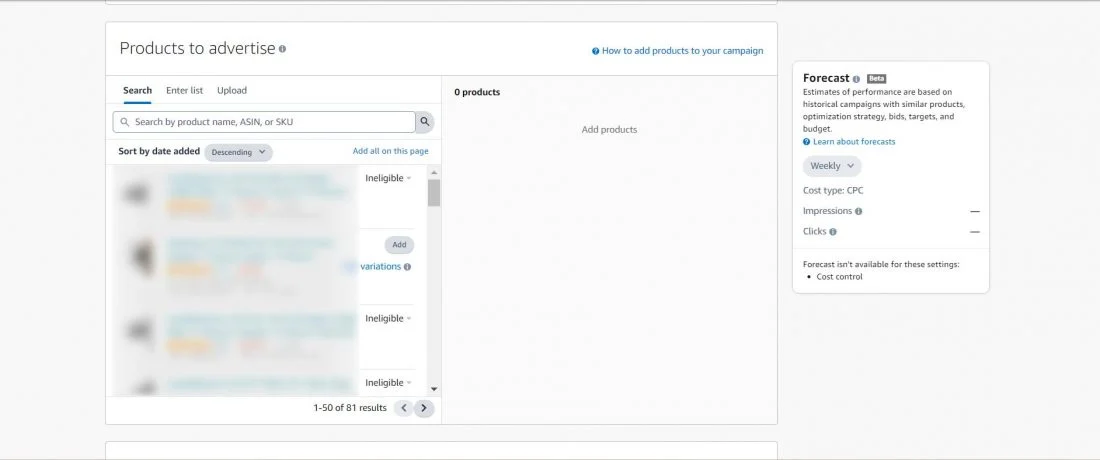
7. Select the products (ASIN) that you want to run the advertising in the ad group.
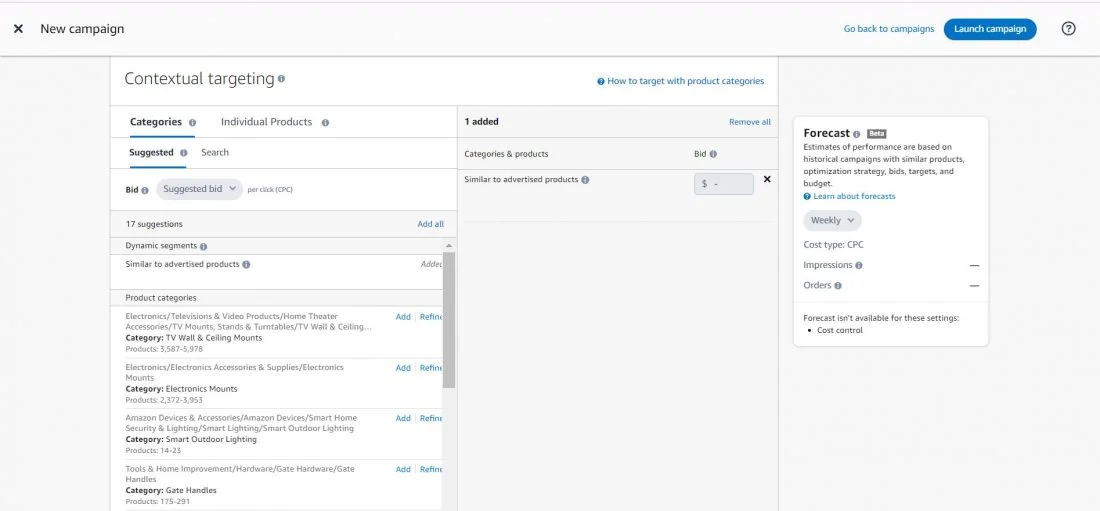
8. Next, choose whether you want to do “contextual targeting” or “audience targeting” in the ad group. We have explained the difference between the two above.
9. Next, add the targets that you want to target in your ad group.
10. Then, add a logo, a headline, and an image for your ad.
Finally, you can preview and submit your Sponsored Display ads.
Amazon Display Ads Best Practices
To get the most out of Amazon Display Ads, you should follow these practices:
- Allocate sufficient budget for your campaign to remain active throughout the day. Notice which campaigns are exhausting their budget early, as this indicates strong demand and potential opportunities to scale.
- While selecting products for display ads, choose those products that are closely related to similar pricing and strong listings.
- When starting your first campaign, start with a low bid and gradually increase it based on performance metrics.
- Optimize your Amazon product listing with A+ content, right keywords, description, and high quality images to increase click-through rates.
- Use different metrics to gauge the effectiveness of display campaigns created for targeting shoppers at different stages.
Limitations of Amazon Display Ads
While sponsored display ads are effective in many ways, they are still not free from limitations. It is essential to be aware of the potential limitations while creating ad campaigns to set realistic expectations.
- Limited control over ad creatives.
- Requires Brand Registry enrollment.
- Less precise control compared to keyword-based ads.
- Performance depends heavily on listing quality and shopper signals.
- Limited reporting depth compared to search-based campaigns.
Deciding whether Amazon Display ads are worth investing in for your business depends on your own testing and analysis. It is crucial to experiment with different strategies to determine what works best for your products and your business on Amazon.
Conclusion
Amazon Display Ads are a powerful way to reach shoppers both on and off Amazon at different stages in their buying journey. By using Sponsored Display Ads, brands can drive more conversions by capturing high intent buyers. With a better understanding of targeting and optimization, you can utilize these ads to build awareness and grow sales over time.
If you’re looking for expert guidance to scale your growth with Amazon Display Ads effectively, AMZDUDES can help. AMZDUDES is a full-service Amazon marketing agency specializing in eCommerce advertising, supporting brands with strategic expertise and proven solutions. Book a free consultation call today.
Frequently Asked Questions
What are Amazon Display Ads?
Amazon Display Ads are ads that help you show your products to shoppers both on Amazon and on other websites, based on their interests and shopping behavior.
Do Amazon Display Ads use keywords?
No. Sponsored Display Ads do not rely on keywords. They use audience targeting and contextual targeting instead.
How do Sponsored Display Ads charge you?
Most Sponsored Display Ads work on a cost-per-click (CPC) model. With the Amazon display ads cpc model, you only pay for clicks on your ad.
Are Sponsored Display Ads good for new products?
Yes. They are useful for building awareness and driving traffic, especially when combined with reach to attract shoppers to product pages and optimization to convert those visitors.
How do Amazon display ads work outside Amazon?
Amazon display ads can appear on third-party websites and apps through Amazon’s advertising network. These ads reach shoppers across the web based on their past shopping behavior and interactions with products on Amazon.