
Key Takeaways
- Check “Show Limitations” in Seller Central before sourcing any inventory to confirm whether a product requires approval.
- Submit a commercial wholesale invoice with 10+ units, your exact business name, and a date within 90–180 days, retail receipts are auto-rejected.
- Use alternative methods without invoices: auto-approval via clean account health, Letter of Authorization (LOA), brand outreach, wholesale account for ungating only, or trade shows.
- Apply through Inventory → Add a Product and respond to “more information requested” within 24 hours to avoid application timeouts.
- Fix rejections by correcting the specific issue (mismatched name, old invoice, unauthorized supplier) and wait 30 days before reapplying.
Amazon gates certain categories and brands to protect customers from counterfeits and to protect legitimate sellers from unfair competition. If Amazon is showing you “Request Approval” upon listing something on Amazon, this means you need to get ungated first to sell in that category. In this guide, we’ll walk you through every method available in 2026 for how to get ungated on Amazon, including what to do when you don’t have invoices.
What “Ungated” Means on Amazon (And Why It Matters in 2026)
A “gated” product on Amazon requires Amazon’s approval before you can list it for sale. “Getting ungated” means receiving that approval. Gates exist at three levels: the whole category (e.g., Health & Beauty), a specific brand (e.g., Nike), or an individual ASIN. When you get ungated, you unlock the ability to list and sell that product.
Here is why this matters in 2026 because Amazon now has over 2.5 million active sellers competing for the same product listings. Gated categories are less crowded by definition, and most sellers give up when they see “Approval Needed”. But that’s where you have to go through the Amazon ungating process so that you can access better margins and less pricing competition.
But the twist is that Amazon does not gate categories randomly. It’s because they have spent over $1 billion annually fighting counterfeits, and in 2025 alone, their teams seized more than 15 million counterfeit products globally, so they implemented gating that forces sellers to prove they have a legitimate supply chain before they ever list a product.
The Three Levels of Amazon Gating
- Category gating: The entire product category requires approval. Example: Grocery & Gourmet Food, Fine Jewelry, Medical Devices.
- Brand gating: A specific brand within an open category is gated. Example: You can sell in Sports, but Nike requires a separate brand approval.
- ASIN gating: A single product listing is restricted, even if the category and brand are open. Common with high-value electronics and new product launches.
Full List of Amazon Gated Categories & Brands in 2026
The table below covers all currently Amazon-gated categories in the US marketplace as of May 2026. Amazon updates these requirements without notice, so always verify in Seller Central before sourcing inventory.
| Category | Gate Level | Difficulty | Common Requirements |
| Beauty & Personal Care (Topicals) | Sub-category | Medium | Invoice, product images, safety docs |
| Grocery & Gourmet Food | Category | Medium | Invoice from authorized distributor, food safety compliance |
| Health & Personal Care | Category + Sub | Medium | Invoice, COA (Certificate of Analysis) for supplements |
| Toys & Games (Q4 seasonal) | Seasonal | Medium | Pre-qualification before October each year |
| Automotive | Sub-category | Easy | Often auto-approved for established accounts |
| Sports and Outdoors | Sub-category | Easy | Often auto-approved for established accounts |
| Medical Devices & Accessories | Category | Hard | FDA registration, compliance documentation |
| Dietary Supplements | Sub-category | Hard | COA, FDA labels, manufacturer documentation |
| Collectible Coins | Category | Hard | Application fee, grading service certification |
| Fine Art | Category | Closed/ Fee | Non-refundable fee up to $5,000, physical presence verification |
| Watches | Category | Closed/ Fee | Non-refundable fee up to $5,000, established track record required |
| Streaming Media Players | ASIN-level | Hard | Compliance with device certification requirements |
| DVD / Blu-ray (new releases) | ASIN-level | Medium | Invoice from authorized distributor |
| Handmade | Program | Medium | Application and review process for the Handmade program |
| Amazon Renewed (Refurbished) | Program | Hard | Seller must meet quality inspection standards |
Amazon Ungating Expert Advice:

Do not start here!
Avoid Fine Jewelry, Watches, Fine Art, and tier-1 closed brands as your first ungating targets. The non-refundable application fees run up to $5,000, and approval rates for new sellers are very low. Build a track record in easier categories first, Beauty, Grocery, Automotive, and Sports,  then work your way up.
Step-by-Step: How to Get Ungated on Amazon in 2026
Here’s the exact step-by-step walkthrough for how to get ungated on Amazon in 2026. Follow this exactly, and you’ll get ungated on Amazon gated categories, as this is the same Amazon ungating process we implement to ungate Amazon restricted categories:
1. Verify Your Account Meets the Prerequisites
Before you apply for anything, confirm your account is in good standing. Amazon’s review team looks at your metrics. A weak account will get rejected even with perfect documents.
Your account needs:
- Professional Selling Plan: $39.99/month. Individual accounts cannot apply for category approval.
- Order Defect Rate (ODR) under 1%: checked in Account Health in Seller Central.
- No active account health warnings or policy violations.
- A consistent sales history: not required, but significantly increases auto-approval chances.
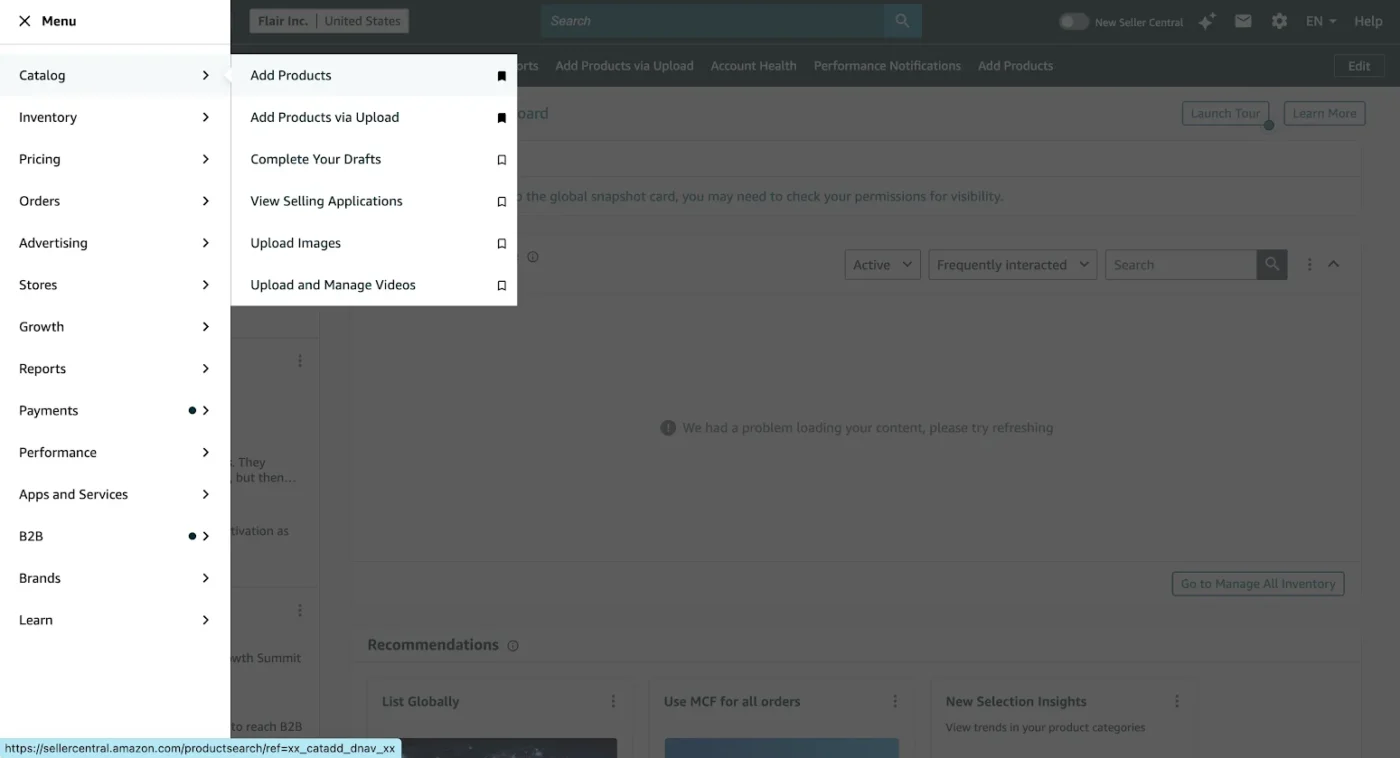
2. Log in to Seller Central and go to Inventory → Add a Product
From your Seller Central dashboard, click the Inventory menu in the top navigation bar, then select Add a Product from the dropdown.
3. Search for the Product by ASIN, UPC, or Product Name
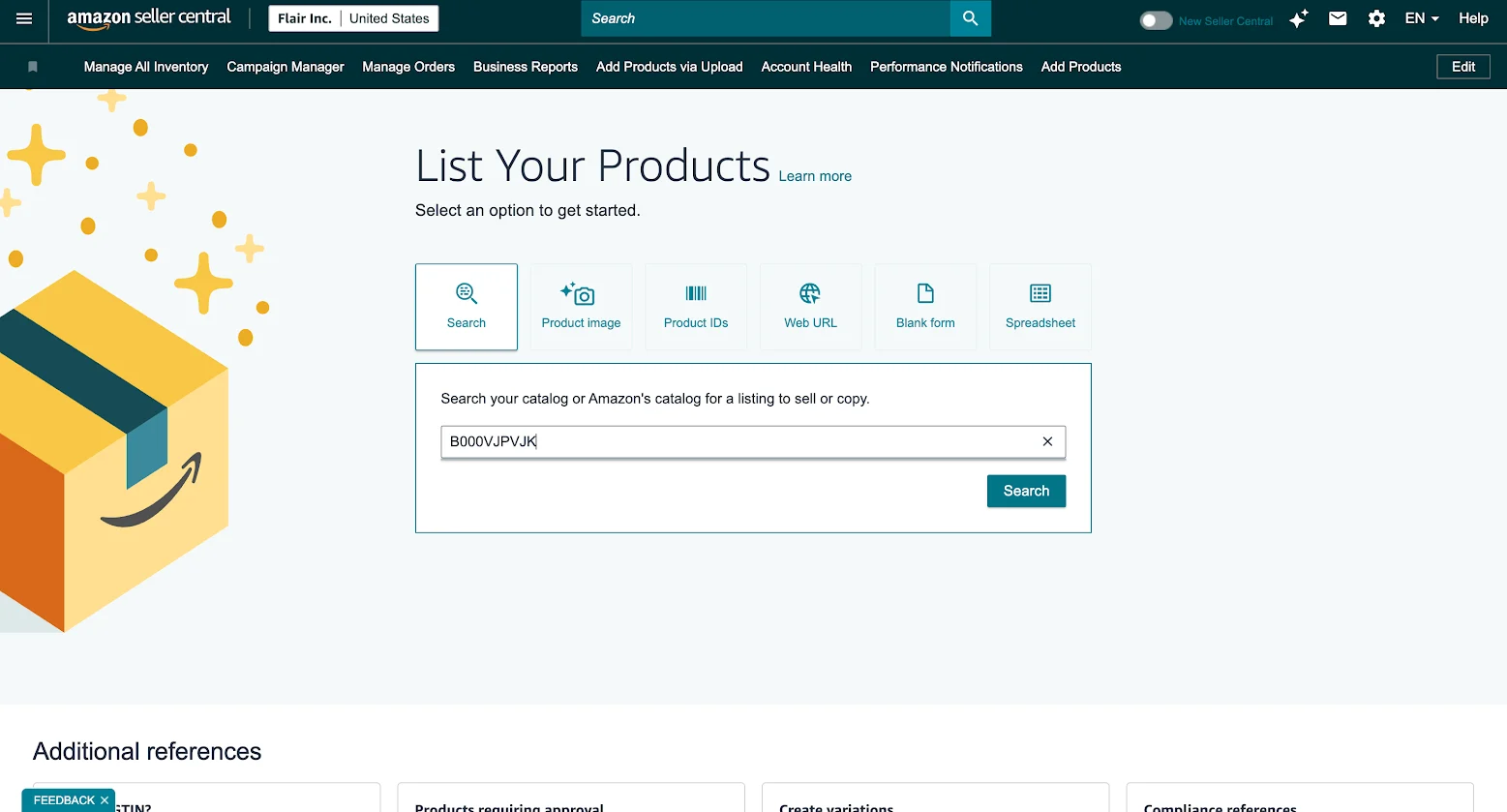
In the search bar, enter the ASIN, barcode (UPC/EAN), part number, or product name of the item you want to check. Using the ASIN is the most precise, it removes any ambiguity about which listing you’re checking.
4. Click “Apply to Sell” on the Product Listing
After searching the ASIN in Catalog → Add Products, Amazon will show the product listing along with its selling status.
If the product is restricted, you’ll see an “Apply to sell” button instead of the normal listing option. Click it to open Amazon’s approval workflow for that ASIN.
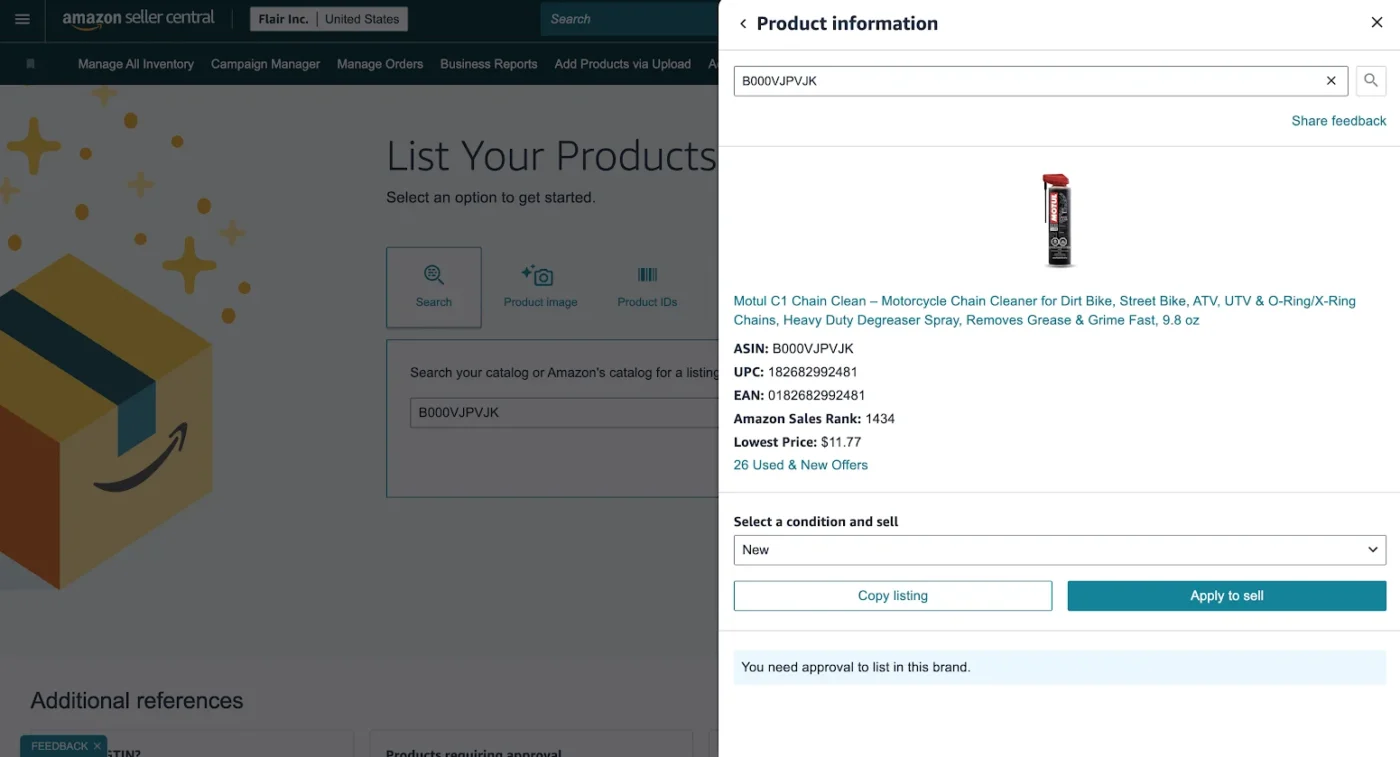
Amazon will also display the brand name, ASIN, sales rank, and the condition you’re applying under (typically “New”).
5. Review Amazon’s Approval Requirements
Once the application window opens, Amazon will show the exact requirements needed for approval. In most cases, you’ll be asked to submit at least one purchase invoice for products purchased from a manufacturer or distributor.
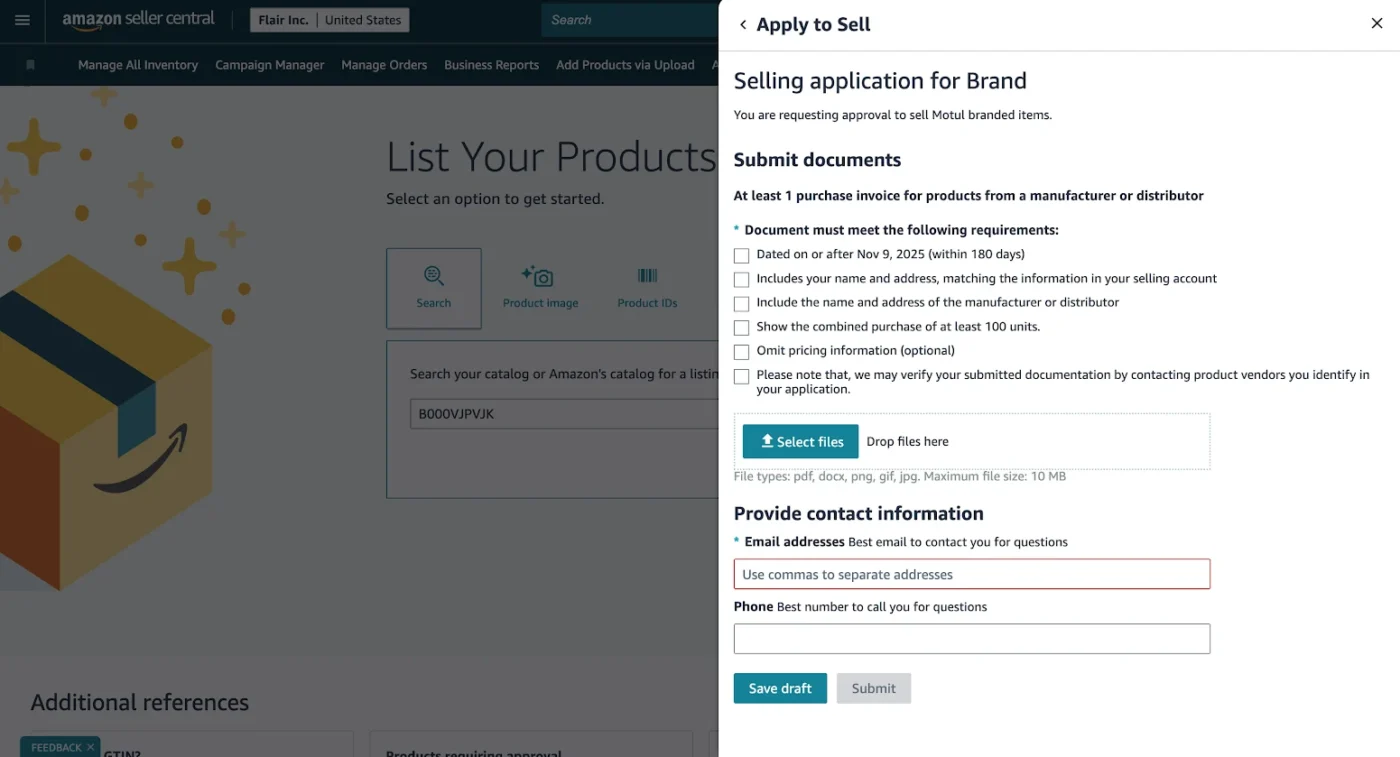
Amazon’s requirements typically include:
- Invoice dated within the last 180 days
- Supplier name and address are clearly visible
- Your business name and address match your Seller Central account
- Product quantity showing at least 10 units purchased
- Manufacturer or distributor contact information
- Product images or additional documentation if requested
You’ll also see that Amazon notes that they may verify your documents directly with the supplier.
6. Prepare Your Documents Properly Before Uploading
This is where most sellers get rejected. The issue is usually not the product, it’s poor documentation quality.
Before uploading your files:
- Use a clear PDF scan instead of blurry phone pictures
- Highlight key sections on the invoice:
- Your business name
- Supplier name
- Product name/model
- Quantity purchased
- Invoice date
- Make sure the invoice product matches the ASIN you’re applying for
- Double-check that supplier contact details are visible and readable
Amazon reviewers process large volumes of applications quickly. Clean, easy-to-read documents improve approval chances significantly.
7. Upload Documents and Submit the Application
Inside the “Apply to Sell” window, upload your invoice files directly into the document section. Amazon accepts formats like PDF, PNG, JPG, and DOC files within the stated size limits.
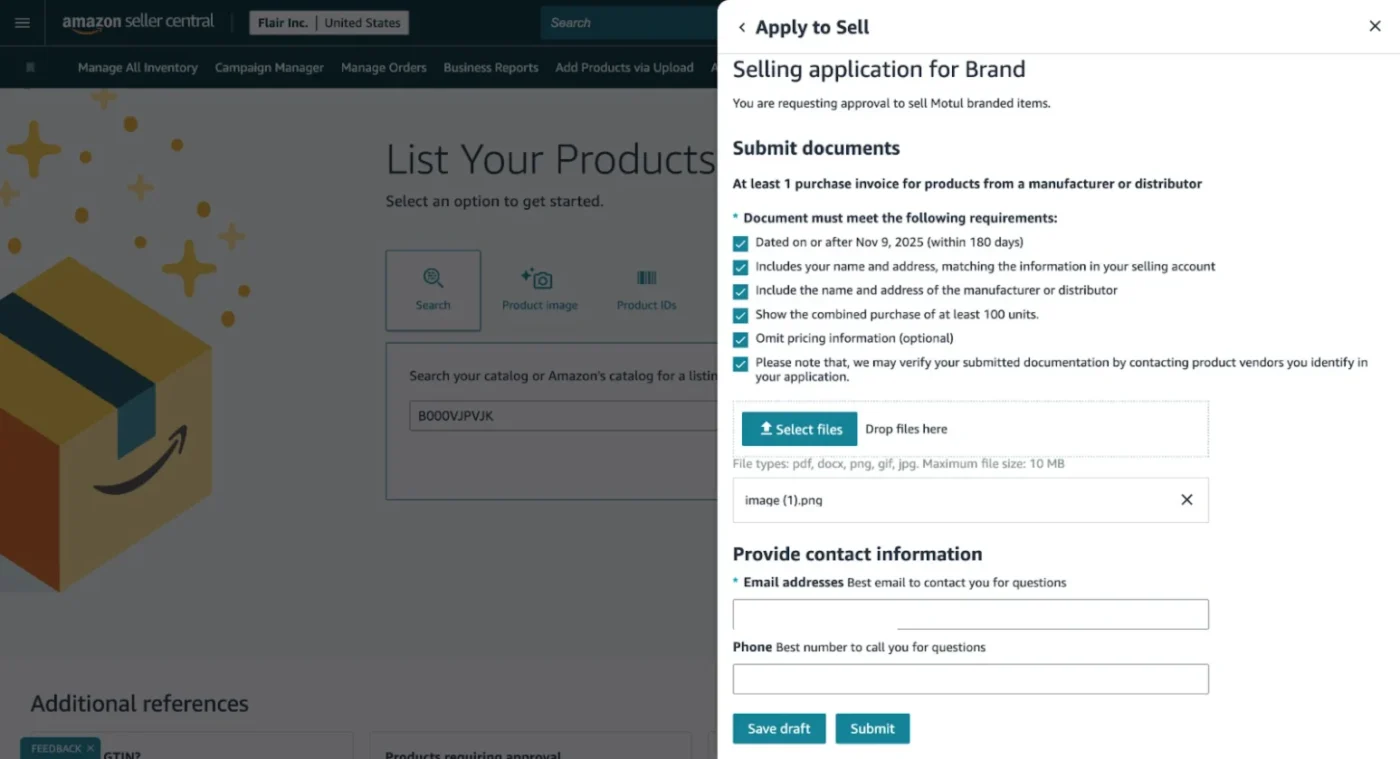
After uploading:
- Enter your contact email and phone number
- Review all uploaded documents carefully
- Click “Submit” to send the application for review
Amazon will then review the submission and respond through Seller Central or email. Approval timelines vary by category and brand, but many applications are reviewed within a few business days.
8. Wait for the Decision, & Know What “More Information Requested” Means
After submission, one of three things will happen:
- Approved: You will receive an email confirmation, and the listing becomes available immediately.
- More information requested: Amazon’s team needs something additional, usually a clearer document or an extra certification. Respond within 24 hours with clean, unedited documents. Delays here often result in the application timing out.
- Rejected: You have to file a comprehensive appeal.
Timeline to expect: Most decisions arrive within 5–30 business days. Categories with strict compliance requirements, dietary supplements being the most common, can take longer due to the volume of documentation reviewed.
What Documents Does Amazon Actually Accept?
This section covers the exact invoice requirements Amazon enforces in 2026. These come directly from Amazon’s sourcing guidelines and from verified seller experience in their forums.
The 7 Fields Every Valid Invoice Must Contain
| Required Field | Notes |
| Supplier’s full business name | Must be an authorized distributor or manufacturer, not a retail store |
| Supplier’s address and phone number | Amazon may call to verify the supplier is legitimate |
| Supplier’s website or email | Used for verification purposes |
| Your business name and shipping address | Must match Seller Central exactly, LLC, Inc., punctuation included |
| Itemized product list with quantities | Minimum 10 units of the product you are applying to sell |
| UPC, ASIN, or manufacturer part number | Ties the invoice line to the specific product being reviewed |
| Invoice date | Must be within 90–180 days of your application date (varies by category) |
Documents That Get Auto-Rejected
Amazon’s systems automatically flag and reject the following document types. Submitting them wastes your application attempt:
- Retail receipts (Walmart, Target, Costco, CVS)
- Online order confirmations
- Packing slips
- Pro-forma invoices
- Sales quotes
- Amazon purchase receipts
- Screenshots of order pages
The reason is straightforward: a retail receipt proves you bought a product as an end consumer. It does not prove supply chain integrity.
Amazon’s exact rejection language reads:
“We are unable to accept retail receipts, online order confirmations, packing slips, sales orders, pro-forma invoices, or sales quotes for approval.”
Category-Specific Compliance Documents
Some categories require additional documentation beyond the standard invoice. The most common examples:
- Dietary Supplements: Certificate of Analysis (COA) from a third-party lab, FDA facility registration, ingredient list
- Cosmetics & Topicals: Safety assessment, ingredient list, product liability insurance in some cases
- Toys & Children’s Products: Children’s Product Certificate (CPC), ASTM F963 compliance documentation
- Electronics: FCC certification, compliance with applicable safety standards
- Brand-gated products: Letter of Authorization (LOA) from the brand owner stating you are authorized to sell their products on Amazon
How to Get Ungated on Amazon Without Invoices: 5 Proven Methods
Not having a wholesale invoice does not automatically close all paths to ungating. 5 legitimate methods work in 2026, but you need to be clear about which situation applies to you, because the wrong approach will waste time and risk your account.
1. Auto-Approval Based on Account Health
For a number of sub-categories, particularly in Beauty, Grocery, Toys, Sports, and Automotive, Amazon’s system automatically approves sellers who meet internal account health benchmarks without requiring any documents at all.
When you click “Apply to Sell” and get an instant approval message, that is this mechanism at work. It is driven by your Order Defect Rate (under 1%), account age (sellers with 2.5+ years of history see significantly higher auto-approval rates), and overall performance metrics.
You cannot force auto-approval, but you can make yourself eligible for it by keeping your account health clean before you apply. If you have a newer account, start by applying for the easier categories and build history there first.
2. Brand Letter of Authorization (LOA)
A Letter of Authorization is a written document from the brand owner stating that you are authorized to sell their products on Amazon. For brand-gated products, Amazon sometimes accepts an LOA in place of, or alongside, a wholesale invoice.
For the LOA to be accepted, it must include:
- The brand owner’s company name, address, and contact information
- Your business name exactly as it appears in Seller Central
- Explicit permission to sell the brand’s products on Amazon specifically, and generic resale authorization, is not enough
- A signature from an authorized representative of the brand
- A date (Amazon checks freshness)
- Amazon’s Seller Central has a detailed LOA guideline page. Review it before submitting to confirm the format requirements for the specific category you are applying to.
3. Brand-Direct Outreach for Authorization
Many mid-size brands will provide an LOA and a list of their authorized distributors if you contact them directly with a professional pitch. This approach works particularly well when you can show clean Amazon performance metrics, a positive sales history, and no policy violations, making you an attractive reseller partner.
A basic outreach email should cover:
- Who you are and your business track record on Amazon
- Which of their products do you want to carry
- A request for their authorized distributor list
- A request for an LOA or brand authorization letter for Amazon
Major brands like Nike, Apple, and Disney rarely respond to these requests. Focus your outreach on brands with $1M–$50M in annual revenue, they have enough scale to care about authorized distribution but enough flexibility to say yes to a qualified reseller.
4. Open a Wholesale Account for Ungating Only
Even if your primary sourcing model is retail arbitrage or online arbitrage, you can open a wholesale account with an authorized distributor purely to generate a compliant invoice for ungating purposes. You do not need to commit to ongoing purchases, the goal is to obtain a legitimate commercial invoice that meets Amazon’s requirements.
The minimum order is typically 10 units of the product you are applying to sell. Many wholesale distributors have relatively low minimum order quantities for first-time buyers. Look for authorized distributors in directories like Worldwide Brands or contact the brand’s accounts team for their preferred distributor list.
Once approved, you can continue ordering through that distributor or simply use the ungating to access the category and source elsewhere within Amazon’s guidelines.
5. Trade Shows
Trade shows are one of the most underused ungating tools for resellers. Events like ASD Market Week, Natural Products Expo, and industry-specific shows give you direct access to brands and distributors who can provide compliant invoices on the spot. You build the supplier relationship in person, which often results in lower minimum order quantities and better payment terms for ungating purchases than cold online applications.
The invoice you receive from a trade show purchase from an authorized exhibitor is fully compliant with Amazon’s requirements, provided it contains all seven required fields that we mentioned above.
Category-Specific Ungating Requirements for Amazon Category Approval
Every category has quirks. Here is what you need to know about the most important ones.
1. Health & Personal Care (Including Beauty)
This is one of the most profitable gated categories on Amazon. Thanks to repeat purchases and Subscribe & Save, Health & Personal Care generates consistent, predictable revenue. Olly Gummies, for example, generates over $3 million per month in Amazon sales alone.
Requirements vary by sub-category:
- General Beauty: Invoice from authorized distributor, high-quality product images (front, back, barcode visible). Often auto-approved for established accounts.
- Topicals (creams, serums, medicated products): Treated as Hazmat. Additional safety documentation required. Longer review time.
- Dietary Supplements: Certificate of Analysis (COA) from a third-party lab is mandatory. The FDA facility registration number should be visible on the product label. This sub-category has the longest typical review time in the category.
2. Grocery & Gourmet Food
Grocery is described as “protected” by experienced sellers because it requires more than just an invoice, you need to demonstrate that your supply chain is food-safe. Requirements include a wholesale distributor invoice and food safety compliance documentation. Clearance or liquidation suppliers are not accepted and will result in immediate rejection. Stick to authorized food distributors only.
3. Toys & Games (Seasonal Gating)
Toys has a unique mechanic: Amazon applies seasonal gating every Q4. In October, Amazon restricts new sellers from entering the Toys & Games category to protect customers during the holiday season from sellers without a track record. If you want to sell toys in Q4, you must pre-qualify in August or September before the seasonal gate goes up. Missing this window means waiting until after the holidays, a significant loss of opportunity.
4. Automotive & Sports
These are among the easier categories for established accounts. Sellers with strong account health and over a year of sales history often receive auto-approval with no documents required. If you are not auto-approved, a standard wholesale invoice is generally sufficient. These are good first targets when you are building your ungating track record.
5. Fine Jewelry, Watches & Fine Art
These are high-barrier categories that require specialty seller status, physical presence verification in some cases, and non-refundable application fees of up to $5,000 per category. These are not designed for general resellers. Unless you have an established jewelry or watch business with supplier relationships already in place, do not start here.
Amazon Brand Ungating vs Amazon Category Ungating
This distinction confuses many sellers. Getting category approval does not permit you to sell every brand in that category. Many brands, particularly in Health & Beauty, Electronics, and Sporting Goods, operate their own gating on top of the category gate.
For Amazon brand ungating, you typically need:
- A purchase invoice from an authorized distributor showing at least 10 units of a product from that specific brand
- Or a Letter of Authorization from the brand owner
- In some cases, both
Amazon Ungating Service: Is It Worth It?
Amazon ungating services are companies or individuals that offer to handle the ungating process on your behalf. They are common enough that most Amazon seller Facebook groups have multiple providers advertising in them. The honest answer to whether they are worth it depends entirely on which service you use and what category you need.
What a Reliable Amazon Ungating Service Actually Does
The best Amazon ungating service helps you source compliant wholesale invoices from verified distributors, formats your application correctly, and submits it on your behalf. They have relationships with distributors and know exactly what each category’s application requires. The value proposition is time, they have done this hundreds of times and can move faster than a seller doing it for the first time.
What is the Cost of Amazon Ungating Service
Amazon ungating services typically charge around $1,000 per category. Compare this to the DIY cost: buying 10 units from a wholesale distributor might cost $50–$300, depending on the product. The service fee pays for expertise and sourcing relationships, not for the approval itself. Amazon approves, not the service.
When Is It Right to Use Amazon Ungating Service?
- You have been rejected multiple times and do not know why
- You need access to a high-value category quickly, and your time is worth more than the fee
- You are trying to ungate a hard category like Medical Devices, where compliance documentation is complex
When Is It Not Right to Use Amazon Ungating Service?
- For easy categories like Automotive or Sports, you can likely get auto-approved for free
- When the service cannot explain exactly what documents they will use
- When the service guarantees approval, no one can guarantee Amazon’s decisions
Why Your Application Got Rejected & How to Fix It
Most Amazon ungating rejections are fixable. The problem is that sellers either reapply immediately with the same documents (which fails for the same reason) or give up entirely. Neither approach is right.
The 7 Most Common Amazon Ungating Rejection Reasons
1. Business name or address mismatch. The name on your invoice differs from your Seller Central account, even minor differences like “Co.” vs “Company” or a missing suite number will trigger rejection. Fix by updating one to match the other before reapplying.
2. Retail receipt submitted instead of a wholesale invoice. This is the most common mistake from new sellers. Amazon’s rejection message is explicit. You need a commercial invoice from an authorized distributor, not a receipt.
3. Invoice is too old. If your invoice is dated more than 90–180 days before your application (threshold varies by category), it is rejected automatically. Obtain a fresh invoice before reapplying.
4. Fewer than 10 units on the invoice. Amazon requires a minimum of 10 units of the specific product you are applying for. A partial order or a sample invoice will not work.
5. Supplier contact information is missing or incomplete. If Amazon cannot verify your supplier by calling their listed phone number, your application is rejected. Ensure the supplier’s full name, address, phone, and website appear on the invoice.
6. Missing compliance documentation. Categories like Supplements and Toys require additional documents beyond the invoice. If you submitted an invoice only for a category that requires a COA or CPC, the application will be incomplete.
7. Unauthorized supplier. Your distributor is not recognized by Amazon as an authorized channel for that brand. This is common when using liquidators, closeout sellers, or secondary wholesalers. Go back to the primary authorized distributor.
How to Write an Effective Appeal for Amazon Restricted Categories
When appealing a rejection, keep it clean and direct. Amazon’s review team reads hundreds of appeals. Make yours easy to action:
- Acknowledge specifically what was wrong with your first application
- State clearly what you have corrected (new invoice, updated business name, added compliance doc)
- Attach the corrected documents
- Keep the written explanation under 150 words, do not over-explain
- Timing Your Reapplication
- Wait at least 30 days for most categories and 60–90 days for harder ones before resubmitting.
Facing Rejections During the Amazon Ungating Process
If you have been rejected twice for what appears to be a correctable reason, escalate through the Account Health team rather than Seller Support. Account Health has more authority to review your case individually. You can also use the Executive Seller Relations path for serious cases, accessible by contacting Amazon’s executive team through official channels. Document every communication.
Conclusion
If you want to know how to get ungated on Amazon in 2026, the answer is you need the right documents, a clean account health, and a methodical approach. Auto-approval favors established sellers. Hard categories demand strict compliance. Rejections are fixable if you correct the specific issue and reapply with clean documentation.
For sellers facing repeated rejections or needing faster access to gated categories, AMZDUDES provides reliable Amazon ungating services. Their team knows exactly what documents Amazon accepts and can help you submit applications that get approved.
Ready to get ungated? Book a call with AMZDUDES today.
FAQs
1. How long does ungating take on Amazon?
Most decisions arrive within 5–30 business days. Categories with complex compliance requirements, particularly dietary supplements, often take longer. Auto-approvals are instant. If you haven’t heard back after 30 days, check your case log in Seller Central for any “more information requested” messages that may have gone unnoticed.
2. Can a brand new seller get ungated on Amazon?
Yes, but your options are limited. New accounts are unlikely to get auto-approved and will need to submit full documentation. Starting with the easier categories, Beauty, Grocery, Automotive, and Sports, gives you the best chance. Avoid Fine Jewelry, Watches, and hard brand gates until you have at least 6–12 months of sales history.
3. Does ungating in one Amazon marketplace (e.g., Amazon.com) carry over to others (e.g., Amazon.co.uk)?
No. Ungating is marketplace-specific. Approval on Amazon.com does not apply to Amazon.co.uk, Amazon.de, or any other marketplace. You need to apply separately in each marketplace where you want to sell.
4. Can you get re-gated after being approved?
Yes. Amazon can revoke category access if your account health deteriorates significantly, particularly if your Order Defect Rate spikes, if you receive valid IP infringement complaints, or if you violate category-specific listing policies. Maintaining approval requires maintaining account health.
5. Do you need an LLC to get ungated?
No. Amazon does not require a specific business structure. However, your business name on the invoice must match Seller Central exactly, whether you are a sole proprietor, LLC, or corporation. Sole proprietors typically use their legal name, which needs to match the Seller Central registration.
6. Does account age help with ungating?
Significantly. Sellers with 2.5+ years of history on Amazon see materially higher auto-approval rates for many sub-categories. Amazon’s internal scoring system factors in account age, sales velocity, and defect rate history. This is one reason experienced resellers recommend building account history in open categories before targeting hard-gated ones.
7. Is Amazon ungating permanent?
Category-level approval is generally permanent as long as your account remains in good standing. ASIN-level approvals can be time-limited or revoked if the brand owner updates their gating requirements. Always re-check approval status before sourcing large quantities of a brand-gated product.