
Key Takeaways
- Audit your Amazon PPC campaigns regularly to avoid wasting budget: Do not run ads without reviewing performance, because unchecked campaigns quickly lead to high spend and low returns.
- Always define clear goals before optimizing campaigns: Set ACoS targets, launch objectives, or profit goals first, then adjust keywords, bids, and targeting based on those goals.
- Review keywords, campaign structure, and bids consistently: Remove unprofitable keywords, keep campaigns organized, and adjust bids frequently to maintain control over ad spend.
- Track performance metrics to make decisions: Monitor ACOS, CPC, CTR, conversion rate, and ad spend to identify problems and optimize campaigns based on data.
- Avoid 5 common PPC mistakes: Do not ignore negative keywords, do not run poorly structured campaigns, do not increase budget without listing optimization, and never leave campaigns unmonitored.
Managing Amazon PPC campaigns is an ongoing process. Without regular evaluation, you can easily overlook critical elements that directly impact your performance. This is why it is necessary for every seller to follow a structured Amazon PPC audit checklist to identify gaps and optimize performance.
This guide provides a complete Amazon PPC audit checklist that you can use to review campaigns to fix Amazon PPC campaign issues that are losing money. With our actionable steps, you can run campaigns smoothly with better results.
Why Does Amazon PPC Campaign Audit Matter?
Regular audits safeguard your budget, protect performance, and catch issues early. Running Amazon ads without auditing them regularly can quickly lead to wasted ad spend and declining performance. Amazon’s advertising system constantly changes, and to keep up with these changes, sellers need to review their campaigns consistently to make sure everything is aligned with current goals and competition.
An Amazon PPC campaign audit helps you stay in control of your advertising. It shows what is working, what is wasting budget, and what needs to be improved. Regular audits protect performance and allow you to make data-driven decisions that enable you to maximize profitability with efficient Amazon PPC spending.
Amazon PPC Audit Checklist
PPC auditing can take time, but if you frequently optimize your campaigns, the process becomes much easier and more effective. Regular reviews help you catch problems early.
Here is our Amazon PPC audit checklist you can use to review your campaigns step by step.
1. Check On Your Current Amazon PPC Goals
Before making any changes, you need to confirm what your campaign is trying to achieve. Every account will have different goals, which is why it is crucial to check up on them. Some brands may aim to hit a specific ACoS target while others may focus on launching new products or increasing sales volume.
Your audit should start by making sure your current campaign strategies are aligned with these goals. For example, campaigns focused on product launches usually allow higher ACoS, while profit-focused campaigns require tighter bid control and careful keyword selection. Reviewing your goals first ensures that every optimization you make supports the right outcome.
2. Analyze Your Keywords
Keywords are the foundation of every Amazon PPC campaign, so reviewing them carefully is a critical part of any Amazon PPC audit checklist. Start by checking search term reports to see which keywords are:
- Generating sales
- Getting clicks but no conversions
- Spending budget without results
Move high-converting search terms into manual campaigns so you can control bids more accurately. Add negative keywords for search terms that are irrelevant or unprofitable. Remove keywords with high spend and no conversions.
3. Evaluate Your Amazon PPC Campaign Structure
The more organized your campaigns are, the easier it is to optimize them and precisely know what’s working and what’s not with clear reports. Campaigns should be built around goals that you set up for your campaign.
During your audit, check whether your campaigns are separated in a logical way, such as automatic and manual campaigns, different match types, brand and non-brand keywords. A clean structure allows you to track performance accurately and make changes without affecting the entire account.
4. Optimize Amazon PPC Bidding & Review Ad Targeting
After reviewing your campaign structure and analyzing your keywords, take a look at your targeting. Correct targeting ensures your ads reach the right audience, while proper bidding keeps your ad spend under control.
Start by reviewing search terms and keyword performance. Reduce bids or pause keywords that spend without conversions, and increase bids for keywords that generate profitable sales but have low impressions. Move strong search terms to exact match campaigns for better control.
Next, review product and category targeting. Make sure your ads appear on relevant listings. If spend is high but conversions are low, narrow your targeting to avoid wasted budget.
Also, check your bidding strategy settings, such as dynamic bids down only, up and down, or fixed bids. Use conservative bidding for profit-focused campaigns and more aggressive bidding for ranking or launch campaigns.
5. Conduct a Performance Metrics Analysis
The final step in your Amazon PPC audit checklist is reviewing Amazon campaign performance reports. These numbers show whether your campaigns are working or need optimization.
Key metrics to analyze include:
- ACOS (Advertising Cost of Sales)
- ROAS (Return on Ad Spend)
- CTR (Click Through Rate)
- CPC (Cost Per Click)
- Conversion Rate
- Total Ad Spend
- Total Sales from Ads
High ACOS may indicate poor targeting or high bids.
Low CTR may mean your keywords are not relevant.
Low conversion rate may point to weak product listings.
High CPC may suggest strong competition or incorrect bidding.
By analyzing these metrics together, you can understand exactly where your campaign is losing money and where it can be improved.
5 Common PPC Mistakes to Avoid
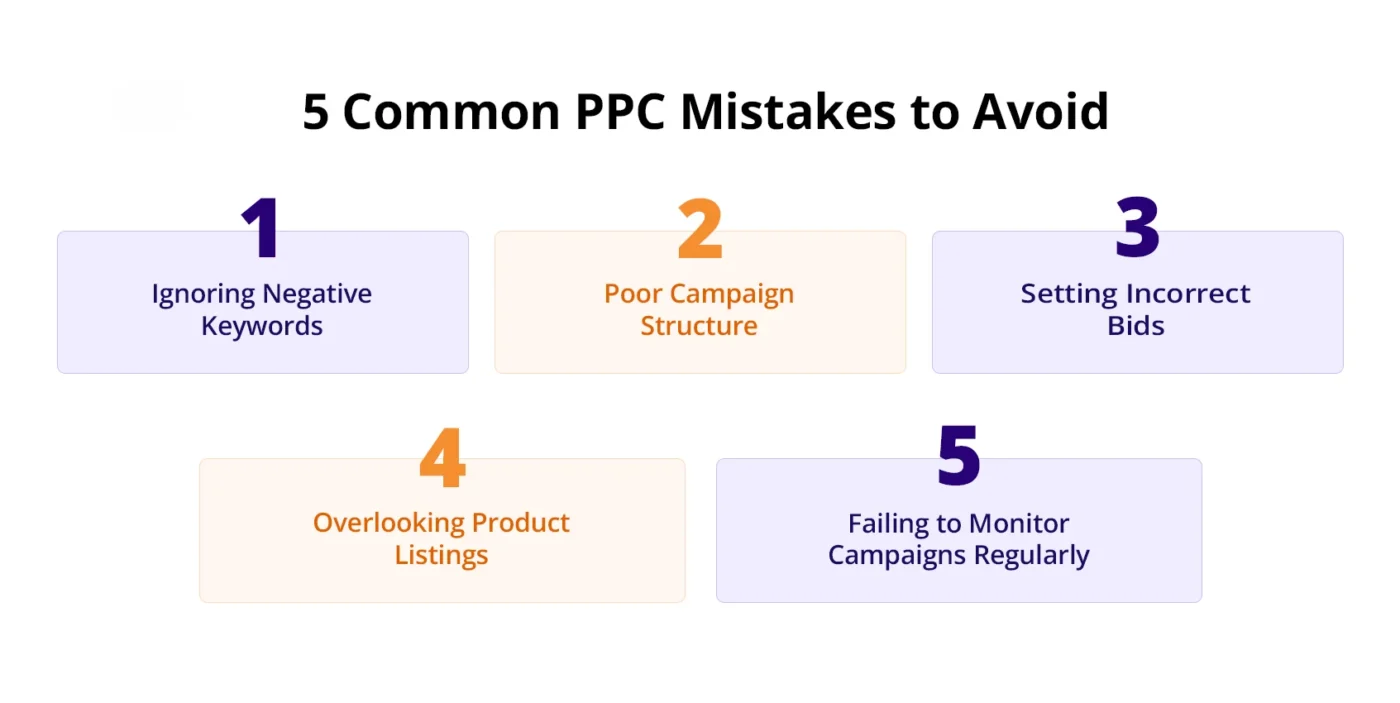
Here is a breakdown of the most common mistakes that prevent your Amazon PPC campaigns from reaching their full potential.
1. Ignoring Negative Keywords
One of the most common Amazon PPC mistakes is not using negative keywords. When you do not block irrelevant search terms, your ads continue showing for queries that do not convert, which leads to wasted budget and higher ACOS.
Regularly review search term reports and add negative keywords to stop spending on traffic that does not generate sales.
2. Poor Campaign Structure
Running too many products, match types, or keyword types in the same campaign makes optimization difficult. Without a clear structure, you cannot control bids properly or identify which keywords are performing well.
Separate campaigns by match type, product, and targeting strategy so you can manage performance more effectively.
3. Setting Incorrect Bids
Bids that are too high can quickly drain your budget, while bids that are too low can limit impressions and reduce sales. Many sellers set bids once and never adjust them, which leads to poor performance over time.
Manage Amazon bids regularly to maintain profitability and adjust them based on ACOS, conversions, and impressions.
4. Overlooking Product Listings
Amazon PPC cannot perform well if your product listing is weak, as optimized product listings directly improve advertising results and conversions. Low-quality images, unclear titles, or poor descriptions reduce conversion rate, which increases ACOS and wastes ad spend.
Before increasing ad budget, make sure your listing is fully optimized for conversions.
5. Failing to Monitor Campaigns Regularly
Amazon PPC is not a set-and-forget system. Competition, CPC, and customer behavior change frequently, so campaigns need regular monitoring.
Not reviewing campaigns often can cause performance to drop without notice. Weekly checks and monthly audits help keep campaigns profitable and efficient.
Conclusion
Running Amazon ads without regular evaluation can quickly lead to declining performance. Our checklist helps you stay in control of your campaign. The best way to audit your Amazon PPC is to audit it often, as consistent reviews allow you to catch issues early.
If you need expert support, AMZDUDES, an Amazon PPC agency, can help you carry out audits and optimize your campaign. Book a free consultation to get connected with our experts.
Frequently Asked Questions
How often should I audit my Amazon PPC campaigns?
You should review your campaigns weekly and perform a detailed Amazon PPC audit at least once a month to keep performance stable.
What is included in an Amazon PPC audit?
An audit includes reviewing campaign goals, keywords, targeting, bidding strategy, campaign structure, and performance metrics like ACOS, CTR, and conversion rate.
Why is my Amazon PPC spending money but not generating sales?
This usually happens due to poor targeting, weak keywords, high bids, or low-converting product listings. A PPC audit helps identify the exact issue.
Can campaign structure affect Amazon PPC performance?
Yes, a poor campaign structure makes optimization difficult and often leads to higher ACOS and wasted ad spend. A clean structure improves control and results.
Do I need an Amazon PPC agency for campaign audits?
Not always, but working with an experienced Amazon PPC agency can help identify issues faster and improve performance with advanced optimization strategies.