
Key Takeaways
- Conversion Rate Optimization drives revenue growth: Focus on improving your Amazon conversion rate to generate more sales from the traffic you already receive.
- Track sessions to measure performance: Monitor the Session Percentage metric in Seller Central to understand how effectively your listing converts visitors into buyers and identify opportunities for improvement.
- Improve conversions to rank higher: Optimize your listings to convert consistently, as strong conversion rates signal relevance to Amazon’s algorithm and can improve your organic rankings.
- Benchmark your conversion rate: Compare your CVR against Amazon benchmark to evaluate listing performance.
- Follow the 9 best practices to turn sessions into sales: These are proven practices that help sellers convert traffic into sales.
On Amazon, getting traffic is only half the battle, as the real challenge lies in converting those visits into sales. If your listing receives thousands of visitors but only a small percentage turn into purchases, it signals missed opportunities. That’s where Amazon conversion rate optimization (CRO) becomes critical.
Amazon’s algorithm actively rewards high converting listings with better visibility and stronger organic ranking. This guide provides a clear breakdown of everything you need to know to understand Amazon conversion rate optimization. From understanding how sessions influence conversion rate to practical listing improvements, you’ll learn how you can effectively turn more sessions into sales.
What is Amazon Conversion Rate Optimization and Why It Matters
Conversion Rate Optimization (CRO) on Amazon refers to the process of improving your product listing so that a higher percentage of visitors convert into buyers. CRO is a non-negotiable focus for Amazon sellers who want to maximize revenue from the traffic they already receive.
A minor increase in your Conversion Rate (CVR), even as small as 1%, can lead to a significant rise in sales, and the best part is that you don’t have to invest in more traffic. This comes from the same amount of traffic you already receive.
Conversion rate impacts both short-term results (immediate sales) and long-term business performance. Listings that convert well are rewarded by the algorithm, which aligns closely with broader Amazon SEO strategies to rank higher in search results. This further benefits you as a seller, as you don’t have to heavily rely on paid traffic, resulting in high profitability over time.
A high conversion rate sends a strong signal to Amazon’s algorithm that the product is relevant and appealing to shoppers. When a listing consistently converts visitors into buyers, Amazon is more likely to rank it higher in search results.
In short, Amazon conversion rate optimization is a growth multiplier that directly impacts your business.
What are Sessions and Why They Matter
Sessions show how many unique users visit your listing in 24 hours. More sessions mean more chances to convert. Sessions provide an accurate picture of true shopper interest. This makes them the standard reference point for any conversion analysis.
You can track your Amazon conversion rate optimization in Seller Central. You can find conversion rate data in Seller Central here:
Reports > Business Reports > Detail Page Sales and Traffic
Look for the column Session Percentage, which is Amazon’s built-in CVR metric. This is calculated as:
CVR = (Total Order Items ÷ Total Sessions) × 100
If your product listing receives 1,000 sessions in a given period and generates 120 orders, your conversion rate would be calculated as:
CVR = (120 ÷ 1,000) × 100 = 12%
This means that 12 out of every 100 visitors who viewed the listing ended up purchasing the product, giving the listing a 12% conversion rate.
Amazon Conversion Rate Benchmarks
Amazon conversion rates vary across categories, but here’s a general breakdown:
- Low (1% – 8%): Suggests the listing may have issues such as weak images, unclear messaging, poor reviews, or irrelevant traffic. Optimization is usually needed.
- Average (8% – 12%): This is where many Amazon listings perform, indicating a reasonably optimized page with moderate demand.
- Excellent (13% – 15%): Reflects a strong listing with effective visuals, compelling content, and solid customer trust signals.
- Very High (Above 16%): While this indicates excellent conversion, it may also mean your listing isn’t receiving enough traffic or advertising exposure to fully scale sales.
9 Proven Ways to Turn More Amazon Sessions into Sales
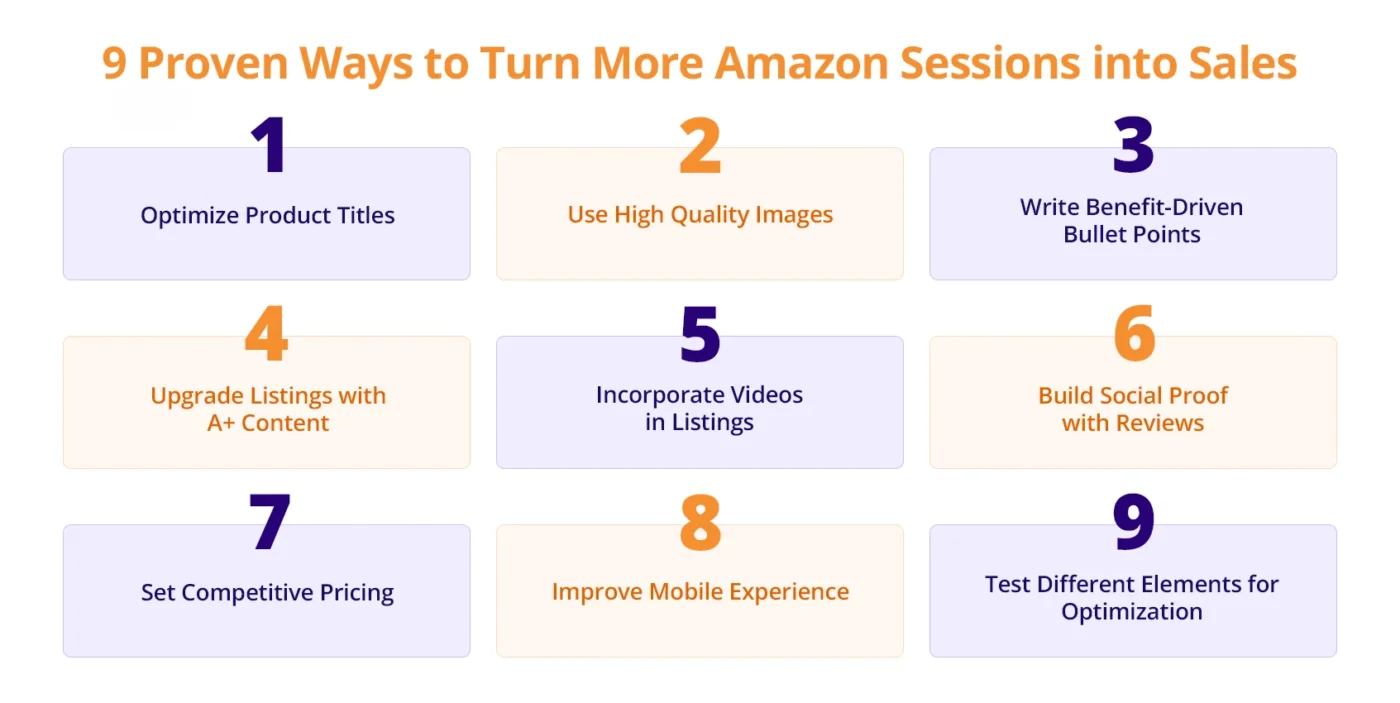
It is possible to turn Amazon sessions into sales without more traffic or increasing your advertising budget. You can work on conversion focused elements and adopt Amazon product listing optimization best practices to smoothly turn traffic into more purchases.
1. Optimize Product Titles
Your Product title is the first element shoppers notice in Amazon search results, and optimizing the Amazon product listing title correctly can significantly impact conversions. The title needs to be keyword optimized and easy to read. Avoid unnecessary terms, and be structured to align with how customers search. Here is how you can optimize the amazon product listing title to attract shoppers:
- Ensure your most valuable search term appears naturally within the first part of the title.
- Keep it readable and avoid keyword stuffing.
- Include size, quantity, or key features if relevant.
2. Use High Quality Images
Use high-quality images that clearly display the actual product in the main image. High-quality images play a crucial role in conversion. It is best to:
- Use a clean main image with a white background, keeping the product centered and filling about 85% of the frame, with a minimum resolution of 1600px to enable zoom.
- Include lifestyle images that show the product being used in real-life situations.
- Add infographic-style images to visually highlight key features, specifications, or dimensions.
3. Write Benefit-Driven Bullet Points
Bullet points should communicate the value of your product. You have 5 bullet points to quickly explain why your product is worth buying and how it solves a customer’s problem. These are best practices to write benefit driven bullet points that convert:
- Begin with a high-impact keyword that quickly gains readers attention (e.g., FAST CHARGING, SAFE FOR KIDS).
- Turn product features into clear customer benefits. For example, instead of simply stating “large 2-liter capacity,” highlight the benefit, such as preparing more servings at once without frequent refilling.
- Anticipate common buyer concerns and address them directly, such as durability, safety, or ease of use.
- Use secondary keywords naturally.
4. Upgrade Listings with A+ Content
Optimising your Amazon listing goes beyond words. Amazon gives you the option to enhance your product pages with A+ Content, allowing you to include richer visuals. If done right, it builds trust and boosts sales, and here is how to do it right:
- Showcase product features using visual modules that explain benefits more clearly than plain text.
- Add lifestyle images that help customers see how the product is used in real-life situations.
- Include comparison charts to highlight differences between your products and help shoppers choose the right option.
- Strengthen brand credibility by telling your brand story and emphasizing product quality.
5. Incorporate Videos in Listings
Product videos show the product in action and can reduce buyer hesitation. They are highly recommended to use in highly competitive niches to make your product stand out from the rest. It’s included in A+ Premium, which is not available to all sellers. If available, you can add short product videos to your top performing listings. Use interactive modules to guide shoppers and convert sessions into sales.
6. Build Social Proof with Reviews
The review section is an important checkpoint for serious buyers. Research shows that 93% of customers read online reviews before buying a product. A product with a high number of reviews and rating signals credibility. You can grow your review count with legitimate ways:
- Use Amazon’s Request a Review button in Seller Central to send review requests to customers who recently purchased your product. Research shows that 65% of consumers will likely leave a review if the business asks.
- Enroll in Amazon Vine if you are a brand registered, which allows trusted reviewers to try your product and share honest feedback.
- Focus on delivering a great post-purchase experience, such as clear instructions or thoughtful touches like a thank-you note, which can naturally encourage customers to leave reviews.
7. Set Competitive Pricing
Price directly impacts click-through and conversion. If two listings look the same, shoppers usually click the cheaper one. However, this does not mean you should compete to offer the cheapest price, as it will impact your profitability. You have to be strategic in pricing to push customers to buy while securing profitability.
- Monitor competitor pricing regularly to understand the typical price range within your category and position your product competitively.
- Use psychological pricing strategies such as $19.99 instead of $20 to make the product appear more attractive to shoppers.
- Offer coupons or limited-time discounts.
- Adjust pricing strategically during high-traffic periods such as Prime Day, Black Friday, or seasonal demand spikes.
8. Improve Mobile Experience
Mobile devices dominate Amazon’s traffic, representing 70-75% of all website visits. Mobile first optimization has thus become necessary for sellers who want to convert a larger share of shoppers browsing on smartphones.
- Place the most important keywords and benefits at the beginning of the title so they appear in the limited mobile view.
- Keep bullet points short and easy to scan, focusing on the most important benefits first.
- Use clear, high-resolution images that communicate the product value even on small screens.
- Avoid long blocks of text and prioritize concise, benefit-focused messaging.
9. Test Different Elements for Optimization
A/B testing product titles, images, and keywords helps identify which variations drive the most conversions. Small changes can make a big difference in click-through and purchase rates. Regular testing ensures that listings are always optimized for peak performance.
Amazon’s “Manage Your Experiments” tool lets you test different versions of your content. It’s the only way to know what works with your audience. It is best practise to:
- Test titles, images, and A+ modules
- Run each test for 4 to 10 weeks for valid results
- Always test one variable at a time
Conclusion
Amazon conversion rate optimization is one of the most powerful ways to grow sales without increasing traffic or ad spend. By improving key listing elements such as titles, images, bullet points, pricing, and social proof, sellers can turn more sessions into actual purchases while strengthening their organic rankings.
The key to Amazon conversion rate optimization is to monitor and adjust continuously. Tracking your conversion rate, analyzing performance, and making strategic updates will help you win more sales from the traffic you are already receiving.
If you want expert support in Amazon conversion rate optimization, AMZDUDES is a full-service Amazon marketing agency and specialized Amazon SEO agency that can help. Book a free consultation to explore our services.
Frequently Asked Questions
1. What is a good Amazon conversion rate?
A good Amazon conversion rate typically falls between 10% and 15% for most categories. Listings that exceed 15% are considered highly optimized and usually benefit from strong product images, competitive pricing, positive reviews, and clear product messaging.
2. Why is Amazon conversion rate optimization important for sellers?
Amazon conversion rate optimization is important because it helps sellers turn more listing visitors into buyers. A higher conversion rate increases sales from existing traffic and reduces reliance on paid advertising, ultimately making listings more profitable.
How do I check my Amazon conversion rate?
You can check your conversion rate in Seller Central by navigating to Reports → Business Reports → Detail Page Sales and Traffic. The metric labeled Session Percentage represents your product listing’s conversion rate.
3. What factors affect Amazon conversion rate the most?
The most influential factors include high-quality images, optimized product titles, compelling bullet points, competitive pricing, strong customer reviews, and A+ Content. Optimize every element of your Amazon product listings to build trust and make it easier for shoppers to make purchase decisions.
4. What is the difference between sessions and conversion rate on Amazon?
Sessions represent the number of unique visits to your product page within 24 hours, while conversion rate measures the percentage of those visitors who actually purchase the product.